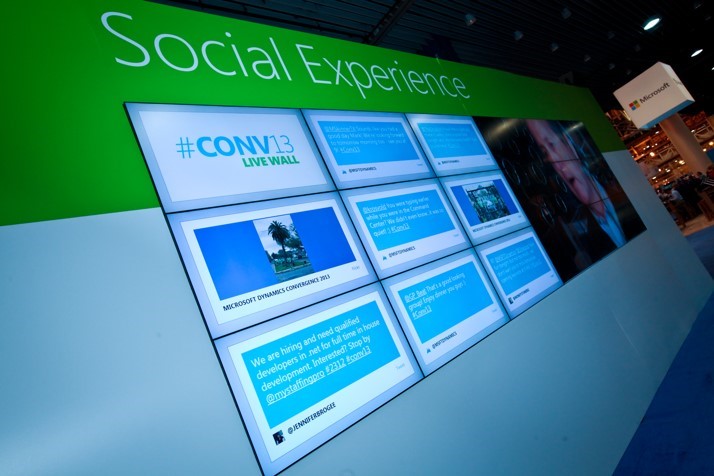
Convergence 2014 – Atlanta March 4-7

Just over a week to go before Convergence 2014 in Atlanta and judging by the success we had with Convergence EMEA in Barcelona last November, Atlanta is going to be huge!  I am really looking forward to this one. With the exciting announcements we made last week Convergence gives people the opportunity to drill deep into the forthcoming releases as well as find out what else is on the horizon.

Convergence

As was the case in Barcelona I will have the honour of speaking once again at the main Financial Services Session. I will be joining some fantastic guests so I do hope you will come down and say hello if you are there! I will also be spending time at the Financial Services booth so if you want to find out more CRM in Financial Services or how FinDemo was built please come find me.You can find out more about other sessions here.

CSCRM503: Microsoft Dynamics CRM in Financial Services: Winning and retaining customers

Wednesday, March 5th from 2:00 pm – 3:00 pm    Room: B212

Speakers: Mark Margolis, Kevin Konopa, Mirjam van Ruth, Chad Hamblin, Karan Srivastava

In today’s hyper-competitive economic environment, it is critical for institutions to achieve sustainable profitability through customer retention, and drive growth through customer acquisition, all the while improving productivity. Hear from customers on how they are using Microsoft Dynamics CRM to improve customer profitability and organizational efficiency. Watch our innovative demos to learn how you can leverage the capabilities of Microsoft Dynamics CRM 2013 to drive real business benefits.

Other Financial servies events to look out for are:

CSCRM504: Taking Microsoft Dynamics CRM for financial services to the next level

Thursday, March 6th from 11:00 am – 12:00 pm    Room: B212

Speaker(s): Philippe Brissaud, Vish Thirumurthy

You’re about to implement Microsoft Dynamics CRM into your banking environment. Facing this challenge, you wonder how other financial institutions do it. Come and hear how Microsoft Services has helped many customers push their relationship banking to the next level with Microsoft Dynamics CRM. Learn how they managed their project and capture the lessons learned from this implementation leveraging Microsoft Services and Sure Step methodology.

Dynamics Industry Lunch Reception

Tuesday, March 4th, 12:30pm – 2pm Location: Hall C Atrium Foyer, Georgia World Congress Center

connect with other top customers in your industry, share your experiences, and meet with members of the Microsoft industry team who are here to help you take the best possible advantage of your convergence experience

Exclusive Financial Services Networking Breakfast

By invitation only. Please let me know or contact your local Microsoft representative if you wish to attend.

Thursday, March 6th, 8am-9am

• Hear from an industry leader who will share their business success story
• Learn ways to drive improved customer profitability and organizational efficiency
• Meet with Microsoft Dynamics CRM R&D staff and other industry specialists
• Network with your peers and make key business connections
• And of course, eat delicious food

This post was originally published on https://markmargolis.wordpress.com. This posting is provided “AS IS” with no warranties, and confers no rights.

UK Floods Hackathon – Feb 16! Calling all developers!

I have been working with the team here at Microsoft to help mobilise technical assistance and community/victim support in the event of disasters. With the floods going in here in the UK we are mobilising our resources right now. Please come down tomorrow Sunday 16 February and lend your assistance.

Shortlink to this page is :http://aka.ms/ukfloods

Invite and further details below:

Calling all developers!  We have been hit by the worst flooding and weather the UK has seen in our lifetimes. Getting the right information to people about the problems affecting particular areas, and the right places to turn to help (or for information on how THEY can help volunteer) is crucial. The government has near real-time data on flooding levels and alerts, mapped out across the entire country, which they want to put to the best possible use.

Today we hosted a meeting at Number 10 and brought together leading technology companies, the Environment Agency, the Government Digital Service, the Open Data Institute and the Cabinet Office who are working to open up this data to the public, allowing developers to build innovative applications that can help those affected by the flooding.

This Sunday at 10am, we are inviting the community to join developers from Microsoft , GDS, Google, Facebook, Twitter, Conversocial, Datasift, Mother, Taskhub, Do It and many more for a hackathon, hosted by Tech City UK at Google Campus, where the Open Data Institute will share the flood level data with developers and be on hand to help throughout the day. The Cabinet Office will be choosing the most useful applications demoed on the day to be promoted to flood victims across the country.

Sign ups for the hackathon are through Eventbrite – http://floodhack.eventbrite.co.uk and more information can be found here and on the Tech City UK website.

#floodhack


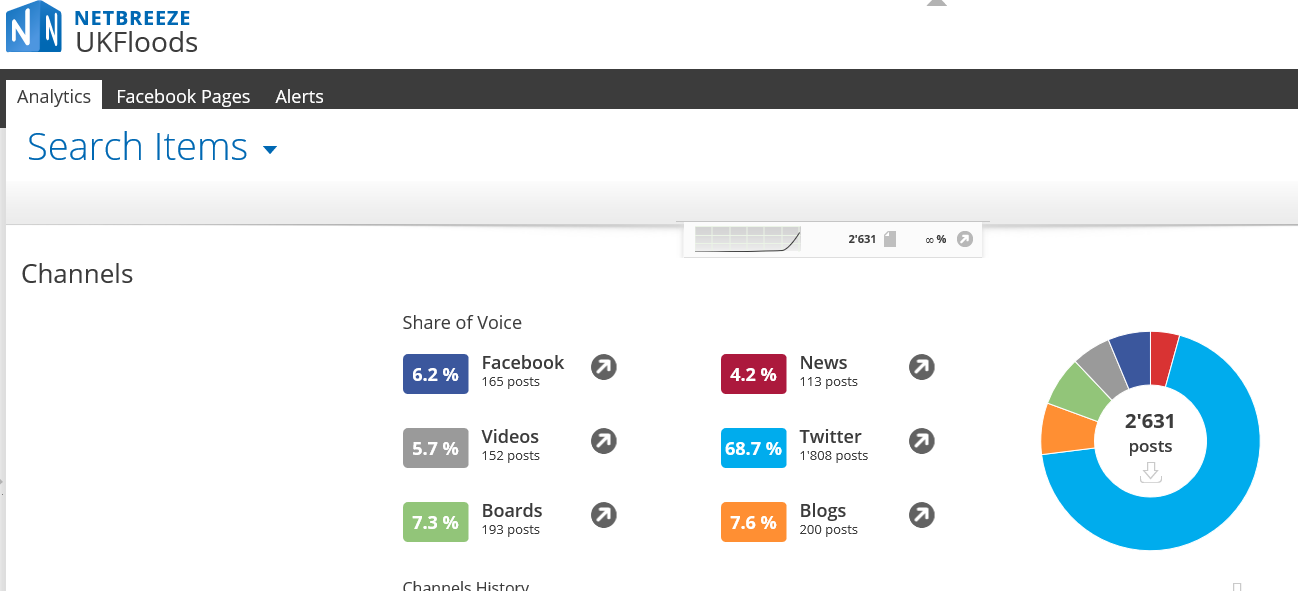
Also in case you interested ive been using our social listening tool to keep track on the Floods:

netbreezeukfloods

CRM Implementation Best Practice with Microsoft Dynamics CRM

A lot of my time day-to-day is spent talking about product features and benefits and how these can help businesses achieve their goals with our product(s). Increasingly however, I spend more of my time talking about CRM implementation best practise than I do about product capability. This pleases me. There are obvious reasons for this, the market is maturing, clients are becoming more knowledgeable and Microsoft Dynamics CRM’s major investments in recent times means I spend less time talking about its capabilities because my clients understand earlier in the process that it meets there needs. People understand that their decision and opportunity for success is less reliant on the technology but about how it’s used and if it’s adopted by the users. A typical conversation goes like this : Microsoft vision for the future, trends that we see in the industry and how that relates to our product(s), case studies and references  in the industry, product capability and implementation best practise. Now the best practise conversation is happening earlier.

Most of my time is spent talking about how Microsoft Dynamics product capabilities support and encourage implementation best practises.

impbestpractise

A CRM project is a bit like cooking a meal, you need good ingredients and you need to cook them properly if you want your guests to enjoy the meal.

I’ve had the pleasure (and sleepless nights) of responsibility of over 100 CRM projects and I have made plenty of mistakes as well as picking some valuable lessons in that time. Some of these are shared below. You will also find links to some more in-depth articles I have written on the subject.

Start on the right track with a living project scope

Understanding and document the project fundamentals. This ensures that you understand the business objectives and project success criteria. As I have said may times before, project success is often based upon whether an implementation was delivered on time, a project should only been seen as a success if it meets the objectives of the business and the needs of the users. Don’t assume that everyone will read this documentation however, it is actually the process that is more important. Don’t get lost in documentation, and don’t use it as weapon to prevent change. Expect change and cater for it.

A scoping document can consist of the following:

  • Project Background
  • Project Assumptions
  • Project Commercials / Business Case
  • Project Methodology & Control
  • Project Team & Contacts
  • Project Scope / Out of Scope
  • Project Requirements
    • Functional
    • Non Functional
  • Go Live Plan

You can read more on this subject in my article: A Sample CRM Project Scoping / Initiation Document.

Continue on the right track with a sound process and project methodology

Describe and agree a Project Methodology and Control from the outset, describe exactly what this means and what the level of “project ceremony” will be. A good methodology with the appropriate project and control should:

  • Allow the project team to work at maximum efficiency with the business requirement top of mind
  • Allow the business users full transparency into the project with ownership and accountability of  the deliverable (under project guidance)
  • Ensure a consistent level of delivery, work and service across the team
  • Provide the ability to learn from previous projects, implement best practice and build upon that learning
  • Ensure information is shared and that there are not unreasonable expectations placed on individuals
  • Deliver frequent iterative deliverables with engagement of business users throughout the project
  • Allow the project to quickly adapt to change

Implement a sound project prioritisation framework. Prioritisation is a key skill and one you should try to master. Make prioritisation activities a daily activity, always evaluating the most important items and moving them to the top of the list. Understand “Minimal Viable product“. Maintain absolute focus on features that are easily perceived as useful and benefits that are highly visible. Address the most challenging aspects of the project first, prioritise features and items that are architecturally significant as well as those that most clearly meet business objectives.

If possible and if the organisational culture allows, adopt an agile iterative methodology.

Beware of a project that is called an Agile project but in reality is still waterfall in nature. An Agile project is much more than just iterative development  so take time to truly understand and undertake the agile methodology, the Agile Manifesto is a good place to start. You will need the understanding and support of the organisation if you are going to successfully implement an agile methodology, you can’t do it on your own.

  • The requirements process should deliver assets and visibility of requirements that:
    • Clearly outline to the client what they want
    • Clearly outline to the client what they need (the difference between want and need can be vast)
    • Clearly outline the priority of these requirements
    • Clearly outline to the developer what needs to be built
  • Primary Requirement Documentation Artefacts:
    • User Stories
    • Use Cases
    • Workflow & Business Process Diagrams
    • Data Models
    • User Interface Wireframes & Prototypes

Prepare appropriately for the  workshops and the requirement gathering activities. Make sure you understand their competitors and their customers. Understand the industry, what is the history and how have business, technology, regulatory changes affected this. Tailor and Personalise the questions so that the workshop is relevant, it’s not their job to educate you on their business and it is likely that the business is making a significant investment by making people available for the workshop. During the requirements sessions keep asking why this will help you understand the root cause and the problem behind the problem. Often users will describe the solution to a problem instead of the problem itself.

You can read more on this subject with my articles on CRM Workshop Questions and Requirements Gathering Techniques and Product, Project and Day to Day Prioritisation.

It all about the business and all about the users

CRM User adoption is the key to CRM projects. Correlate and show a link between positive individual performance results and CRM usage. Measure User Adoption and tell users why you are doing the project and keep them involved throughout. Rethink how you evaluate and measure project success. Sadly, project success is to often measured by budget and delivery time-scales when really the true value is user adoption and return on investment of tangible business benefits. A project should only been seen as a success if it meets the objectives of the business and the needs of the users. So Iinvolve the business stakeholders and the users from the outset of the project, it is important to ensure that both the business and IT are  working towards the same goal. End user involvement and User Acceptance Testing should be done throughout the implementation life cycle and not just at the end. If you do it at the end you’ll discover problems to late.

A CRM project is not about technology it is about people and it is about the ability for the business to deliver value to their customers. It is not something that can be measured on a Gantt chart.

The value of a CRM project is broad user adoption across the organisation where information and data is being shared. Implementing CRM from a department to department perspective does little to consider the customer journey.

When assembling your CRM team make sure that you have representatives from users from all the various parts of the business. Identify your project champions , get them in early. All of my successful projects have had easy to identify champions, these people are bright, motived, extremely positive, understand the business and create an infectious environment . They can come from sources that are not immediately obvious so work hard to find them. More often than not these people are not senior but have been in the business for some time and are hungry for change and a CRM project is just the opportunity they have been waiting for to empower them to create this change.

Avoid seeds of discontent immediately. To achieve this you need to listen, you need a project structure and culture than listens to the users. Champions are great help in this regard. Stop discontent in its tracks, waiting until an issue becomes shared amongst a larger group will just be more difficult and costly to resolve later. Be wary of dismissing issues because they are small (from your perspective), be careful and evaluate your issues with care.

To return to the cooking analogy earlier, if you want your guests to enjoy the meal you need to know what ingredients they like and how they want it cooked. Having the food on the table on time is less important than serving a delicious meal you know they will love. Am I taking this analogy to far if I say Agile is a bit like Tapas? Ok time to stop.

You can read more on this subject with my article on CRM & User Adoption.

Thanks for reading.

Mark

This post was originally published on https://markmargolis.wordpress.com. This posting is provided “AS IS” with no warranties, and confers no rights.

Client 360 – A Single Client View for Microsoft Dynamics CRM 2013

Continuing with the theme of the newly released Financial Services demo toolkit (aka FinDemo) I want to share you a little more information on one of its components: Client360. This component was built by a colleague of mine Paul Mare and is one of the most useful CRM components I have ever used. So for this week I will give you some information on how to configure this component. Remember that FinDemo has the component already configured for Asset Management, Corporate Banking, Wealth and Retail Banking. I will be amending these configurations and adding new ones in a future release (by end of Q1 2014) but in the meantime you can configure your own following these instructions. A sample configuration file ready to import is also provided below.

Please note: This article refers to a later version of Client360 that didn’t make it into the current release of FinDemo so I’ll be providing information only on the items that are currently configurable and working.

Pre requisites: Create a trial using the Financial Services Template (FinDemo) here: http://demobuilder.cloudapp.net

Client 360 Component

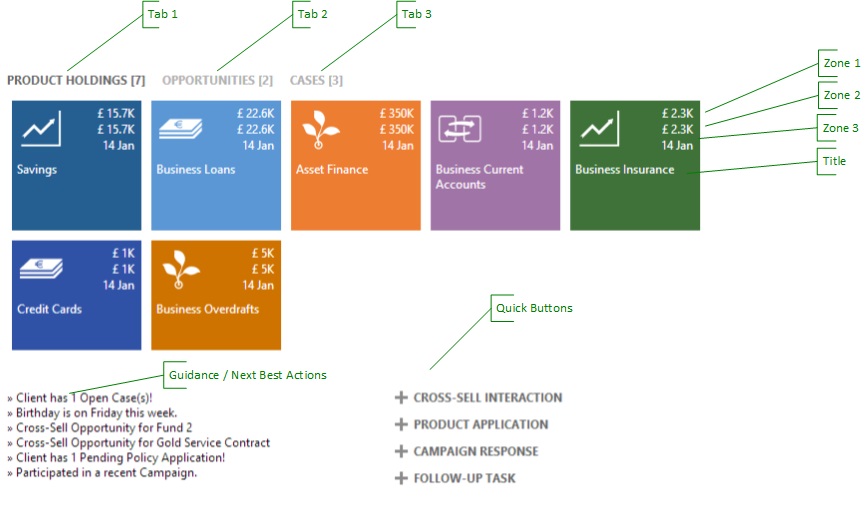
Open up a Company or Contact record (make sure you are on the right form, e.g. AM 360, Retail 360) and you will see something like the following image. Client 360 is made up of:

  • Tabs
  • Tiles
  • Zones
  • Guidance / Next Best Actions
  • Quick Buttons

SingleView

Client360 Single View Settings

If you want to change what Client360 displays then you need to open up the Single View Seetings. Until I add Single View Settings to the sitemap you will need to go to Advanced Find to retrieve it:

  1. Advanced Find
  2. Look for Single View Settings
  3. Open an existing Single View Record

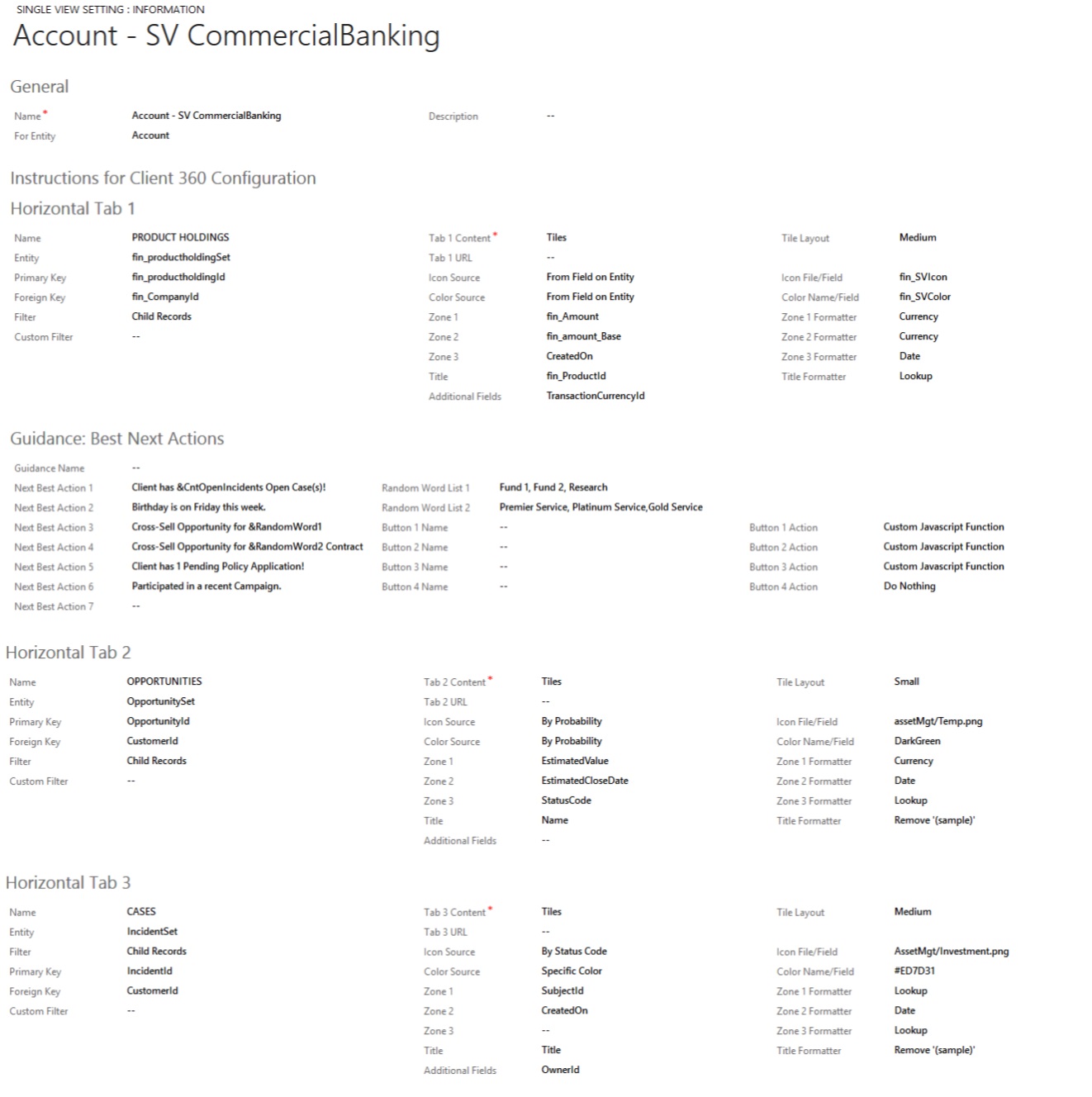
An example Single View Setting record is shown below:

singleviewsetting

Single View Setting is divided into the following Sections:

  • General
  • Horizontal Tab 1
  • Guidance Best Next Actions
  • Horizontal Tab 2
  • Horizontal Tab 3
  • And so on…

You can download an excel export of the above setting for import here:

General:

  • Name: The name of the single view setting. This is referenced on the entity form Parameters. Make sure this is unique.
  • Description: Free text description
  • For Entity: Name of the entity that this relates too.

Horizontal Tab 1

  • Name: Name that you want to appear as the Tab 1 title
  • Entity: Use the name of the entity and put the word “Set” next to it. So for example the Product Holding Entity would be fin_productholdingSet Take care to make sure the case sensitivity is correct.
  • Primary Key: Use the schema name of the primary key (second column on the entity field list) So for example the Product Holding Primary Key would be fin_productholdingId 
  • Foreign Key: Use the schema name of the related entity. So for example on Product Holding I want to display the product holdings related to a company so this would be fin_CompanyId 
  • Filter: Child Records, Active Child Records or Custom Filter. Select Child Records
  • Tab 1 Content: Tiles, CRM Web Resource, CRM Chart. Select Tiles
  • Tile Layout: Small, Medium , Large, Case Process, Opportunity Process. Use Medium
  • Tab 1 URL: Leave blank
  • Icon Source: From field on entity, By Status Code, By Probability, Customer JavaScript Function, Specific Icon: Select From field on entity or Specific Icon
  • Icon File/Field: Enter the schema name of the field to use or select the name of the icon you want to use in the Single View Icons Libary
  • Color Source: From field on entity, By Status Code, By Probability, Customer JavaScript Function, Specific Icon: Select From field on entity or Specific Icon
  • Color Name/Field: Enter the schema name of the field to use or enter a hex code of the color you wish to use
  • Zone 1: Information/Field that you displayed in zone 1. Enter the Schema name.
  • Zone 1 Formatter: None, Currency, Date, Lookup, Picklist, Proper Case, Remove ‘(sample)’, Custom JavaScript Function. Use None for text fields tyes, Currency for Money, Date for Date & Time, Lookup for related entity.
  • Zone 2: as zone 1
  • Zone 2 Formatter: as zone 1
  • Zone 3: as zone 1
  • Zone 3 Formatter: as zone 1
  • Title: Information/Field that you displayed in Title. Enter the Schema name.
  • Title Formatter: as zone 1

Guidance Best Next Actions:

  • Next Best Action 1: Text you want to appear in the Guidance Best Next Action column
  • Random Word List 1: Random text you want to appear in the Guidance Best Next Action column

Quick Buttons:

Button 1 Name: Name you want to appear in the Quick Buttons Column
Button 1 Action: The action you want the button to perform. In this version the quick buttons are static. In the next version you will be able to:

  • Create New Related Record
  • Create New Emtpy Record
  • Quick Create New (empty) Record
  • Pop-UP Web Resourse
  • Show Associated Records
  • Custom Javascript Function
  • Do Nothing

Horizontal Tab 2, 3, etc

As above

Adding Client360 to a form

  1. Create or edit a form (via Solutions or Customisations)
  2. Insert Web Resource: ms_SingleViewDisplay.html
    1. Custom Parameter: name of the Singleview Setting (under General, see above)
    2. Formatting: One column
    3. Number of rows 18
    4. Scrolling: Never
    5. Display border: no

Conclusion

As you can see there is  much more to come, as I said earlier I have focussed on describing the features that are currently fully working but you can see from the configuration settings what enhancements are coming. In the next version (coming on in the next 4-8 weeks) you will be for example able to configure the Quick Buttons and these will be dynamic. I am certain this documentation can be improved so if you find any gaps please send them in.

Thanks for reading.

Mark

This post was originally published on https://markmargolis.wordpress.com. This posting is provided “AS IS” with no warranties, and confers no rights.

New Demo Builder with Financial Services Template is now Live

As I hinted last week my Core Financial Services Demo Pack (aka FinDemo) is now publicly available to Microsoft Customers and Partners via Demo Builder: http://demobuilder.cloudapp.net. This demo pack is a great place to start building out your Financial Services Demo. The solution currently caters for the sub verticals / scenarios: Asset & Wealth Management, Corporate & Investment Banking, Insurance, Supplier Management. coming very soon will be Commercial Banking, Retail Banking and Broker Management.

Please submit feedback (via this site) so we can incorporate any changes you would like to see. I’ll be adding new features on January.

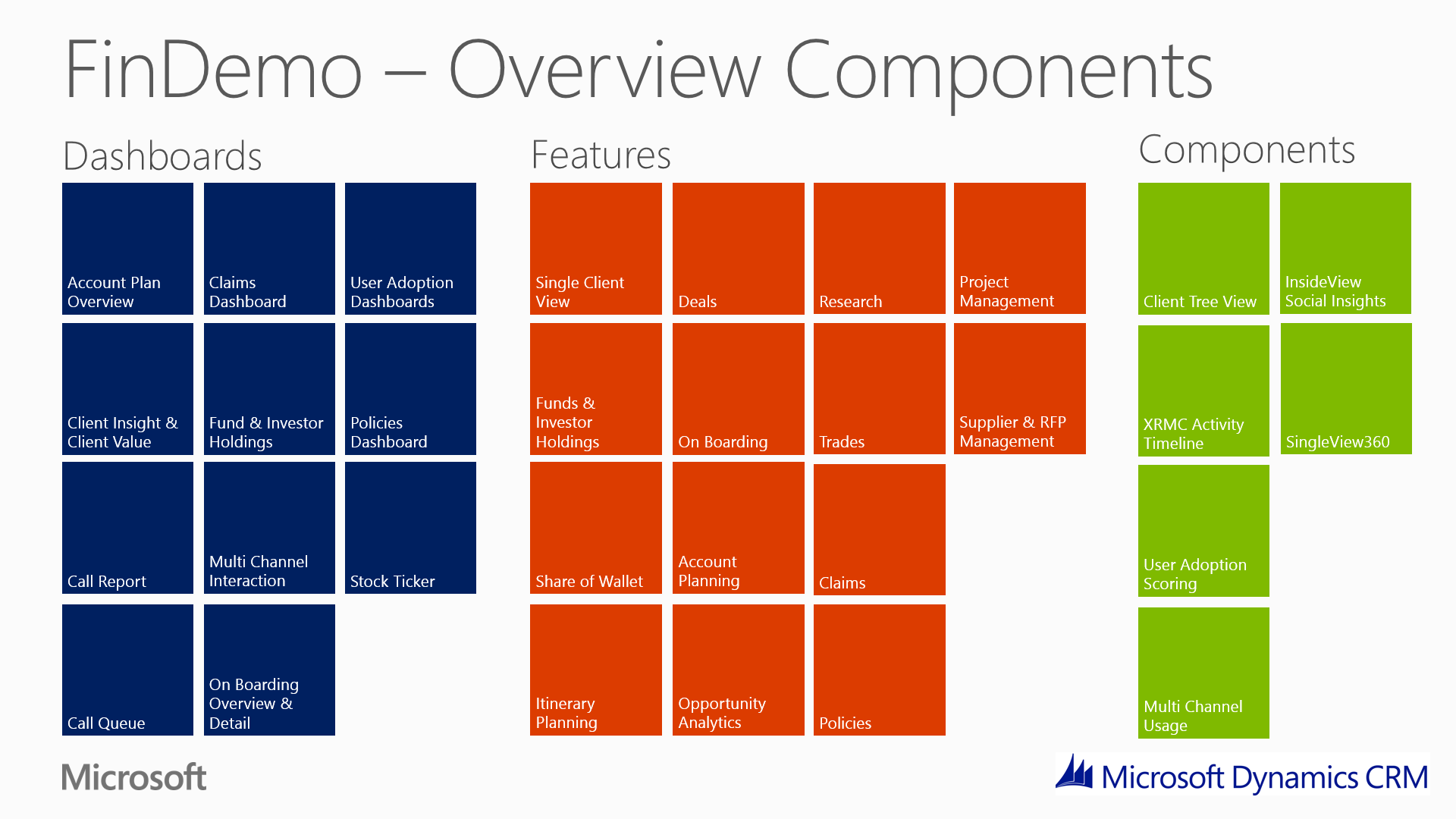
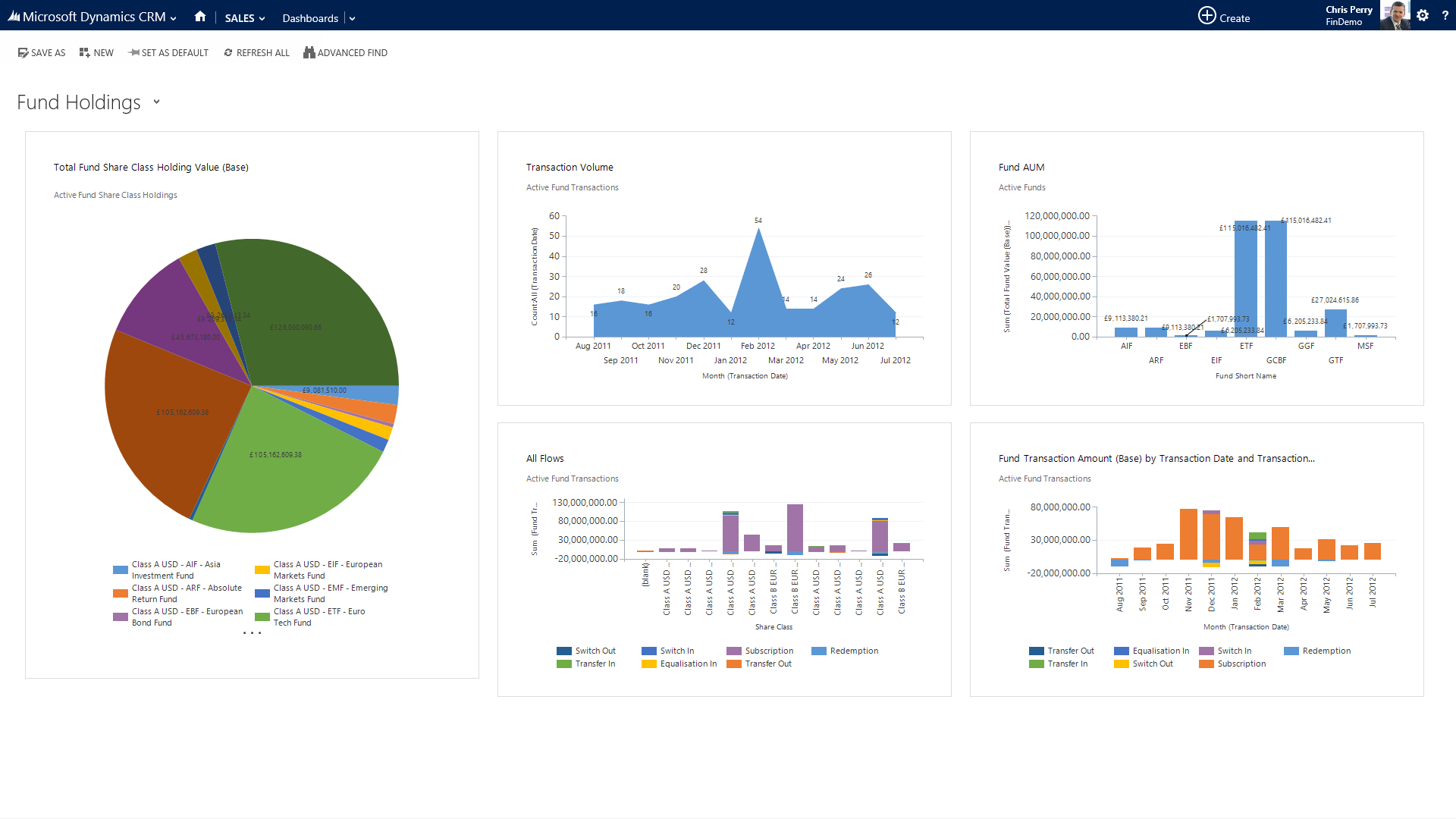
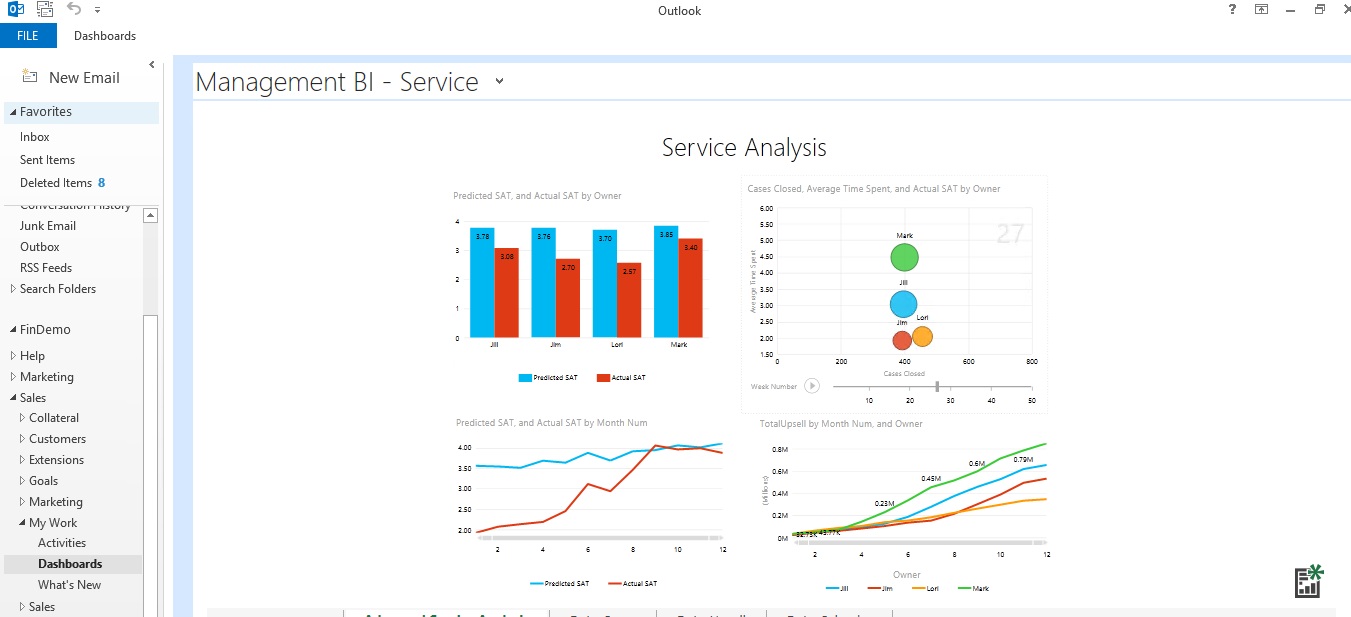
OverviewComponents

FundHoldings

FinDemo Screenshots

Happy holidays, see you in the new year!

Mark

This post was originally published on https://markmargolis.wordpress.com. This posting is provided “AS IS” with no warranties, and confers no rights.

Financial Services Templates and Demo Solution Pack for Microsoft CRM

As this is probably the last post of the year I thought I would take the opportunity to thank you by sharing some new toys for you to play with until I return early January 2014. These are :

  1. The new Financial Services Templates
  2. My Core Financial Services Demo Pack which I will be making publicly available to Microsoft Customer and Partners. Update: Now Live Here.

Financial Services Templates

Firstly I am pleased to say that my Financial Services Business Process “KYC360” also known as Microsoft Dynamics CRM Deal, Onboarding and Account Planning Process has been updated and can now be installed without any errors. For those of you who tried to install this previously you had to manually change the unique solution name, I’m sorry this took so long for us to republish. I’m told that this shouldn’t happen again.

The following templates can be downloaded from Microsoft Pinpoint and consists of small solution files that you can import. Each of these include a data model, sample data and business process flows.

Now that the Financial Services Templates have been made publicly available I can also share the training video I made for the CRM 2013 Launch Training:

Core Financial Services Demo Pack

The Core Financial Services Demo Pack (aka FinDemo) is based upon my core demo that I have built up over the last 18 months. More recently I have been collaborating with my colleagues to bring some of their assets into the Core Financial Services Pack. I’m particularly excited about the Single Client View control that we showed you at the main Financial Services event at Convergence EMEA in Barcelona in November. This will be the frst release of many.

I am going be releasing the core Financial Services Demo pack very soon. Update: Now Live Here. I will announce availability of this shortly via this site and my twitter feed. The solution currently caters for the following sub verticals / scenarios:

  1. Asset / Wealth Management
  2. Corporate / Investment Banking
  3. Insurance
  4. Supplier Management

Scenarios to be added very soon include:

  1. Commercial Banking
  2. Retail Banking
  3. Broker Management

Below you will find a brief overview of the Demo Pack as well as a sample screenshots and a presentation that goes into a bit more detail. I will be providing further detail, instructions, demo scripts and information on how you can get your hands on it due course (very soon!).

OverviewComponents

FundHoldings

And Finally

I would like to thank all those of who have spent the time reading my blog and following me on twitter. I hope that you have found this blog interesting and useful and I look forward to adding much more next year. Many thanks to my Customers, Partners and the dedicated colleagues at Microsoft who helped me throughout the year. Happy holidays and Happy New year!!!! See you in 2014!

This post was originally published on https://markmargolis.wordpress.com. This posting is provided “AS IS” with no warranties, and confers no rights.

Embedding Power View Reports in CRM 2013 – The Easy Way

I recently rebuilt my demo to coincide with the launch of CRM 2013 and this means I needed to reconfigure CRM, SharePoint and SQL in order to display my Power View reports in CRM. With all the work I needed to do in order to prepare for Convergence EMEA I just didn’t have the time. Fortunately my colleagues Eric Boocock and John Straumann had an innovative suggestion. With SharePoint 2013 you can now upload a Power View Report in Excel and with a simple configuration it will render embedded in the page essentially giving you the same as if you had Power View and SQL 2013 and SharePoint fully configured! From a demo perspective this was exactly what I needed. See below for an example of a PowerView report embedded in CRM viewed from the Outlook Client:

powerviewembed

Set-up instructions:

  1. Create an Office 365 E3 Trial (it has to be an E3 trial, I believe you can use SharePoint on Premises  but remember to enable Webb Apps)
  2. Upload a Power View report. You can use the same one (PowerViewOppsExample) from my previous article
  3. Open the PowerView Excel document from SharePoint (it should render as a web app) and copy the URL E.g. https://yoursharepoint.sharepoint.com/_layouts/15/WopiFrame.aspx?sourcedoc={documentguidisinhere}&action=default
  4. Change the last few characters of the URL from &action=default to &action=embedview
  5. Create a new system dashboard (it has to be a system dashboard in order to not restrict cross frame scripting). Add an Iframe and paste the URL. Make sure Restrict Cross Frame Scripting is not ticked.
  6. Save and Publish.

If you have any problems such as the message “This content cannot be displayed in a frame” then do the following:

  1. Close all browsers
  2. Goto the office 365 portal and login
  3. Open a new tab and goto the SharePoint site and check that you can open the report
  4. Open CRM and test again

If you continue to have problems follow the steps on my earlier article CRM 2011 & SharePoint iFrame Error and make the necessary browser changes. After that you should be good to go. I have problems but I followed all these steps, rebooted and then it has worked flawlessly ever since.

IF you like this article then take a look at some of my other articles on analytics and visualisations.

This post was originally published on https://markmargolis.wordpress.com. This posting is provided “AS IS” with no warranties, and confers no rights.

KYC 360 – A Financial Services Business Process Template

UPDATE: The Microsoft Dynamics CRM Deal, Onboarding and Account Planning Process has been updated and now imports without an errors. If you want to uninstall the solution you may need to deactive the relevant processes first.

My financial service business template is now Live! Some of you saw this during the CRM 2013 Beta and the training blitz, others may of seen this during this weeks Convergence 2013 EMEA. You can download the solution here. ITs free but you will need to login with your Microsoft Live/Hotmail/Outlook.com ID.

In the next few weeks  I will write an article in the solutions area of my site about how it was built and I’ll be posting updates and enhancements. In the meantime please download, rate and leave comments. Thank You!

Solution Description:

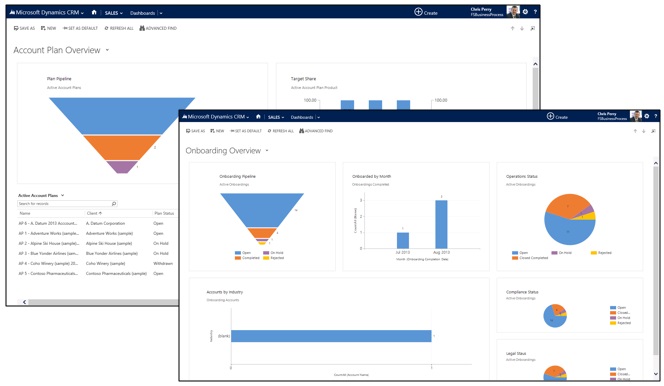
This business process guides financial organizations through the complete client lifecycle for new and existing customers – from initial data gathering and on-boarding to account planning and execution. This solution gives ongoing visibility into the status of client relationships, so that you can handle deals consistently and drive successful outcomes.

This solution includes:

• Six business processes to handle onboarding and account management for new and existing clients.

• Two dashboards: one tailored for account planning and one for onboarding new clients.

• Two dialogs to help employees gather required information from clients.

• Workflows and security roles to support the business processes.

• Three custom entities: Account Plan, Account Plan Product, and Onboarding.

• Demo data so that you can experiment with the processes and see how they work.
Important: This solution is not supported by Microsoft. It is intended to serve only as a template for customizations in Microsoft Dynamics CRM.

fsbp

Demo Video:

We have also just released an updates (and more polished video) via our You Tube channel here:

https://www.youtube.com/watch?v=UZB5bLA8wF4&feature=em-uploademail

This post was originally published on https://markmargolis.wordpress.com. This posting is provided “AS IS” with no warranties, and confers no rights.

Next time on Mark Margolis’s Blog: TBD.

Convergence EMEA November 2013

Live Updates:

Wednesday 6 November 2013

Convergence Day 3, just finished the financial services breakfast event and had a mad dash to get to the room for my next event on Business Process for CRM 2013! I’m getting a lot of questions on the availability  of the I ndsutry templates, more are appearing every day and you can find them here.

Yesterday 3 Solution Selling Templates went live in addition to the public sector ones. Financial Services should be any day now.

Tuesday 5 November 2013

This is what backstage looked like during the keynote:

What is amazing  about CRM 2013 and all these announcement is that the product development are already building the next release!

18 Vertical Industry Templates! Will be available on the Market place first week of November. Some are already there. You can see the Financial Services industry template live tomorrow at 10:30 AM and 2:30PM. See below for details (BKCRM11 and BKCRM52).

Microsoft is introducing a new global pricing promotion that lets eligible existing and new Microsoft Office 365 customers purchase professional licenses of Microsoft Dynamics CRM Online and get up to a 40% discount on the price of the CRM license, giving them immediate and significant value for their technology investment

WP_20131105_001[1]

Ok, here we go again!

Monday 4 November 2013

Great day with all customer and partners. ITs amazing to see how many people have come together to share experiences on how to put the customer experience in the centre of everything they do. Look out for the keynote tomorrow and breakout sessions!

WP_20131104_013[1]

Live wall waiting for the Global Premier to start!

WP_20131104_012[1]

Only a short time to go before the main event! Standing room only, Cava is flowing!
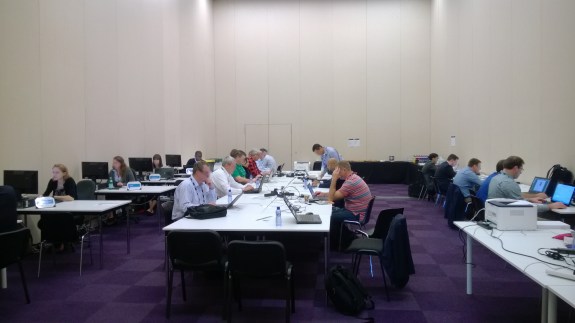
speaker room

In the speaker people are getting ready for their session. The User Group breakout sessions start at 11AM CET in about 15 minutes so no doubt there are some last minute refinements being made. Remember that at 6PM CET the will be the live broadcast of the Global Premier Event. See below for more information.

Sunday 3rd November 2013

Convergence EMEA November 2013

So we are days away from Convergence and this time it is in EMEA! I will be speaking and will do a combination of live blogging and tweeting so follow me on @markmargolis and bookmark this page: http://aka.ms/emea13 to find out the latest, first! I’m expecting to get information early so stay tuned. I’ll try to give you a behind the scenes view whilst not getting into trouble! And if you have any questions please send them in via twitter. I arrive on Sunday afternoon and  sessions start on Monday 4th November but keep an eye out for the Keynote and the Global Premier Event itself as it starts:

Global Premier Event: Live Broadcast Tuesday, 4 November 6:00 PM Central European Time

Keynote: Live Broadcast Tuesday, 5 November 9:30 AM Central European Time

media wall

Look for and use the following hashtag #Conv13EMEA if you want your tweets to appear on the live wall (see above). And if you want to engage directly remember to use the following handles @MarkMargolis@MSFTDynamics@MSFTConvergence and @MSDynamicsCRM

Use the schedule builder to decide what you want to see. It’s a great tool and you can add items to your calendar to make sure you don’t have any clashes.

If you are attending

Fira Barcelona Gran Via Conference Centre (Hall 8 of the Fira de Barcelona, Gran Via Convention Centre. There are two Fira convention centres in Barcelona, so please ensure you go to the “Gran Via”!)

Link to MAP: http://binged.it/1cgSjdJ

Main Venue Details for above:
Fira de Barcelona – Gran Via venue
Av. Joan Carles I, 64
08908 L’Hospitalet de Llobregat
Barcelona – See more at: http://www.firabarcelona.com/en/gran-via

You can download the mobile Convergence  app here. Not all devices are yet available (as of Sun 2nd Nov) but there is a mobile site in the interim.

If you are not attending but want to watch virtually

Resigter for the Microsoft Dynamics Global Premier Event 4th November 6PM CET

here: https://vts.inxpo.com/scripts/Server.nxp?LASCmd=AI:4%3bF:QS%2110100&ShowKey=15965&AffiliateKey=17182&AffiliateData

Register for Virtual Convergence here: https://presentations.inxpo.com/Shows/microsoft/MSConvergence_EMEA/11-13/Registration/Registration.html

My sessions (CET Time)

If you are coming to Barcelona, I hope you will stop by and say hello, if you can’t make it to Spain then I hope you’ll join virtually.

BKCRM20: Building an extended CRM application for non-developers

Tuesday, November 5 17:00 – 18:00 Room: B2
Microsoft Dynamics CRM
Speaker(s): Marco Amoedo Martinez, Mark Margolis
Microsoft Dynamics CRM provides a framework that allows you to define a business application without writing a single line of code! Everyone can configure powerful applications but–are you a little too intimidated to get started? Join us to learn the basics of how to configure a business data model, user experience, social collaboration, reports and business processes. You’ll learn dozens of tips and tricks and better understand the power and flexibility of your Microsoft Dynamics CRM investment.

Microsoft Dynamics CRM for Financial Services: Breakfast Networking Reception

This one is not on the agenda but if you in Barcelona than as an event staff member for details.

Wednesday, November 6th 8:00 – 9:30
Hotel Porta Fira, Plaza Europa, 45-47, 08908 Hospitalet de Llobregat, Barcelona
Meeting room name: Las Arenas

This is a great chance to meet other Microsoft Dynamics CRM financial services customers. You will also have the unique opportunity to mingle with Microsoft executives and network with key industry leaders, hear an amazing transformational banking CRM story from Metro Bank and see our Windows 8 demos. Includes a message from David Brown, EMEA Director of Financial Services & Metro Bank’s Jeff Higgs, Head of Customer Management Platform, Metro Bank on how they are using Microsoft Dynamics CRM to improve customer profitability and organizational efficiency. See Windows 8 mobile-based demos and learn how you can leverage the capabilities of Microsoft Dynamics CRM 2013 to drive real business benefits.

Breakfast will be served.

BKCRM11: Introduction to Business Process Management (BPM) with Microsoft Dynamics CRM 2013

Wednesday, November 6 10:30 – 11:30 Room: B3
Microsoft Dynamics CRM
Speaker(s): Andy Smith, Mark Margolis, Stephanie Dart
At work or on the go, Microsoft Dynamics CRM 2013 provides the tools, insights and experiences needed to power your business processes. In this session we will demonstrate, using real-world examples, the power of Microsoft Dynamics CRM business process management (BPM) capabilities including workflows, dialogs and process flows. Join us to see how easy it is to configure business processes with no programming skills!

BKCRM52: Microsoft Dynamics CRM for Financial Services: Winning and retaining customers

Wednesday, November 6 14:30 – 15:30 Room: B2

Microsoft Dynamics CRM
Speaker(s): Chad Hamblin, David Russell, Jo Vanackere, Mark Margolis, Paul Mare, Simon Hutson
In today’s hyper-competitive economic environment, it is critical for institutions to achieve sustainable profitability through customer retention, and drive growth through customer acquisition, all the while improving productivity. Hear from financial service customers on how they are using Microsoft Dynamics CRM to improve customer profitability and organizational efficiency. See Windows 8 mobile-based demos and learn how you can leverage the capabilities of Microsoft Dynamics CRM to drive real business benefits.

This post was originally published on https://markmargolis.wordpress.com. This posting is provided “AS IS” with no warranties, and confers no rights.

Next time on Mark Margolis’s Blog: Probably more things on Convergence.

Mark
Real-time language translation with Microsoft CRM, Bing & North52

I was going to write about Convergence EMEA November 2013 to give you a heads up on a couple of things, however North52 sent me this video which I couldn’t wait to share. Stay tuned on Wednesday for some information on Convergence.

I was out with with a few CRM consultants this week and we got talking about some interesting use cases. One scenario was of a global organisation that wants non English speaking staff to enter CRM data in their own language but still want so allow the English speaking management staff to run reports and see data in English. Sounds like a challenge right? Well the next day I got an email from John from North52 and here is his solution built right into Microsoft Dynamics CRM and leveraging Bing Translator.

bingmscrmn52

I’m going to keep this article brief this week because the video below says it all, great use case. Wait until you see what they do with Japanese characters. Stunning work from North52 and the Bing team!

This post was originally published on https://markmargolis.wordpress.com. This posting is provided “AS IS” with no warranties, and confers no rights.

Next time on Mark Margolis’s Blog: A Look ahead to Convergence EMEA November 2013.

Mark