CRM 2013 Posts, Activities & Notes Control

It has been an exciting few weeks at Microsoft recently, the launch of CRM 2013 is in full swing and Convergence is only a few weeks away. I have 2-3 speaking sessions, so if your going, I do hope you’ll come by and say hello. I’ve been asked to cover Convergence via my twitter feed and blog so stay tuned for the latest and more information on that very soon, including a behind the scenes view. Follow me on twitter to find out more @markmargolis. For those of you that saw the Blitz webcast and my demo on Financial Services Business Process (Client KYC, Deal, On boarding and Account Planning) thanks for the great feedback, I promise it will be available on Pinpoint soon. I’ll add a solutions area on this site with additional information as soon as I’m given the OK!

Activities Tab configuration

In the meantime I want to cover a specific area of CRM 2013. If you have been working with CRM 2013 recently you will have noticed many changes. One of these changes is the way Notes, Activity Feeds and Activities are displayed on the form. These three elements are now combined into a single control. If you have upgraded from CRM 2011 and you are having problems adding an Activity Feed wall on an entity then I have the solution for you as well.

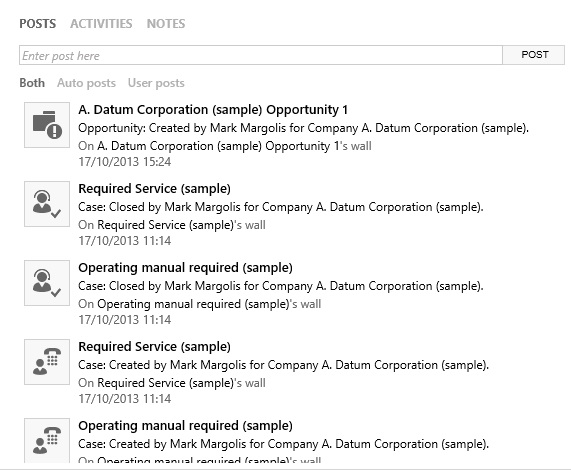
Once you successfully added and configured the control then it should look something like this. You can view Posts, Activities and Feeds from the sale control:

NotesControl

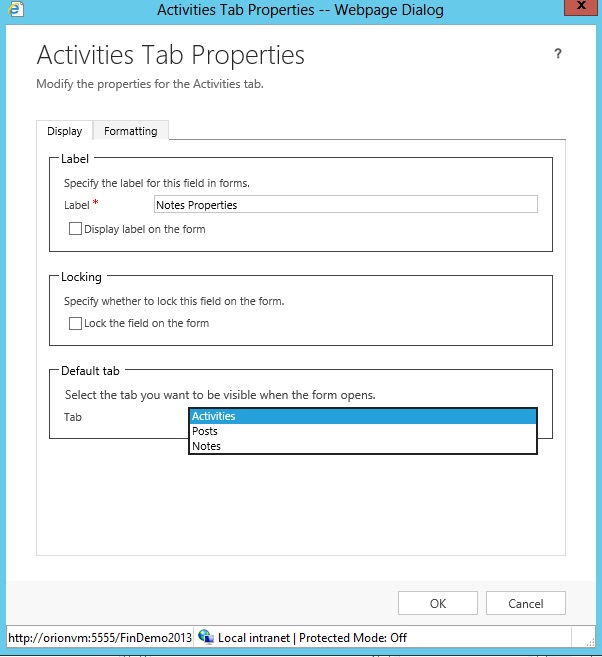
When you have added he control of the form from the form designer you can also determine what tab you would like to set as default:

activitiestab

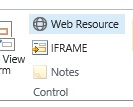
It is as simple as going to the insert tab in the form designer and selecting notes. Double click on the control and you can set the properties as above. However if the notes is grayed out or inactive then you probably already have the notes component on the form:

notes

Find the notes or delete then and re insert them and you’ll be able to set the appropriate parameters.

Problems if you have upgraded from CRM 2011

If you have upgraded from CRM 2011 and you cannot get the Activity Feed to display on a record wall (a problem I had) then you have most likely not enabled the entity for Activity feeds in “Post Configurations”. Also if like me you removed “Post Configurations” from the sitemap (or if for some reason it is not there) then you are going to have to make site map changes to get your entities to display an activity feed wall. Please note that getting to “Post Configuration” via the advanced find will not work (tried that also). You will have to edit the site map. Fortunately its very simple.

1. Check that you sill have Post Configurations in the Site Map by going to Settings > Post Configurations

If you do not then you need to edit the site map (download the SDK for full documentation). A full SDK article will be available for this shortly,including a managed solution file. In the meantime here is a snippet from my colleague.

2. Add Post Configuration to the site map if it is missing

Locate the three Area elements with the Id values ” SFA”, “CS”, and “MA”. Add the following Group element to each (sorry I lost the formatting).

<Group Id=”MyWork”
ResourceId=”Group_MyWork”
DescriptionResourceId=”My_Work_Description”>
<SubArea Id=”nav_personalwall”
ResourceId=”Whats_New_Label”
DescriptionResourceId=”Whats_New_Description”
Icon=”$webresource:msdyn_/Images/Wall_16.png”
OutlookShortcutIcon=”$webresource:msdyn_/Images/Wall_16.png”
AvailableOffline=”false”
Url=”$webresource:msdyn_/PersonalWall.htm?data=HideUserProfile%3D0″>
<Privilege Entity=”post”
Privilege=”Read” />
<!–SubArea>
</Group>
<Group Id=”Tools”
ResourceId=”Area_Tools”
IsProfile=”true”
DescriptionResourceId=”Area_Tools_Description”>
<SubArea Id=”nav_traces”
Icon=”/_imgs/area/18_alerts.png”
Url=”/_root/tracewall.aspx”
ResourceId=”Homepage_Alerts”
AvailableOffline=”false”
DescriptionResourceId=”Alerts_SubArea_Description”>
<Privilege Entity=”tracelog”
Privilege=”Read”/>
<!–SubArea>
</Group>

Locate the Area element with the Id=”Settings” and add the following Group:

<Group Id=”System_Setting”
ResourceId=”Menu_Label_System”
DescriptionResourceId=”Menu_Label_System” >
<SubArea Id=”nav_social”
ResourceId=”Social_SubArea_Title”
DescriptionResourceId=”Social_SubArea_Description”
Icon=”/_imgs/area/16_social.png”
Url=”/tools/social/social_area.aspx”
AvailableOffline=”false” />
<SubArea Id=”msdyn_postconfig”
ResourceId=”Activity_Feed_Configuration”
Entity=”msdyn_postconfig” />
<SubArea Id=”msdyn_postruleconfig”
ResourceId=”Activity_Feed_Rules_Configuration”
Entity=”msdyn_postruleconfig” />
</Group>

3. Activate the Post Configuration for the required entity (make sure wall enabled is yes)

Settings > Post Confiruations > Select Entiity > Activate > Publish the entity

4. One more thing

If you are still having problems then recreate the form in form designer and you’ll be good to go.

That should be it, let me know if you still have problems.

This post was originally published on https://markmargolis.wordpress.com. This posting is provided “AS IS” with no warranties, and confers no rights.

Next time on Mark Margolis’s Blog: A Look ahead to Convergence EMEA November 2013

Power Map (GeoFlow) for Microsoft Dynamics CRM

Continuing with the theme of Analytics and Visualisations this week we are going to take a look at Power Map for Excel. This used to be known as GeoFlow but is the same thing as Power Map. In this article we will see how we can further analyse our Opportunity information using Power Map and also taking advantage of census data from the cloud, all within Excel. We will use the same data set  as my previous article “Power View with CRM 2011 and CRM Online“. I must take this opportunity to thank Marco Amoedo for designing this demo scenario.

What we will notice from a CRM Analytics perspective is how our Loans (we are a bank in this scenario) are not doing so well in our Birmingham region, using Power Map, CRM and Census data together tells us that we have a high concentration of Managers and High Net Worth individuals (the red patches). Perhaps we should be offering different products and services in that region?

When you done, you should see your CRM data looking like this:

PowerMap

Prerequisites

  1. Install PowerMap (Make sure you have the latest version, there are some important changes)
  2. Download Sample Opportuntities & Excel File

Step by Step Instructions

  1. Open the Excel Spreadsheet provided – This is the exported Opportunity data from CRM and also includes Censuses Data on Sheet 1
  2. From the Insert Tab > Map > Launch PowerMap
  3. New Tour
  4. On the right hand pane under Choose Geography select Country and City and then click Next.
  5. Add ProductActual Revenue and  Actual Close
  6. Add Layer
  7. Add Postcode -> Other and Click Next (the first time this generates it can take a while)
  8. Add Managers change chart to heat map

Video Recording (No Audio)

This post was originally published on https://markmargolis.wordpress.com. This posting is provided “AS IS” with no warranties, and confers no rights.

Next time on Mark Margolis’s Blog: CRM 2013 Posts, Activities &amp; Notes Control

Microsoft Dynamics CRM and Data Mining

As you have probably already gathered I’m a big fan of Analytics and Visualisations so when my colleague Manuel Altermatt told me he was doing some work on CRM and Data Mining and wanted to do a  guest post I jumped at the chance! You can contact manuel on analyticalcrm@outlook.com.

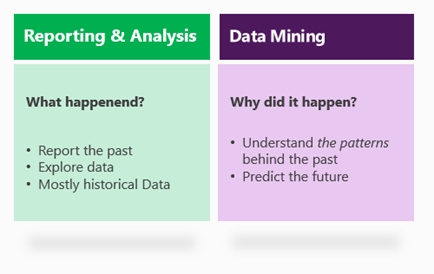
Whilst Dynamics CRM is widely recognized for its strong operational capabilities, the outstanding analytical capabilities which arise in conjunction with SQL Server are sometimes overlooked. We can think about business intelligence in two categories:
Reporting and analytics, which are methodologies and tools that focus on “what happened”, thus working on data exploration, historical information, reports, dashboards, KPI’s, etc.
Data Mining, which are methodologies and tools that focus on “why did it happen”, thus working on data understanding, patterns, correlation, past and future data, and data prediction.

intro

This blog post shows how Dynamics CRM can be combined with SQL Server to create some remarkable scenarios around data mining and data prediction.

services

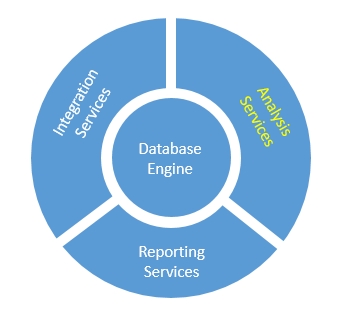
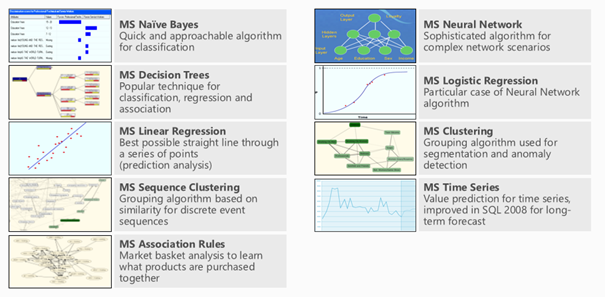
SQL Server Analysis Services (SSAS) is part of SQL’s fundamental framework and offers a wide set of tools and methodologies for data analysis. In particular, SSAS contains various capabilities around SQL data mining, including 9 advanced algorithms for data analysis. The discussion of each algorithm goes well beyond the scope of this post (and my limited understanding of statistics), but we will tackle a few algorithms for the example below.

algorithms

Before we get started, let’s quickly review a general and common approach to data mining. We will follow these steps in the example below.

  1. Understand your data. A data source – in this example. Dynamics CRM – holds transactional information generated by daily business. This is the data that we want to analyze. For example, we could be looking at customers of a supermarket or teleco provider.
  2. Extract your data. Since we may need to combine the transactional data with some additional data, plus also data analysis can have a large performance impact on your CRM system, the data is usually extracted and put in a Data Mart or Data Warehouse. This is where the data mining will happen. Notice that Dynamics CRM offers numerous ways for data extraction, such as file export, access to the SQL tables, API’s, etc.
  3. Enrich your data. The data is quite often enriched with additional data, which can either be owned and generated by the company, or also imported from third party sources such as the Internet, Azure Marketplace, etc. Read here for some great examples on how easy it is to integrate different sources of data thanks to PowerPivot. For example, you may want to enrich your customer data with some demographic information related to the area where they life.
  4. Analyse your data. This is the critical step, and it’s actually a lot of magic simplified for the sake of this post. Basically the SQL algroithms allow you to:
    • a. Define a model by selecting both an algorithm as well as the relevant pieces of information for your model.
    • b. Train the model based on some historical data, thus fine-tuning the inner parameters of the model based on your data.
  5. Predict your data. Use the model to predict the outcome of new data. For example, you may predict possible upsale opportunities (aka leads), or customers who are at risk of canceling your contract.
  6. Import your data. The new generated information (eg. leads or risk flags) are then imported back into the CRM for operational action.

let’s look at a real-life example. Imagine the scenario of a retail bank that wants to get a better understanding of their AAA customer (“how can we know a AAA customer when we see one?”) as well as generate some possible leads for upsell opportunities. We will follow the suggested approach above.
Let’s talk about infrastructure first: For the CRM part, I built this example based on Dynamics CRM Online. For simplicity, I used the one-click CRM Demobuilder with the basic demo and some slight customizations (see data below). Since CRM Online does not offer direct access to the underlying SQL Database and its SSAS component, we need a separate instance of SQL Server for our data warehouse. Again, using the cloud: I used Azure and created a virtual machine with Windows Server 2008 and SQL 2008. Pick the one from the VM cataloge and you will be up and running in less than 5min. Last but not least, although the Data Mining algorithms can be access directly from within SSAS, I’m actually more of an Excel guy. I installed the Excel Data Mining Add-On on my Excel 2013 so I could surface the SQL algorithms from within Excel. You still need the power of SQL in the back, but you can access the algorithms comfortably from your Excel environment.

1. Understand your data

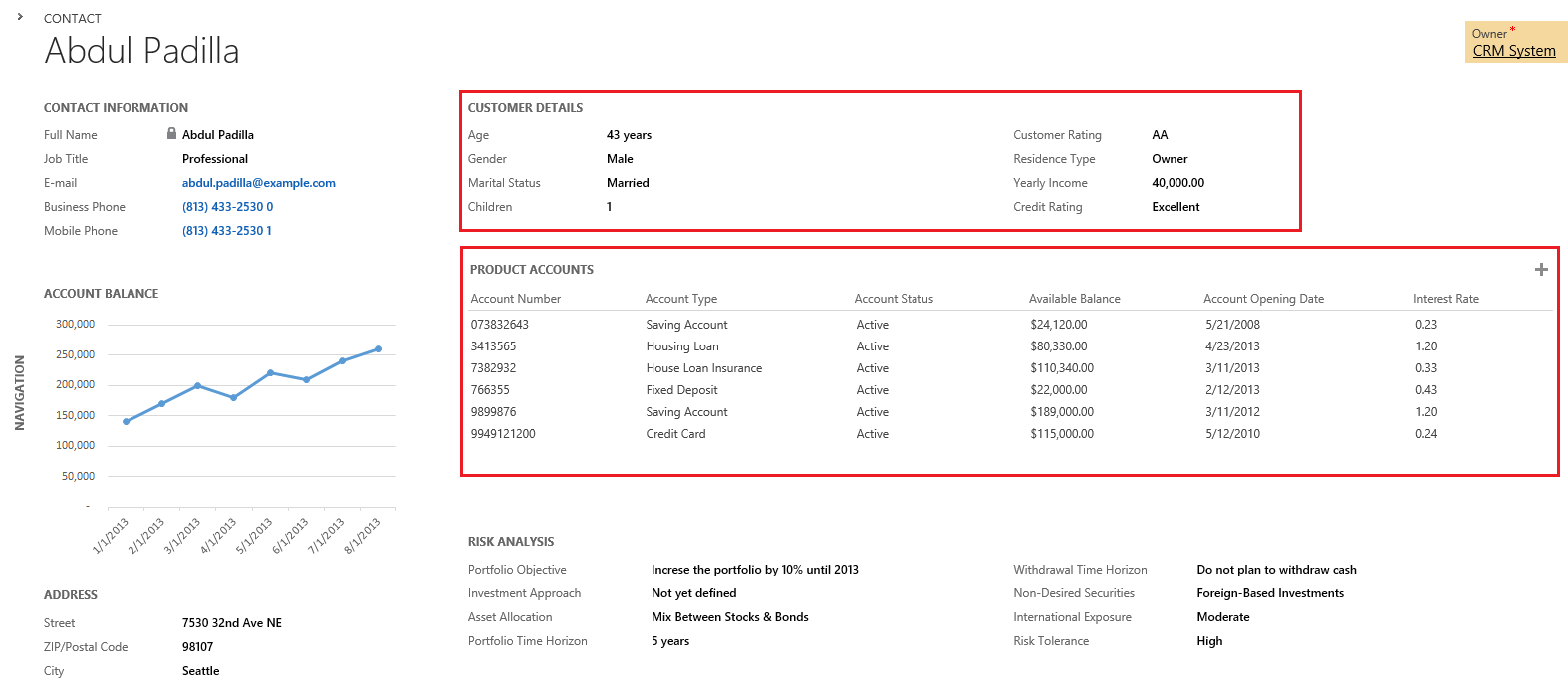
Here is a look at the CRM data. Notice that we have a number of important data fields for our analysis: Gender, Age, Yearly Income, Marital Status, Job, Residence Type, Number of Children,  Address (ZIP Code) and Customer Rating (A, AA, AAA). We will try to uncover the hidden correlations between these fields to get a good predictor of the customer rating. Notice that we also have a linked table with the customer’s financial accounts.

customer

2. Extract your data

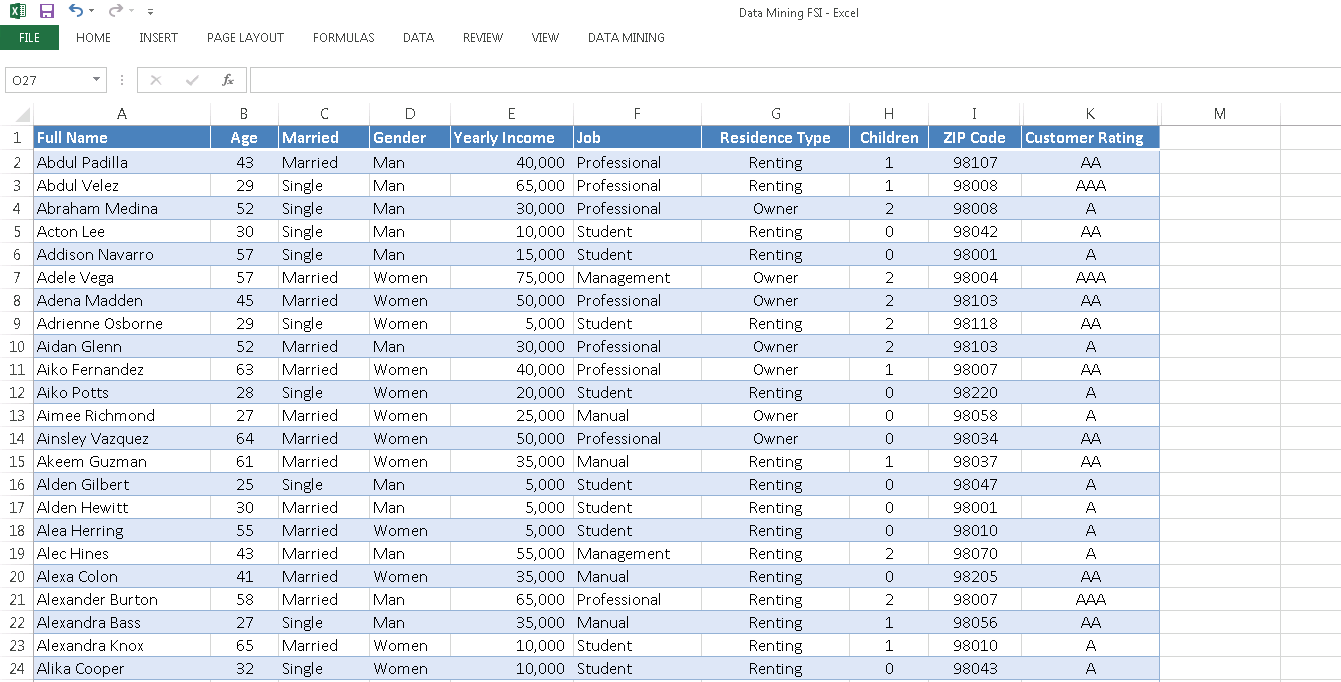
Data extraction and replication to the DWH can happen in many ways, including automated batch processes, API’s, etc. To keep this example simple, I’ve decided to do a simple file export/import. The contact entity is my main starting point. I will also need the associated financial accounts (custom entity), so I’ve exportet that too. Here is a look at our Excel export. Notice that we included all of the mentioned fields above.

contact_list_13.    Enrich your data
Insights come not only by considering the information that is already known, but by combining this with some new, external data. There are many ways to combine our data with external data – including good old VLOOKUP – but thankfully PowerPivot allows me to include external data sources directly into my data model.
Could the neighborhood of our customers hold some insight into their categorization and value for our bank? Maybe. So I’ve connected my data model with an Azure database that is free, publicly available and holds key demographic information for all US neighborhoods by ZIP Code. Here are some step-by-step instructions on how to include external demographic data into our table.

We’ve now enriched our customer table a new column: Average home value of houses in the corresponding neighbood (ZIP code).

contact_list_24.    Analyse your data
Once we’ve connect Excel to our SQL Database in the Azure Virtual Machine, we get access to the SQL Data Mining Algorithms right from the Excel Ribbon.

ribbon_1

ribbon_2
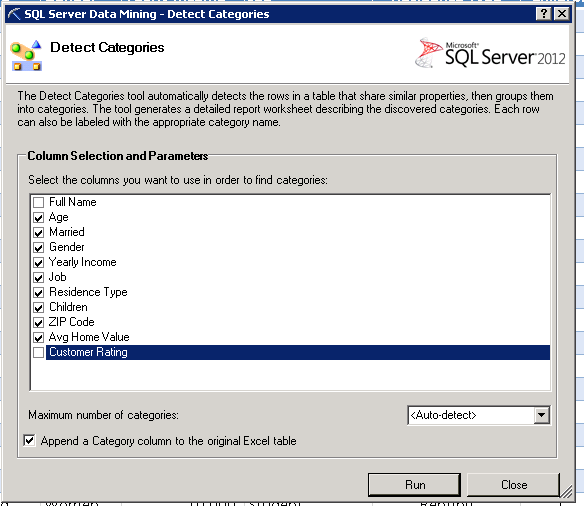
Using the first algorithm – Detect Categories – Excel can help us understand the high level segments of our customer base. In this case, we select the columns Age, Married, Gender, Income, Job, etc. We unselect the column “Full Name”, assuming that the categories do not correlate with customer names.  Also we leave “Customer Rating” out of the picture for a moment as we want to understand our customer base unbiased from our own categories and ratings.
category_configuration

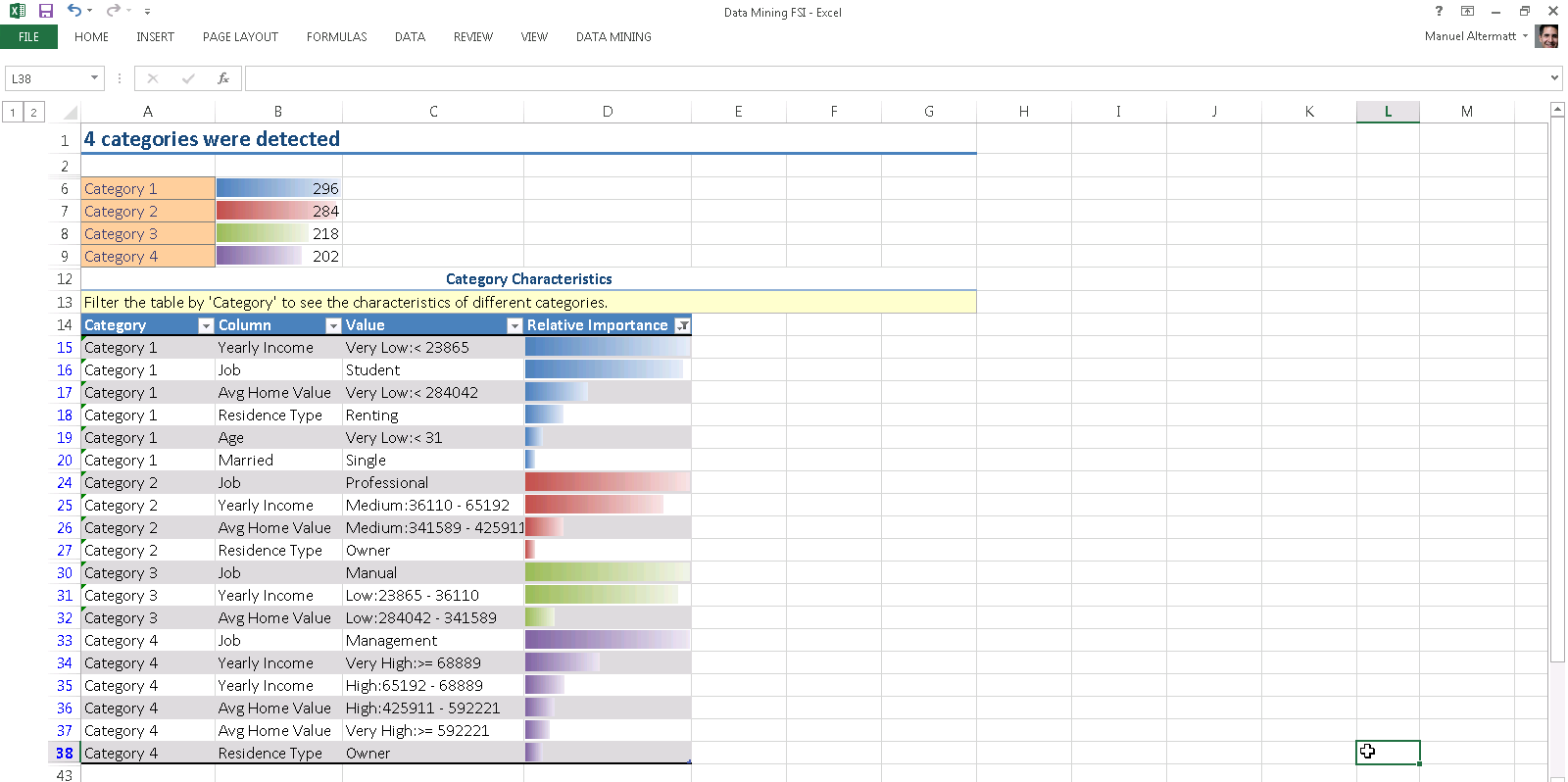
The analysis takes a few moments, but the results are worth the wait. Excel segments our customer base into 4 categories, providing us with  the key factors to help us decide in which category a customer belongs. Notice the bars in column D? This is statistics, so everything is always weighted with some probability or importance.

categoriesHere are the four categories in plain English.
1.    Category 1, aka “the Students”, consisting mostly of customers with very low income, student profession, young age, and renting residency.
2.    Category 2, aka “the Professionals”, consisting mostly of customers with medium income, living in an neighborhood of medium home value and slightly biased to home owners.
3.    Category 3, aka “the Middle Class”, consisting mostly of customers with manual labour low income, and living in neighborhoods of low home value.
4.    Category 4, aka “the Upper Class”, consisting mostly of customers with very high income, management profession, house ownership and living in expensive neighborhoods.

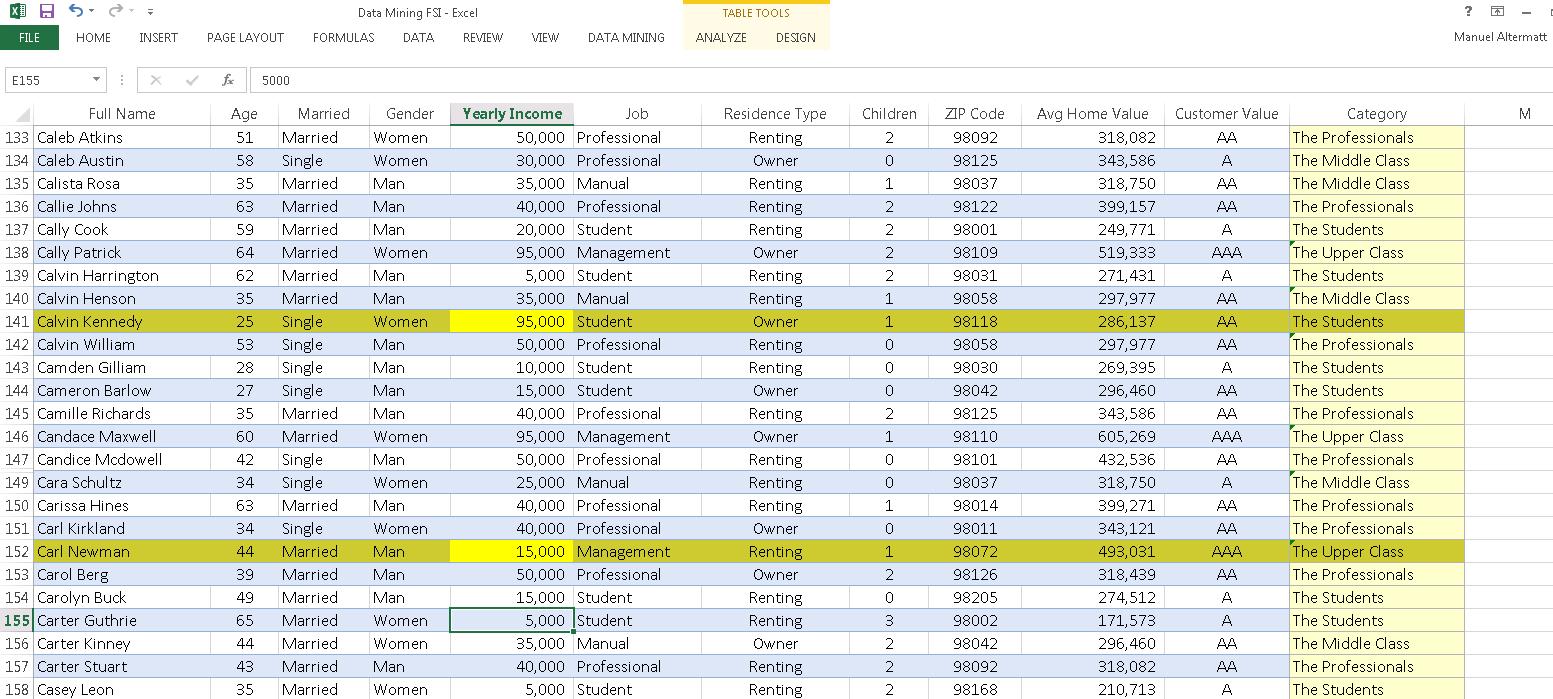
If you want, the algorithm can automatically detect and highlights exceptions. Notice the wealthy student and the low income CEO.

exceptions

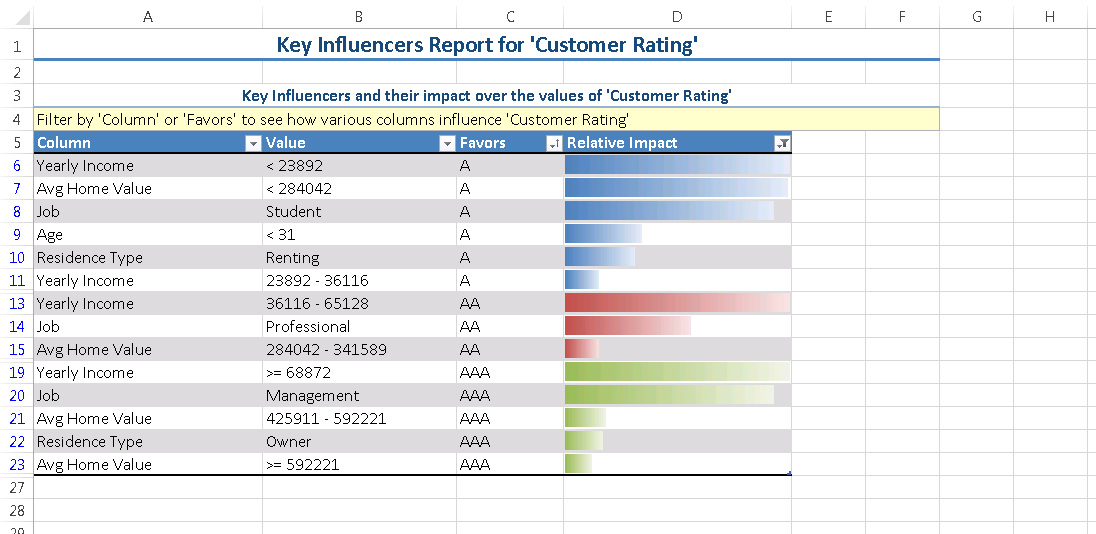
Our next algorithm – Analyze Key Influencers – should help us get a better understanding of our own internal ratings for our customers. The algorithm allows you to pick any column (“Customer Rating” for this example) and uncover the hidden correlations between the other columns and your column of choice. Let’s ee what are the key influencers for a A, double-A, or triple-A customer rating. Here is the result of the analysis:

key_influencers

The column “Favors” shows you the customer category. The column “Relative Impact” is again the statistical importance for every key indicator. As you can see, low yearly income as well young age and student profession favors a simple-A customer rating. On the other hand, income above 86k, management profession, ownership of a residence and a high value neighborhood favors a triple-A customer rating.
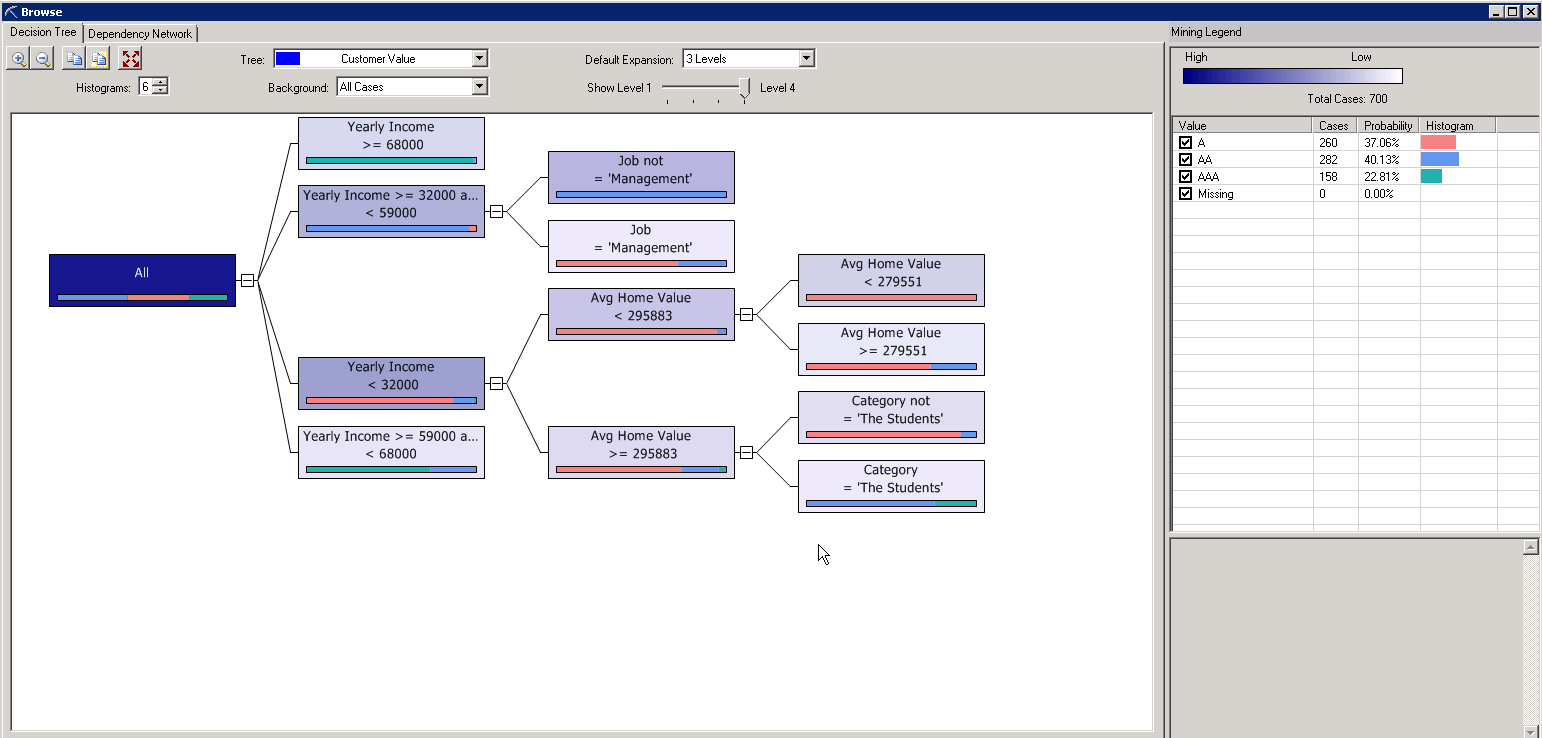
The analysis can be taken to the next level by analzying the decision tree and decision networks. This is priceless information for your next dynamic marketing list and marketing campaign.
decision_tree

5.    Predict your data
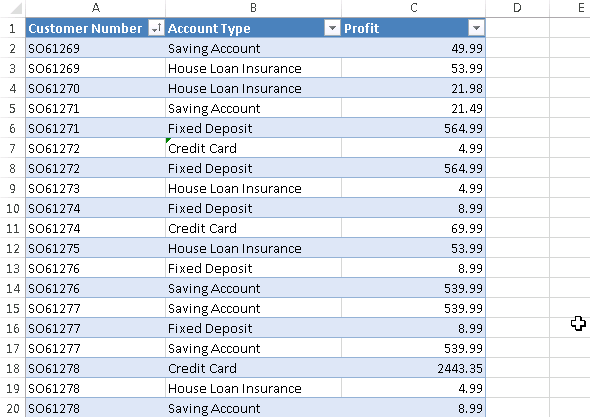
Any insight is typically useless if you cannot take action on it. So let’s go ahead and see if we can generate some upsell opportunities. For this example I’m using an export of the financial accounts of all customers. Column A holds the customer’s number. Column B is the account type. Column C is the yearly profit of the respective account.

account_list

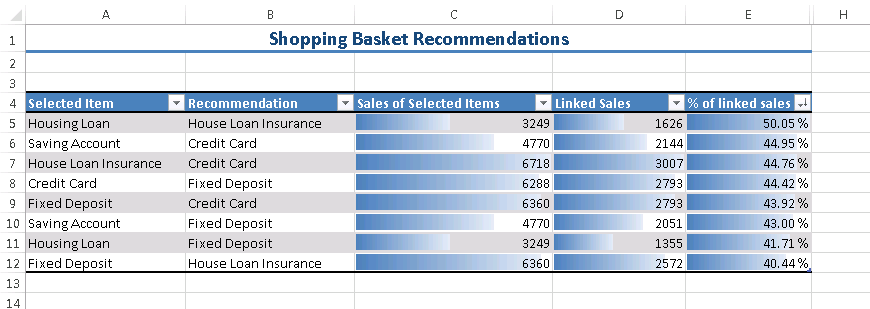
The basket analysis algorithm has its name from the retail industry and it will tell you which transactions are usually bundled together. Common belief is that you will find a pack of diapers and a pack of beer in the same shopping basket of a young father. Let’s use this algorithm on our data.

ribbon_shopping_basket

shopping_basketHere is how you read the results (row 5): Housing Loans seem to be often in the same “basket” than House Loan Insurances. As a matter of fact, there are 3’249 Housing Loan Accounts. Out of these, 1’626 (or 50.05%) are attached to a House Loan Insurance Account. So there is some serious upsell potential of the remaining 1’623 House Loan Accounts which do not have an attached House Loan Insurance Account. Similar observations can be made for Saving Accounts and Credit Cards.
This translates into well qualified opportunities.

6.    Import your data
Now that we’ve gained a better understanding of who our customers are, and what products/services they buy together, we can take a number of paths from here. A dynamics marketing list could be the start of a marketing campaign. A workflow or a plugin could help us detect possible upsell opportunities in real-time. For simplicity, I’ve used a simple macro in Excel to create a number of leads for customers who did buy a House Loan Account, but did not buy a House Loan Insurance. Here are the new leads in CRM.

leads_listConclusion
This blog post shows just the tip of the iceberg. The combined power of Dynamics CRM and SQL Server offers a huge land of opportunities to get better understanding and actionable insights on your customers.
Manuel

This post was originally published on https://markmargolis.wordpress.com. This posting is provided “AS IS” with no warranties, and confers no rights.

Next time on Mark Margolis’s Blog: Power Map (GeoFlow) for Microsoft Dynamics CRM

Microsoft CRM – Leading by Example with Financial Services Case Studies

*Updated February 23 2014 to include Natwest*

Continuing with the financial services theme I wanted to write about some of the most successful case studies in the industry. Rather than just provide you a link to the case studies I have tried to pull out the salient points in two to four bullet points. If you want further detail then I have also included the full case study should you wish to read on.

I try to stay on top of the latest projects and CRM implementations in the financial services industry, keeping current with the latest trends and best practises is a key part of my job. I keep in regular contact with existing and previous clients and regularly catch up with people in the field to find out what they are doing in the client management arena. With so much going on it can be quite a challenge, fortunately Microsoft also maintains a site dedicated to case studies, If you use the advanced find you can filter by industry and product. Below are some of the ones I use most frequently, there are many, many more.

Some of the largest and most successful financial institution in the world use Microsoft Dynamics CRM unfortunately we can’t name them publicly! One such organisation is a major bank here in the UK, they went live in a matter of a few short months and are delivering new business processes to the organisation every week! Their CRM project is in fact so successful and cost effective that many other departments are looking to deliver their projects on the Microsoft CRM platform. A quite unexpected and  good problem for the CRM delivery team! I hope to be able to share more information on this later in the year. In the meantime here are plenty of other great stories!


Citi


Citi Private Bank deploys Microsoft Dynamics CRM. Citi Private Bank is part of Citigroup and delivers private banking services to ultra-high net worth customers across the world. Three years ago, the company launched Project Sheen – an initiative focused on delivering an optimal client experience across all touchpoints.

  • Approximately 1,000 Citi Private Bank employees are using Microsoft Dynamics CRM. Implemented across locations in Asia in November 2012 and the full roll out across all regions worldwide was completed by August 2013.  “Ease of implementation was important for us. We had already experienced the challenge of trying a new CRM system that didn’t work and so it was important that the switch was seamless – and it was,”
  • Citi wanted to ensure that customer information is held in a logical and ordered way that enables bankers to best evaluate clients’ portfolios and to identify investment opportunities.
  • “our technology team considered Microsoft Dynamics CRM and found that it was everything we wanted and more. Most importantly, it could serve as a global solution and integrate with the platform we were currently using.”
  • “Another factor we found to be positive with Microsoft Dynamics CRM was the ability to be compliant with regulatory requirements in each jurisdiction,”
  • We can deliver solutions to our clients in a much more relevant way because we understand their needs,”. “We know what they’re interested in and what their preferences are, which means we can target them better.”


natwest

Natwest.  Natwest has a long history, now a part of the Royal Bank of Scotland, NatWest joined one of the largest financial services groups in the world, with more than 3,600 branches of its own.

  • Gained more than 95% user adoption
  • Deployment of Microsoft Dynamics CRM at NatWest took only four months, with the solution going live to 3,000 users in April 2013
  • Consolidated view of all customer touch points and streamline processes to free up employee time to better focus on those customers.

  • Drives cross-selling opportunities through value-added customer interactions
  • CRM helps them delvier a personalized service which supports customers in achieving their ambitions

Metrobank

Metro Bank. Metro Bank is Britain’s first new High Street bank in over 100 years.  They offer banking focused on the customer through high levels of service and convenience.

  • UK Retail bank using CRM online, Office 365, SharePoint, Yammer, Lync etc.
  • “Fans not customers and a culture that is based around the customer”. “surprise and delight”
  • “Be there when the customer wants them”
  • Chose Microsoft CRM over SalesForce
  • “Microsoft CRM is our customer platform

RaymondJames

Raymond James provide broker services, capital markets and fixed income products. All about personalised financial planning.

  • 6,000 Financial advisors across the world
  • 4,000,000 Clients
  • 20,0000 -30,000 transactions updates every day with updates to CRM in real time
  • Full back office integration that improves advisor efficiency and enables them to provide a personalised service
  • Knowledge is held in once place so that they can proactive personalised services
  • Access to information remotely wherever they are on mobile devices.

henderson

Henderson Global Investors. £65 billion in assets under management. Employing 1,000 people across 15 locations worldwide

  • Automated marketing
  • Mobile access
  • Better quality data & better reporting
  • Comprehensive view of their investors

russelinvestments

Russell Investments. Founded in 1936 and having over 580 independent distributor partners Russell Investment has $237.3 billion under management

  • 50 % cost saving compared with the leading on-demand competitor
  • Solution based on Microsoft CRM Online
  • Integration to other Microsoft technologies deployed like Lync, SharePoint, and Office
  • Expect the go-to-market time for new capabilities and vertical workloads like wealth management will be cut in half,

alianz

Allianz is one of the world leading Insurance organisations and is active in life and non-life, health, personal, and commercial insurance.

  • Reduced quote time by 30%
  • Significantly improved the quality of its distribution relationship management of brokers
  • Brokers are getting new product information to their customers faster and taking advantage of better management from our relationship managers

ing

ING Bank (wanted to improve its market position by investing in CRM for the Salesforce) – Video Case Study http://youtu.be/W-ULdT3jkC4

  • 4 Month implementation
  • Maximise direct opportunities with customers
  • More productive sales time
  • Streamline the sales process

LVE

LV is the UK’s largest friendly society and has 5500 employees working in 17 offices. It provides investment and insurance services to more than 5 million members and customers

  • 66 % reduction in sales administration
  • Centralised, secure data repository which is easily accessible by both in-house and on-the-road sales teams
  • Automation of previously manual tasks, while management have much greater visibility of profitability and are easily able to meet their compliance and auditing commitments

sunnationalbank

Sun National Bank (Wanted to be faster and more effective, and easy to implement and bring to market quickly)

  • Increased cross selling by 20%
  • Increased Loan profitability
  • Reduces time to approve loans by 80%
  • Reduces time-to-market by 67%, cost by 75%

mkb

MKB Bank (Improve the customer experience and marketing and sales force efficiency)

  • Customer service times improved by 25%
  • Customer churn decreased by 5%
  • Migration of customers to higher value segments takes on average 20% less time

dubai

Dubai Bank (Single customer view for service agents)

  • Quicker time to revenue through faster account opening
  • Reduction of service agent applications from eight to one

bancatrans

BancaTransilvania (Increase growth and adopt new business automation process and handle increasing volume of multi channel interactions )

  • Increase call centre productivity by 30%
  • Internet banking subscriptions processing is 75 %  faster
  • Greater control on the productivity and efficiency of the users and the business

sasfin

Sasfin Bank (Increase revenue, improve risk analysis with single view of the customer)

  • Reduce costs associated with gathering customer data and  determining risk exposure
  • Provide easier approach to meet customer-satisfaction benchmarks
  • Streamline customer portfolio management

oshadabank

Oschadbank (Respond efficiently and effectively to a very large call volumes)

  • Implementation of Call Center across 6000 branches
  • Multi Channel (calls, SMS, e-mail), to attract, retain and service with minimum time and effort for both parties.

garanti

Garanti Pension. Garanti Pension provides life insurance services in Turkey, with a net asset value of US $1.8 billion and second place in overall market share.

  • Sales Team Efficiency Increased by 25 Percent
  • Call handling per day increased 50 percent

  • Contributions per customer increased 85 percent since 2007

  • Average resolution time reduced by 75 percent

BP


BP Energy Trading. P has one of the largest and most successful energy trading organisations in the world, known as Integrated Supply & Trading (IST). As the single trading face of international oil and gas company BP, IST does business in over 140 countries and has a global portfolio of around 12,000 customers and suppliers.

  • Organisation wide collaboration
  • Using Dynamics CRM to meet high client demands and expectations
  • 3000 employees, BP’s Energy Trading business is also  known as Integrated Supply & Trading (IST). 80% of BP Group’s turnover flows through this supply and trading business
  • “Basically, if you can manage your Outlook e-mail you can start using some of the functionality in Dynamics CRM without much effort. I believe this makes a huge difference when it comes to successful organisation-wide adoption.”

This post was originally published on https://markmargolis.wordpress.com. This posting is provided “AS IS” with no warranties, and confers no rights.

Next time on Mark Margolis’s Blog: Microsoft CRM and Data Mining

CRM & User Adoption

My last post, CRM for Asset Management, proved to be very popular as was CRM for Investment Banking, so I will continue to add to the series with the my next instalment likely to be CRM for Retail Banking. This time hower I am going to talk about User Adption

In my view CRM User adoption is the key to all CRM projects. Unfortunately, project success is to often measured by budget and delivery time-scales when really the true value is user adoption and return on investment of tangible business benefits. Put simply, I would rather have a CRM project delivered four months late and over budget but that delivered a 243% return on investment than a project that was called a “success” because the project team delivered on time but that the users didn’t use. Business users will always remember a project that failed to deliver to their needs but will likely never remember the fact that a project was a few months late but did exactly what they need.

A project should only been seen as a success if it meets the objectives of the business and the needs of the users.

CRM user adoption starts at the outset of all projects. In fact this consideration should start well before the project team start delivering any work. The users should be involved at product selection and then continually throughout the implementation. Staying close to the business is the most important aspect of a project. A CRM project is not about technology it is about people and it is about the ability for the business to deliver value to their customers. It is not something that can be measured on a Gantt chart.

When assembling your CRM team make sure that you have representatives from users from all the various parts of the business. This is a continuous process, don’t stop involving the business at the first deliverable, keep them involved and accountable throughout the life-cycle. How long is the life-cycle? Forever, the amount of work and involvement may fluctuate but a CRM strategy does not have a start and an end date, it is a living being and you need to keep nurturing it. It doesn’t need to be costly but it does need due care and attention. After all, your business changes, your people change, your industry changes and so do your customers. Your CRM strategy and system(s) need to reflect (and in some cases drive) this change.

What follows in not an extensive article on CRM adoption nor is it a guaranteed recipe for success, but it does include some key learnings from the many projects I have been involved in. I’ll be honest and admin that although I have had many project success (defined not by delivery time-scale but my business ROI) I too have had my fair share of failure!

Start with small but broad functionality

If possible adopt an agile approach, not just in name but in culture, invest in a team that has agile delivery experience and ensure that your management understand what this means. Failure for the stakeholders to understand and support an agile project is likely to end in failure. Better to revert to a waterfall approach if the stakeholders are not fully signed up to the agile approach. I’ll write a future article on how to adopt Agile in the enterprise, this is beyond the scope of this article.

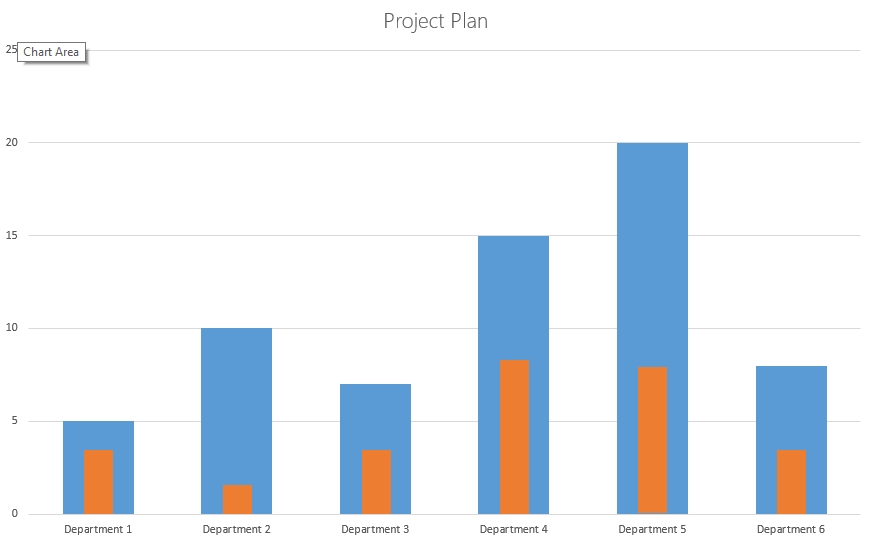
I’ve tried to illustrate below the concept of start small and broad. Typically projects are the blue lines where you start with Department one, complete all required functionality and then move onto Department two. Rather, focus on the absolute must have of each department (orange bar) and deliver for each department as soon as possible (ideally concurrently). Focus on functions that will deliver cross departmental benefits (single customer view for example) and you likely to not only get higher user adoption across the organisation but a greater ROI.

projectplan

As described earlier, the value of a CRM project is broad user adoption across the organisation where information and data is being shared. Implementing CRM from a department to department perspective does little to consider the customer journey. For example think about a customer ringing up a bank for a mortgage,  if only the call centre had your customer details what would your experience be when you are passed to the mortgage advisor team and you had to repeat all your details again. Worse still, would you still be on the phone if you had to repeat it all again?

Iterate with continuous improvements.

Minimal Viable Product (MVP)

Understand Minimal Viable Product and how to structure your project to deliver this. Focus on features and benefits  that deliver complete elements of value:  focus on features that are easily perceived as useful and benefits that are highly visible. You can read more about this on my article on CRM Initiation documents. Address the most challenging aspects of the project first, prioritise features and items that are architecturally significant as well as those that meet business objectives. Put another way, keep your CRM simple and make it easy to use.

The carrot and the stick

It never just one or the other, but both. Be sure to include in compensation, pay and benefits into the contract of employment. This is by far the most effective way of getting users to use the system. Monitor User adoption throughput and encourage usage, don’t publicly punish people for not using CRM, focus instead on positive reinforcement techniques not negative. Correlate and show a link between positive individual performance results and CRM usage. Ensure you have executive sponsorship at the highest level and that the business objectives and rewards and clearly communicated.

Tell users why you are doing it and keep them involved

You’ve got great people working for you but do they really understand why a new CRM system is being put in place? Do they appreciate the business objectives. You may of spent a great deal of time and expense in the hiring process but how much time has been devoted to explain the underlying business conditions and what your CRM strategy is and how the business will use the system(s) to achieve this. Create a customised user guide and make sure that this includes more than just how to use the system.

Measure User Adoption

Measure user adoption throughout so that you can keep on top how people are using the system. There is not just one technique, activity and records creation is common but there are many more. Look onto Gamiifcation as a way of measuring user adoption and remember that this is also a continuous process that should be reported on a regular basis in a careful, positive and constructive way.

Identify champions

Every single one of my successful projects have had easy to identify champions, These people are bright, motived, extremely positive, understand the business and create an infectious environment that just makes CRM projects so much easier! They often come from unlikely sources so keep an eye out they are worth their weight in gold. More often than not these people are not senior but have been in the business for some time and are hungry for change and a CRM project is just the opportunity they have been waiting for to empower them to create this change. It my secret weapon!

Avoid seeds of discontent immediately

To do this you need to listen, you need a project structure and culture than listens to the users. Champions are great help in this regard. Stop discontent in its tracks, waiting until an issue becomes shared amongst a larger group will just be more difficult and costly to resolve later. Most of the time these issues are small niggly things that can be fixed easily but was a project team we often dismiss them because they are small, be careful and evaluate your issues with care.

Training

Train in small focused groups and do continuous training. Don’t overwhelm your users right at the start with three hour training sessions, keep them short but regular. Make sure you have open Q&A forums. Recognise that this is a continuous process, you will need to train and the re train.

Gamification

As with the carrot and the stick described above correlate and show a link between positive individual performance and CRM usage. Use gamiication techniques to make this interesting. Look for ways to use positive reinforcement and reward good usage using individual performance statistics as a positive metric (e.g. sales stats, or cases closed). Perhaps consider rewards for exceptional results.

Data Quality

I have tried to avoid anything related to features or functionality but Data quality is so important I have to mention it. I have talked before about data migration and quality techniques. you can reach more here. I won’t repeat the details of the article here but make sure you have someone who is accountable for data quality and as described avoid the seeds of discontent because if the people do not trust the data or don’t know how to use the system you are in trouble.

Communicate, Communicate, Communicate

Lastly but by no means least is communication. Communicate early and often. Communication means not just talking or telling people what is happening  but listening. If the users feel that are being listened too then you’ve be amazed at how much they will work with you rather than against you. Proof is in the pudding so demonstrate continually that you are listening and coordinate at all levels of users: from senior management, super users and standard users. Make sure you have effective ways of capturing feedback. You could start with Yammer.

This post was originally published on https://markmargolis.wordpress.com. This posting is provided “AS IS” with no warranties, and confers no rights.

Next time on Mark Margolis’s Blog: TBD

CRM for Asset Management – An Overview

This is a part of a series of articles on CRM for Financial Services. Recently I wrote about CRM for Investment Banking, this time I am going to focus on CRM for the Asset Management industry.

CRM in Asset Management – An Overview

Like many Financial services organisations Asset Managers might describe their CRM objectives are relatively straightforward. Some may even describe the usage of their current CRM system as a contact management, perhaps even a Rolodex. An organisation that is definitely not in this category and is a a great example of a successful CRM implementation  is Henderson Global Investors. For a great example of how CRM can be used I highly recommended reading their case study.

With Microsoft Dynamics CRM Henderson can count automated marketing, mobile access, better quality data, better reporting and comprehensive view of their investors as just some of the benefits they have realised with Dynamics CRM.

For the purpose of clarity I think it is worthwhile if I explain what I mean by an Asset Manager, I am talking about large Investment firms (like Henderson, Jupiter, etc) as well as smaller fund managers such as Hedge Funds, Fund of Funds, Wealth Managers and so on. If you are new to this industry think of an Asset Manager as an organisation that creates products (funds) and that investors invest money into and expect a return on that investment. Investors may be other asset management firms, institutional investors, high net worth investors or private or retail investors. Some funds are pooled meaning that investors pool their money into a single vehicle and a fund manager uses the pooled funds to make a return (a bit like a pension fund). Other funds may be “managed” meaning that a fund is managed by a Fund manager for a single investor according to specific terms  and investment guidelines.

Different funds will have a variety of characteristics such as the investment strategy and will have different fees that the investor pays such as performance and management fees.

The above is very much a simplified view of an Asset Management firm but it should suffice for this article.

Although their CRM objectives might be simple, in my experience I would describe some of the issues encountered by asset management firms as some of the most complex I have come across in the financial services industry. One of reasons for this complexity is the difficulty identifying an Investor (client). You would think this would be simple, an investor invests in a fund for X amount and the value of a clients investment is  X + a % return (hopefully positive). Unfortunately this is not always the case, many investments (for a variety of reasons which I won’t go into right now) are made via custodians, nominees and may be pooled and so whilst I might make a $1M investment in the “Absolute Return Fund” the asset management firm might not see that transaction under my name but rather something that might look like this: $1M, Subscription, Absolute Return Fund, Account Name: XYZ Custodian REF 5555.  It is in the mapping of these transactions to the underlying investors (UBO: Underlying Beneficial Owner) that some of the complexity lies. So understanding who their Investors really can be quite a challenge for these firms.

Also, like many industries try to avoid using the term CRM! Call it anything but not CRM, I use Investor Relationship Management.

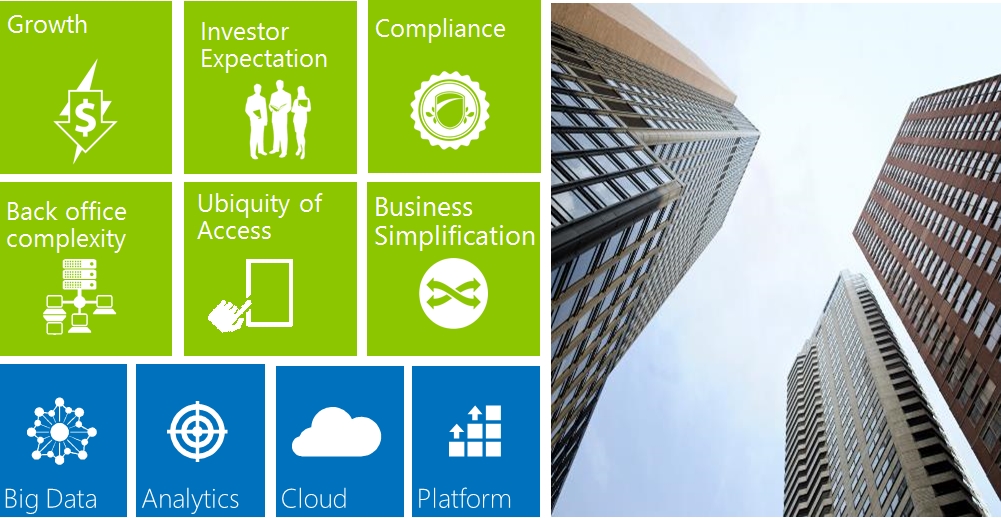
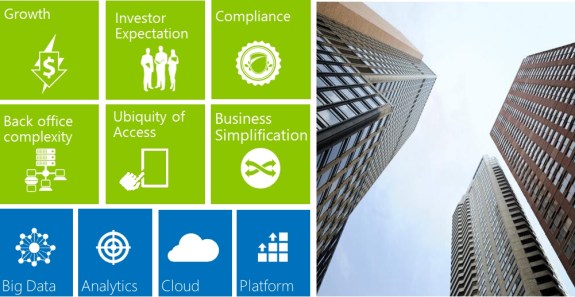
I would summarise the overall trends regarding Investor Management in the Asset Management industry as follows:
assetmanagement1

Low Growth

It is not just about more Investors, it’s about more sustainable relationships and longer term investments. The days of huge returns where a few years go, for many years now there has been a lot of uncertainty and so funds managers have to work harder to grow and retain investors than ever before. It used to all be about the % return. Now it is much more complex than that.

Investor Expectation

Investors have ever increasing expectations and both Institutional investors and private investors have high standards with regards to their client servicing requirements, they want personalised and tailored client reporting. Investor servicing is increasingly one of the most important and complex functions of a fund manager.

Regulation and Compliance

Compliance and regulation has probably been the most talked about topic over the last few years in this industry (.e.g Dodd-Frank, FATCA, ERISA) . Not only has there been a lot of changes but these changes are continuing at pace. Auditability of interactions, flexibility to change with new regulations and having control of data are key to all firms. Many organisations have had to rethink their approach to managing business, operational and compliance risk and with the needs to become more transparent, fund managers want to make sure that they remain compliant without impacting performance.

Many complex back office applications that are not integrated

Traditionally, firms would buy best of breed apps or build their own, these systems often have poor or no integration and considering the trends of increasing complexity of products, market velocity and investor expectation this causes a lot of inefficiency in the organisation. Years ago if I had suggested that an organisation change their behaviours to fit the solution or technology I would have been shown the door, it was always about changing the technology to meet the needs of the users with little consideration on if the users behaviours was the most efficient way of doing something (it was just they way it was always done). Today the story is very different, organisations understand and expect best practise from systems and are willing to change their processes to meet the software. They are asking for systems and process that they can configure and not systems that require complex customisation.

Consumerisation and ubiquity of access

We are all walking around with tablets nowadays and fund managers are no different, they want and need access to their data on these devices in a secure and useful way. Whether this is a single view of investor data for client meetings or detailed risk reporting metrics they want information wherever they are.

Simplification of process and systems

With all these changes such as regulation, client servicing demands, organisations need to reduce the complexity in the business by adopting best practice but with the flexibility they need to support their own models.

This is then underpinned by some of the key technology trends such as: Big data

  • Analytics
  • Mobile
  • Cloud
  • Platform

What follows are some examples of what Asset Managers are looking to do with CRM:

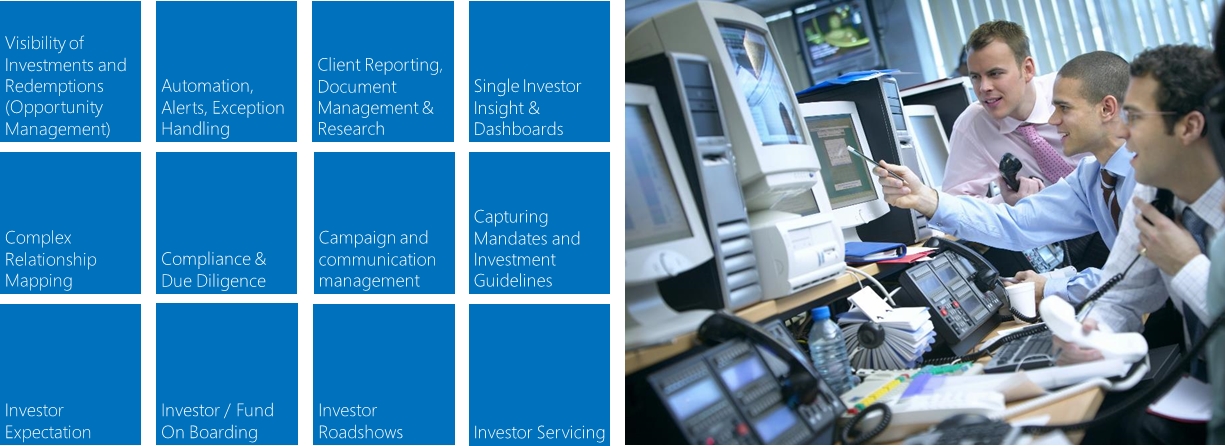
assetmanagement2

Visibility of Investor Holdings

The ability to view an Investor’s underlying investment and entire holding. As outlined earlier these can be complex due to investment made via custodians, nominees etc. Firms can use CRM to help map these transaction to the Underlying Beneficial Owner (UBO) ensuring that the firm has a complete view of an investor. The relationship management aspects of the system should allow fund managers to identity potential investments against investors and funds. Reporting these potential investments or indeed redemptions means that a fund manager has a good understanding of the likely (future) size of the fund based upon expected inflows and outflows.

Automation, Alerts and Exception Handling

With the wealth of information available and the need to move faster, rising investor expectations and with frankly less resources than before Asset Managers are looking to automate as much as possible. Rather then manage each process it is about surfacing issues when they occur and manage by exception.

Client Reporting & Document Management

With increasing sophisticated requirements from investors, fund managers are required to deliver personalised and tailored investment reports. As Asset managers increase their institutional investor base (e.g. pension funds) then the complexity of the reporting increases. The need to store documents across the investor and investment lifecycle, including client reports, attribution and risk reports and so on, firms want to centralise the document storage, control versioning, manage both the structured data (e.g. performance) as well as unstructured (e.g. fund manager commentary) and they need to see all this information against an investor record.

Single Investor View, Insight & Dashboards

The ability to see a single Investor and underlying holdings. Dynamics can provide the integration layer across back office systems (integration or view). This is what I often call the “single point of entry”, which is to say that Microsoft Dynamics CRM  becomes the “authoritative source of data” the place where people go to see client data with confidence. Microsoft Dynamics CRM does not need to be the golden source but it does surface this information in a single user interface. We have seen great success in user adoption because we are removing multiple applications and replacing it with Outlook (or the web client for those who do not have Outlook).

Complex relationship mapping

The ability to store and view the complex relationships from the Asset Managers perspective as well as from the Investor and any third party relationships that might be involved in the deal or relationship. With many parties involved, firms need to map Investors, Custodians, Nominees, Consultants and Advisors in order to fully understand the complexity and stakeholders in a relationship.

Compliance & Due Diligence / Swiss Data / FACTA / ERISA

Regulations are constantly changing and these regulations put massive restrictions on the business. They need the ability to satisfy these compliance rules (client data & KYC) and need to make sure that their data remains safe behind their firewall and in region. Whilst Microsoft CRM can be deployed on premise, cloud and hybrid cloud it is the ability to deploy to their own data centers in region that give firms complete control of their client data. Should regulations change then they still have the flexibility to move to the cloud on a case by case basis.

Campaign and Communication Management

The investor servicing team needs to regularly distribute information to Investors. Information such as performance reports, Fund Manager newsletters or new fund launches all need to be distributed in a personalised and timely fashion across different channels.

Mandates and Investment Guidelines

Firms need to be able to capture mandates and investment guidelines from the Investor. Capturing this information is key not only from a regulatory perspective but also for increasing a client investment in the fund(s).

Investor & Fund On-boarding

The Investor on-boarding process is often managed by legacy applications and processes or bespoke software that is costly to maintain and difficult to change. KYC, Anti Money Laundering (AML) , compliance and operational process are often held in a black box with no visibility to the extended Investor servicing team or relationship managers. Reducing time to value is a key metric yet difficult to improve because of the lack of visibility. A good CRM system exposes this information so that it can be automated, alerts created and actioned.

Investor Expectation

Client expectations are increasing, the drive to more profitable relationships mean that firms need the ability to manage client efficiently and effectively. Making sure that the most profitable relationships are receiving the best client service possible is increasingly important. Segmenting their coverage of client means that account teams and relationships managers are always in control.

Investor Road shows

Managing road shows and events, making sure that  fund managers are meeting the right investors has traditionally be done on an ad-hoc, manual and in efficient way. Automating the process, having this data in CRM and maintaining a single view with complete Investor interaction in CRM gives firms the ability to simplify the process and reduce the cost of service.

Investor Servicing

Ability to define entitlement rules with teams managing investors and deals with a significant degree of granularity. Ability to manage activities (call reports) and report on total investor interaction. Collaboration is a key factor, organisations needs to be able to collaborate due to the complexity of coverage (funds and region). Collaboration enables organisations to provide a better more informed services to their investors. Often these collaboration applications fall outside of the CRM system and process; this is not an effective way of working. A good CRM system should pull this information into the client workflow.

I hope that was useful. I will continue to add to this series so stay tuned!  If you are interested in my other financial services articles then you might want to also take a look at XRM in Financial Services,  Financial Services Webinar: Mobile and Tablet Experiences for Financial Services Institutions and a recent radio like show I did called A CRM Working Lunch.

This posting is provided “AS IS” with no warranties, and confers no rights.

Next time on Mark Margolis’s Blog: TBD
Mark and Marco’s Seattle & Tech Ready Adventure!

One of the best things about working for Microsoft is the ability to further ones own knowledge. The sheer volume of learning opportunities is quite amazing. I am not allowed to talk about some of the specifics as I understand that these relate to confidential Microsoft IP but what I can say is that as a Microsoft employee I have an amazing variety of learning opportunities available to me. We have yearly training that we need to complete such as security, compliance and diversity issues. We also have continuous learning opportunities such as new product launch training materials (across all products) as well as elective web and class room training  such as negotiation, presentation, business and technical skills.

One of the highlights of the year for many of us is Tech Ready, a twice yearly event (February and July) that covers detailed aspects of all the Microsoft products, service and devices. This years Tech Ready (17) was my chance, and the following is a behind the scenes look of my trip. For clarity please be aware that I am unable to share any confidential content but I do hope that this post does give you a little more insight into the company. Further details on Microsoft Dynamics CRM 2013 (Orion) will be available imminently. What I can say is that there might be some small surprises and I think you are going to love the new product!

On this trip I had the please of travelling with my good friend (and trusted technical advisor!) Marco Amoedo Martinez. You can find his blog here. Marco and I decided to go a few days early to Seattle to spend some time on Campus and at the CRM offices in Advanta.

First things first, the trip on British Airways.

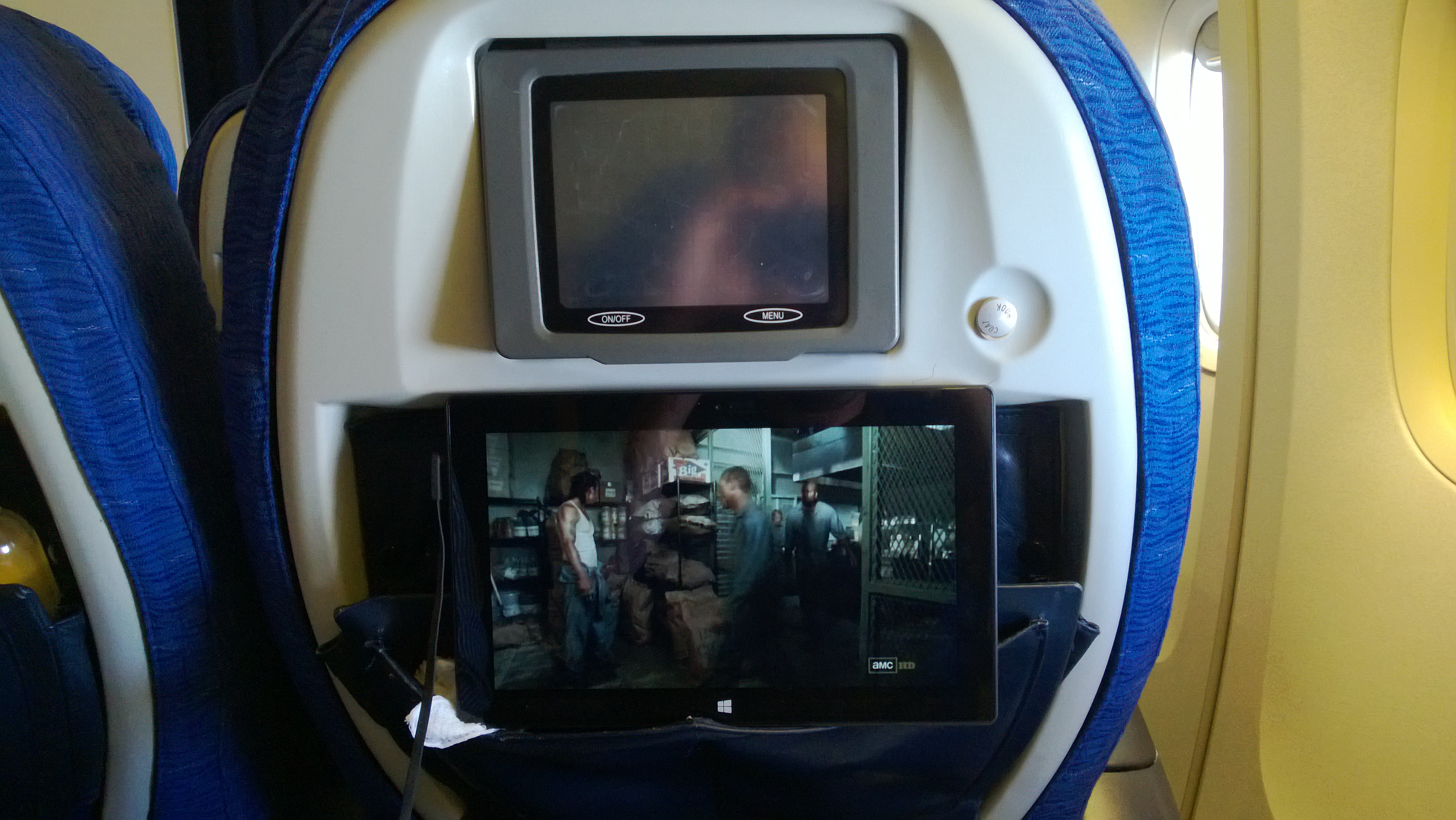
I managed to get myself an upgrade to World Traveller Plus (aka Premium Economy) thanks BA! Marco managed to get Club world (aka business) and so had a fully reclining seats. I was really pleased for him and not jealous at all! Fortunately I managed to improve the size of entertainment system by using the stand of my Surface RT to neatly slide into the pocket of the seat in front of me:

WP_20130717_004

Microsoft Dynamics Offices – Advanta

We arrived late afternoon and so decided on an early night before picking up our car and driving to the Microsoft Dynamics offices in Advanta:
WP_20130718_004

There we got so spend some time with with the product group, talk about plans for this year and how the product is progressing.

Microsoft Campus Redmond

The next day we made the trip to the main campus in Redmond which is a sight to behold. It is basically a small town. Complete with everything you could possible need! Shops, Restaurants, Mobile Phone shops, Gyms, banks etc. I had a meeting with the Financial Services lead and had the opportunity to talk about some of the most pressing issues in the industry, One for a future post!

WP_20130719_018

Yes it a DeLorean. We were leaving campus going to our car when we came across this:

WP_20130719_019

And yes it has a Flux Capatitor!

Tech Ready 17

By this point is was the weekend and we had an opportunity to visit Seattle and the surrounding areas. It is quite beautiful and if you haven’t been I highly encourage you to go. We had 10 days of sunshine, and great food.

WP_20130720_068

Monday morning arrived it was time for breakfast with a few friends:

WP_20130722_001

Breakfast at events like this are an experience, you can’t help but feel like herded animals! The foot isn’t too bad either. After breakfast it was time for the keynote:

WP_20130724_001

Marco getting coffee and ready for his role as a speaker:

WP_20130722_002

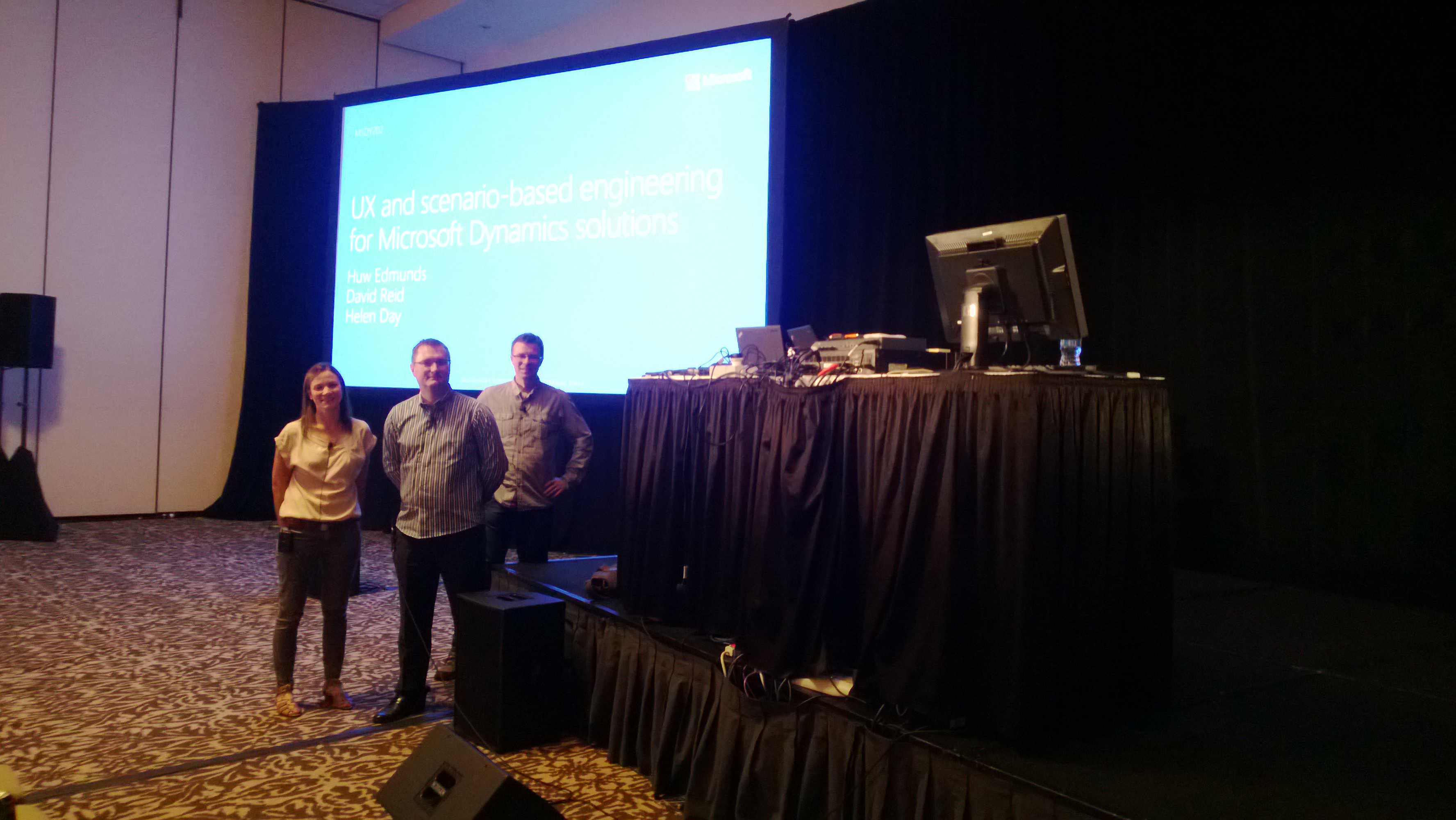
Huw Edmunds, David Reid and Helen day preparing for their presentation:

WP_20130724_004

The party

Five days of training sessions later and the team was ready to have some fun (ok we might of gone out once or twice in the week). Where else to hold a 6,000 strong part but the Centuty Link football / soccer field in seattle. We had the chance to play football (proper football) as well as eat, sing and dance at the various events within the stadium. What an experience!

WP_20130725_023

Before I go, here is an amazing shot from the plane on the way over (Hudson bay):

WP_20130717_010

And that was it, an amazing learning experience, I cannot wait to go back, my head hurts with all the information gained and I am very excited about the new releases we have coming! Until next time!

This posting is provided “AS IS” with no warranties, and confers no rights.

Next on Mark Margolis’s Blog: CRM for Asset Management – An Overview

Microsoft Dynamics CRM and Tagging

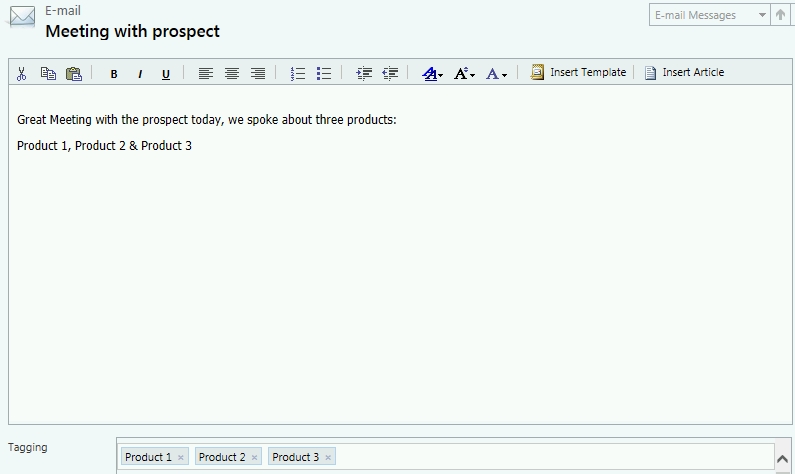
The team over at xRM Consultancy have just released another add-on for Microsoft Dynamics CRM. Hot on the heels of the extremely popular CRM Timeline component the Tagging component (available from today) gives you the ability to tag / categorise content in CRM. The component uses native functionality to achieve this through ‘connections’ so you retain all the functionality you expect. xRM consultancy have layered a great user interface on top of the pre existing functionality. I can think of many great uses cases for this, my favourite is, wait for it: ‘multiple regarding’. Veterans of CRM will know exactly what I mean. With these tags you can now tag your meetings and appointments against multiple topics (see below):

Tagging01

Tags allow me to add multiple topics against meeting and emails

Effective tagging means you can do some clever analysis on the topics and trends in your business that you might otherwise have missed. The tagging functionality is so similar to Twitter, Facebook and Yammer that I’d imagine that users will require almost no training (beyond telling them that it is there). You’ll need to think about the the topics you want to capture and encourage the users to use it, though it is so easy to use particularly if you are replacing a long list of check boxes, your users should be happy.

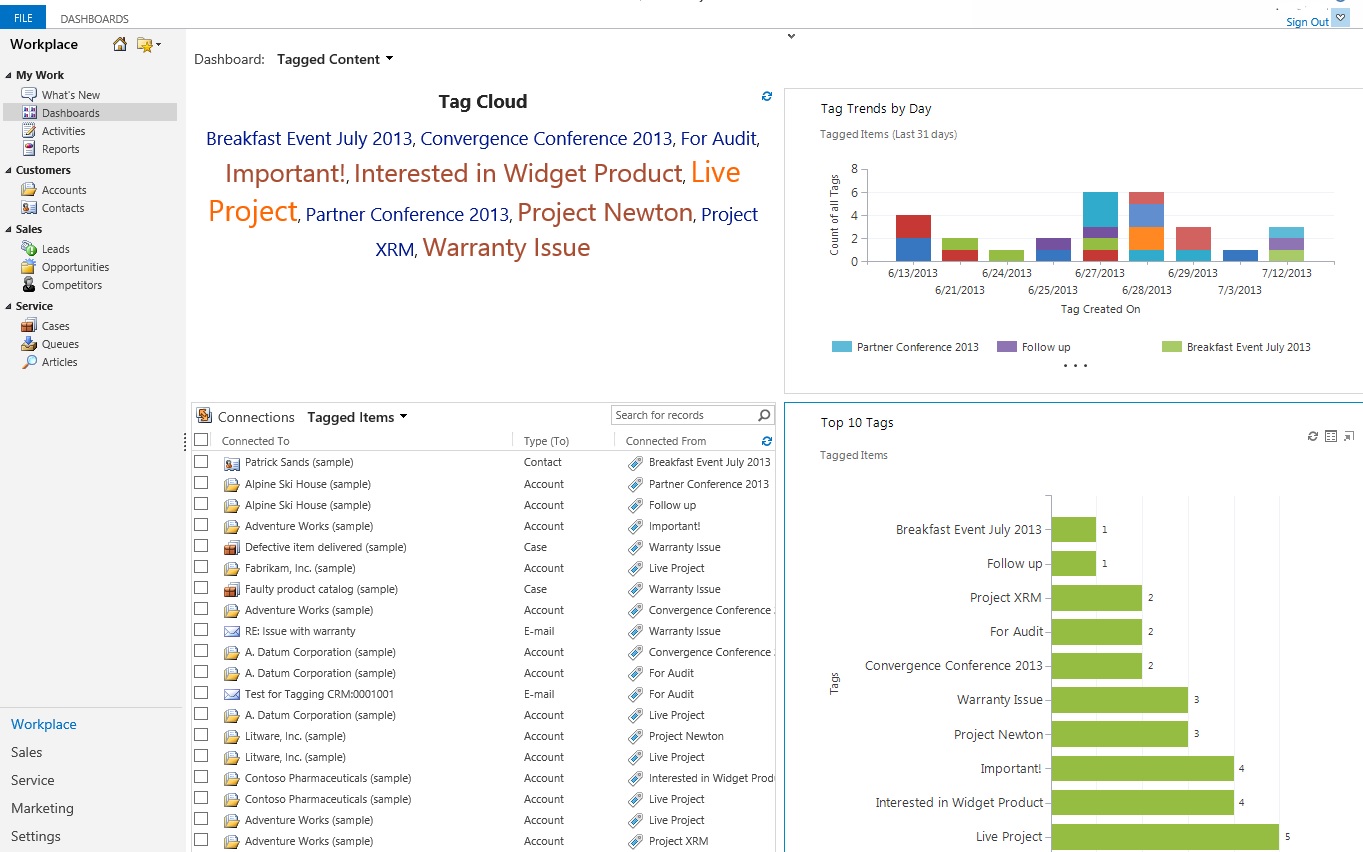
Once you are capturing topics you can get great dashboards like this which is included in the solution:

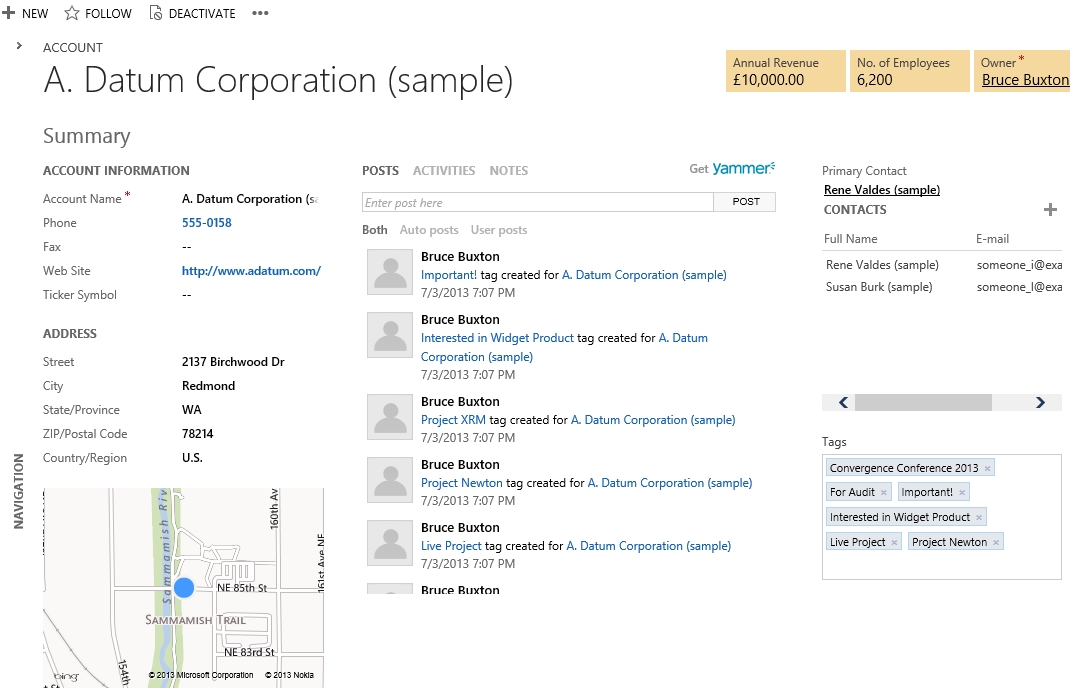
Tagging1This is an example of an account record:

tagging2

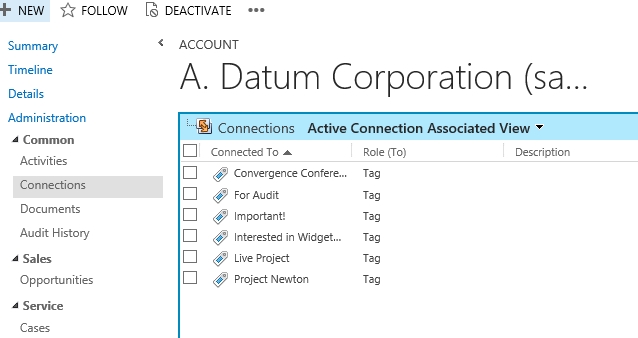
And if you really want proof that this retains the out of the box connection functionality:

tagging3

Setup  & Installation

  1. Download the solution file here.
  2. Import the solution file: Navigate to Settings > Customization > Solutions and choose Import from the grid menu.
  3. Add the Tagging component to the form(s) required:
    • Open the form editor for the required form
    • From the ribbon select Insert > Web Resource tab
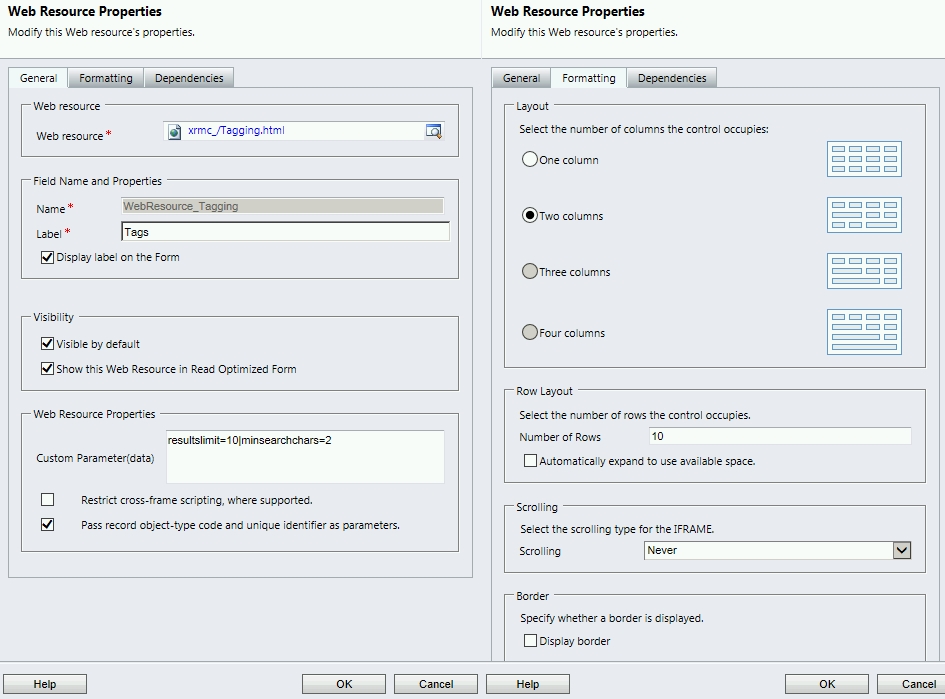
    • Search for the Tagging.html web resource and configure the settings on the General and Formatting tabs exactly as below

tagging5

4. Save & Publish your form

5. Assign one or more of the appropriate security roles (Tag Reader, Tag Associator, Tag Writer) and your done!
6. From the ribbon select Insert > Web Resource tab

Tagging for Microsoft Dynamics CRM is current free for 250 tagged connections, head over to xRM Consultancy to download the solution and find out more.

If you find this add-on useful and you have some interesting use case, please leave a comment, I would love to hear them.

This posting is provided “AS IS” with no warranties, and confers no rights.

Next on Mark Margolis’s Blog: Mark and Marco’s Seattle & Tech Ready Adventure!

Building a Hyper-V Environment for CRM Demonstrations

This blog post is really a prequel to two posts I wrote earlier this year: How to do a CRM Demo  and a Sample CRM Demo Script. On this occasion I am going to focus on building the base environment and infrastructure for the demo. I would like to thank my colleague Simon Hutson who helped me set up my first laptop and demo environment when I joined Microsoft, and it is his recommended configuration that you will find below.

logo

For those of you who follow Microsoft news closely you may remember that at last years MGX (an internal Microsoft meeting with something like 40,000 employees) Steve Ballmer announced a Surface for all FTE’s and a PC refresh. Last week was my turn to benefit from the Microsoft PC refresh program. As soon as I handed in my old PC and took possession of my new one I needed to reconfigure my laptop. So here is what I have configured to enable me to have a fully functioning CRM 2011 environment using Microsoft Hyper-V. My demo environment works offline as well as online and I can get internet connectivity to my virtual image even if I am only connected via Wi-Fi.

After this set up you should be able to:

  • Run a CRM Demo Virtual Machine with and without internet connectivity
  • Run Outlook with the CRM client when you are connected or disconnected to the internet
  • Connect to the CRM Demo Virtual Machine via a fixed IP address

This post assumes that you already have a virtual machine with CRM Installed. If you don’t there are plenty of artciles out there that cover a CRM installation. The focus of this article is the laptop setup and Hyper-V configuration.

My laptop is a whopping 3kg+ and consists of:

  • HP EliteBook 8670w Intel Core i7
  • 32 GB RAM
  • Windows 8 Profession 64 Bit
  • 2 SSD Drives (I replaced the CD drive with an SSD and caddy giving me a total of 2 SSD Drives)
This is a far cry from the days that I used to demo CRM 3 (anyone remember Danube? If so leave a comment) with only 4GB ram and Virtual PC! CRM runs extremely fast on the above spec but you still need to have the base configuration set up properly if you want to avoid problems.

In Summary the steps are:

  1. Enable Microsoft Hyper V
  2. Create three Virtual Switches (External Ethernet, External Wi-Fi, Internal)
  3. Configure Internal Adapter
  4. Create or Import a Virtual Machine
  5. Create and Configure Virtual adapters
  6. Optional – Configure DNS on the CRM Demo Virtual Machine

Step By Step Instructions

  1. Enable Hyper V
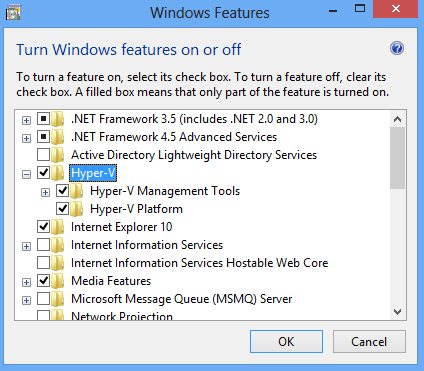
    • a. Go Control Panel > Programs & Features > Turn Windows features on or off
    • b. Select Hyper-V as per the screenshot below

1

This will probably require a reboot. Please note that if the option to select Hyper-V is greyed out you may need to ensure you have the following enabled in the BIOS:

  • Hyper Threading
  • Virtualization Tech and VT-d are enabled
  • Security Chip or TPM is enabled

Note that the naming of the above options may differ depending on the BIOS you are running.

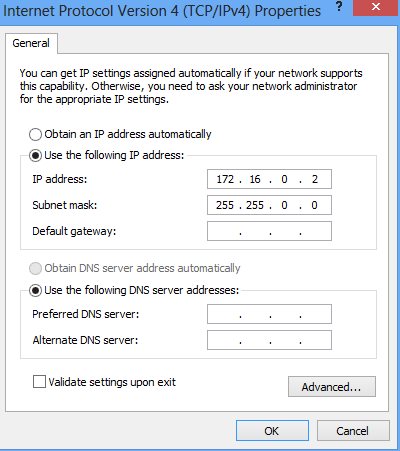
The following settings will give me a fixed IP for my Host PC (Physical) of 172.16.0.2 and a fixed IP for my Guest PC (virtual Demo) of 172.16.0.1

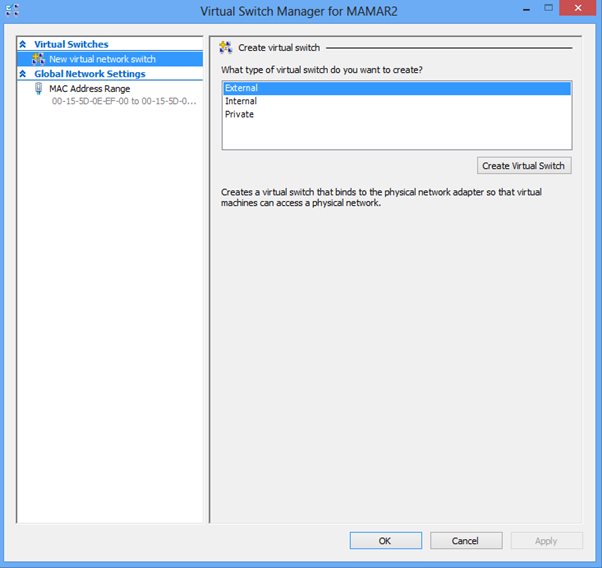
2. Create three Virtual Switches from the Virtual Switch Manager

a. Start Hyper- V Manager > Virtual Switch Manager > Create Virtual Switch

b. Create an the first Virtual Switch: External Virtual Switch (External Ethernet)

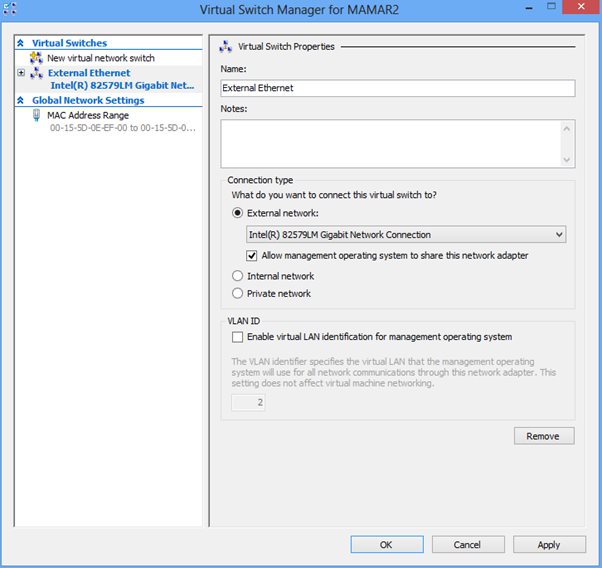
c. Name it External Ethernet

d. See screenshots below, take care to ensure that you select the right option under External Network dropdown. In my case this is the Intel 82579LN Gigabit Network Connection

2

3

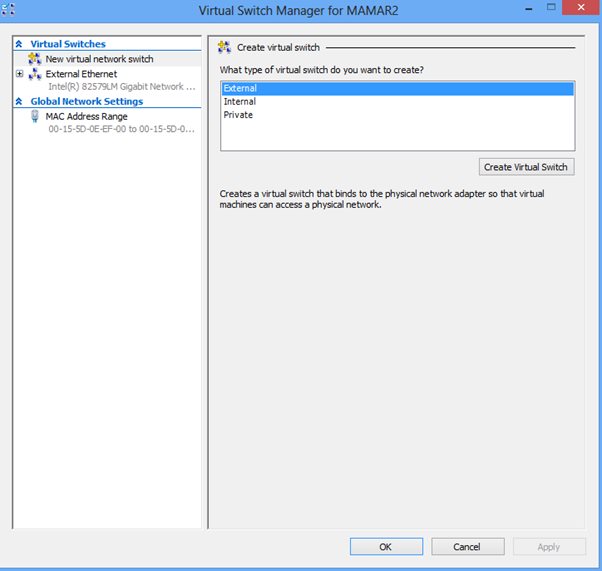
e. Create an the second Virtual Switch: External Virtual Switch (External Wi-Fi)

f. Name it External Wi-Fi

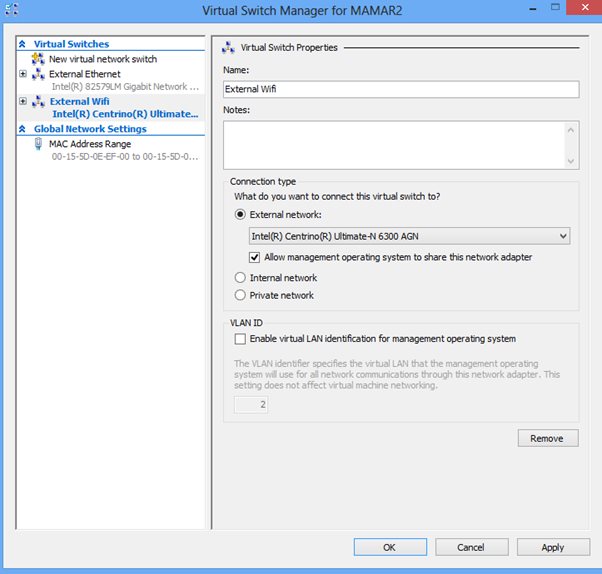
g. See screenshots below, take care to ensure that you select the right option under External Network dropdown. In my case this is the Intel Centrino Ultimate-N 6300 AGN

4

5

h. Create an the third Virtual Switch: Internal Virtual Switch (Internal)

i. Name it Internal

j. See screenshots below, select Internal Network.

 6

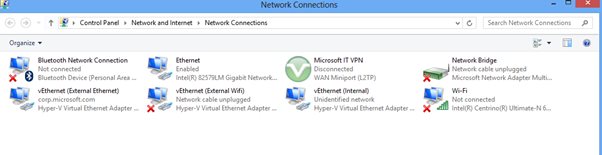
That should give you something like this (Open Network and Sharing Center > Change Adapter Settings):

7

3. Configure the vEthernet (Internal) adapter (right click > properties.

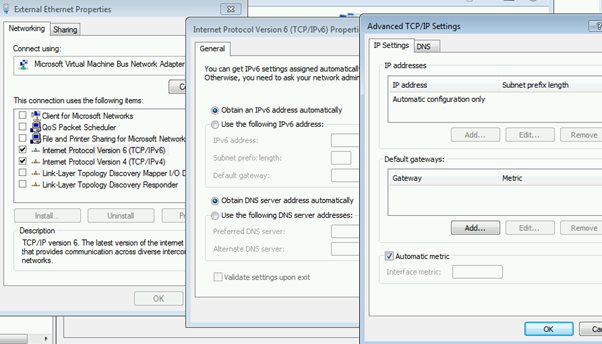
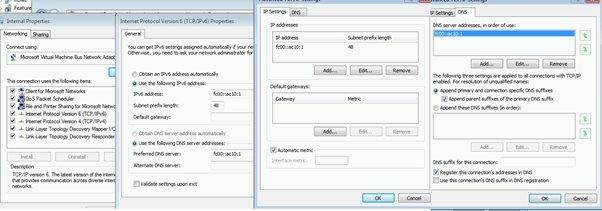
a. Change the IPv6 setting to the following

 8

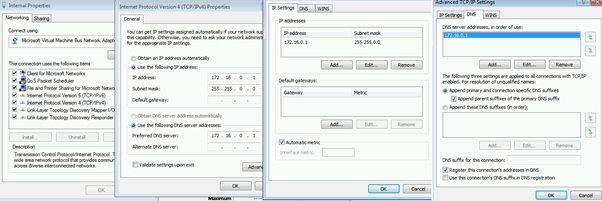
b. Change the IPv4 settings to the following

9

4. Leave default settings for vEthenet External Wi-Fi & External Ethernet Ethernet)

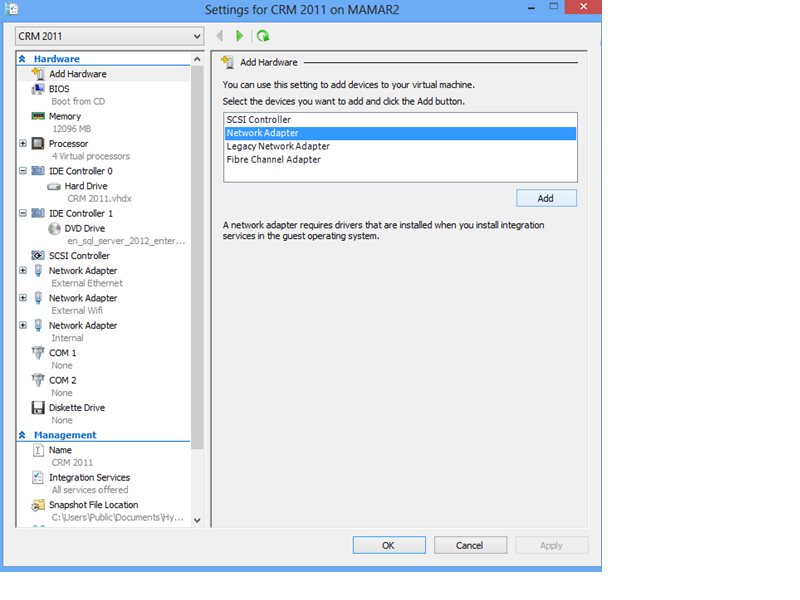
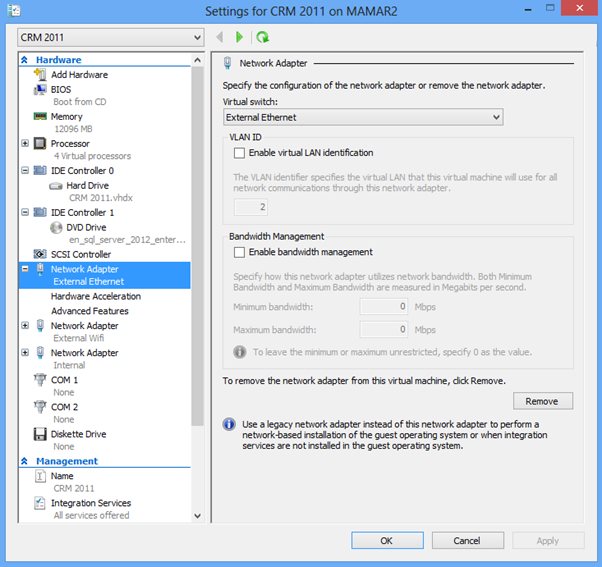
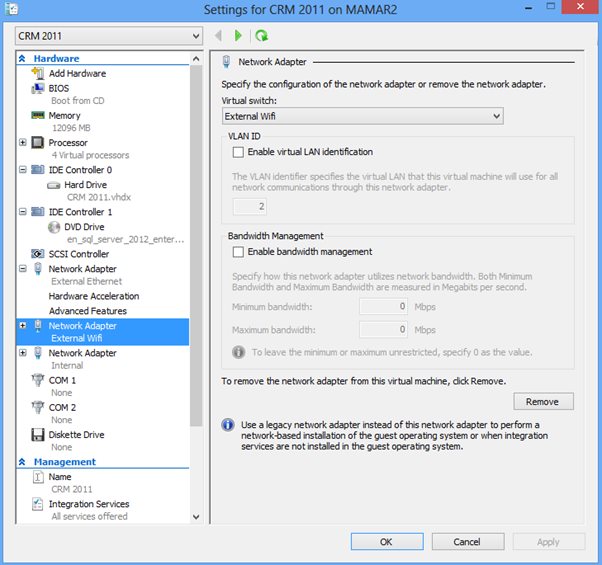
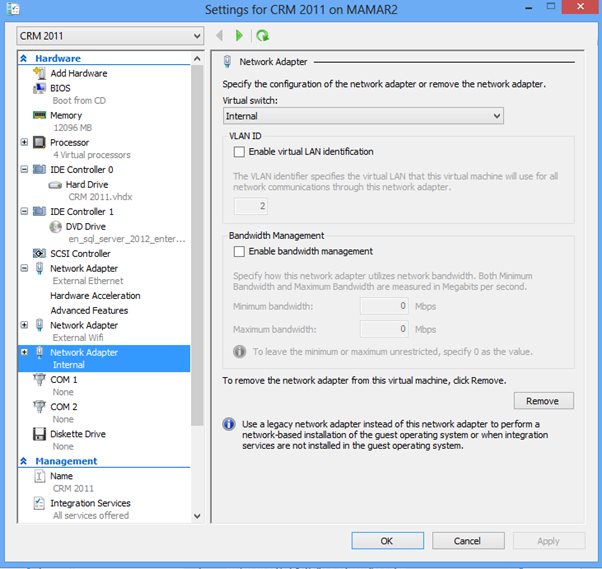
5. Go to the Settings of the virtual machine and add three network adapters

9aExternal Ethernet:

9bExternal Wifi

9cInternal:

9d

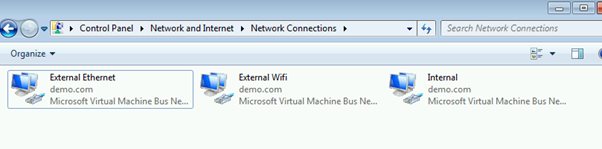
6. Start the virtual machine and go to Control Panel > Network and Internet > Network Connections and you should have the following:

10

7. Mr virtual machine is also a DNS server so for External Ethernet and External Wi-Fi uncheck all items except for IPv6 and IPv4. I left the IPv4 and IPv4 setting as default as per the screenshot below.

11

8. Modify the Internal Adapter IPv6 setting as follows13

9. Modify the Internal Adapter IPv4 setting as followings as follows

12

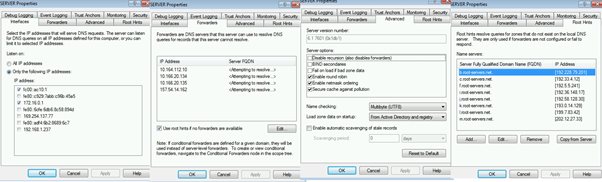
10. If you are interested in my DNS settings that I have on my CRM Demo Virtual Machine they are as follows:

14

That is it you are done. With this set up you should be able do a demo from your Hyper-V virtual Demo machine and get access via Wi-Fi when you are connected

This posting is provided “AS IS” with no warranties, and confers no rights.

Next on Mark Margolis’s Blog: CRM and User Adoption

Product, Project and Day to Day Prioritisation

In my opinion the ability to prioritise is one of the most important skills people should try to master. The problem with prioritisation is that it is not easy. We inherently don’t like making decisions, we also don’t like making sacrifices and sometime we do not want to face the ugly truth which is we can’t have everything we want, so we use hope and bury our head in the sand and wish for good fortune to come along to magically deliver all the things we want.

One of the reasons agile processes have become so successful is that it forces us to constantly prioritise. For those that find it difficult making decisions agile processes provide a great framework without fear of retribution for safe decision making. Knowing that you can revisit your decisions and make new ones based on the latest information is incredibly empowering. Prioritisation activities become a daily activity and so we are always evaluating the most important things and moving them to the top of the list.

But how do we decide what item is more important than another? Well it is difficult to say without being specific but here are some things that I have learnt along the way.

In summary these are:

  • Creating a living list and instill the evaluation of this list in your every day life
  • Understand and identify Important Vs Urgent tasks
  • Decide on a feature or milestone date driven release
  • Decide on the minimal set of features
  • Identify items of architectural significance
  • Identify difficult or high risk items
  • Constantly evaluate and re-evaluate
  • Make sure you understand the goal (and how this might change over time)

First things first: Create a list!

I run my life using lists and I do this every day and evaluate that list all day. The first thing I do when I start my working day is write a list of things I need to do. I look at my calendar  and I review my previous days list and I make sure that today’s list contains both important and urgent items (more on this later). Any project large or small starts with personal prioritisation of individual tasks. Even if you are not working on a project I bet you still have more things to do than you have time for! The way I prioritise long-term projects and objectives differs to how I prioritise for short-term projects. For long-term objectives I like to categorise the different things that I need to achieve, I do this because I want to make sure I have a good balance of goals. For example I have a category of tasks specifically dedicated to personal development, training and mentoring, and other categories for more immediate work or personal related tasks such as demo preparation, blogging or even sorting out my tax returns! I do this because I want to make sure that I have a broad range of achievements and if, for example I didn’t specifically call out personal development activities then these activities would always gets pushed for something more urgent (again, more on this later). So if on my list I don’t have any of personal development activities then I will prioritise accordingly and raise the priority of tasks that fit into this category. This brings me to my next point on how I prioritise.

Focus and remain focused on what is Important vs Urgent

Many years ago I read about the importance of doing importance Vs urgent, I can’t remember where I read or heard this but understanding which of your tasks are important and which are urgent really helps to keep you focused and ensures that you don’t end up running around like a headless chicken doing tasks that are always urgent. Without this technique I used to prioritse tasks based on what needed to be done sooner (urgent) rather than tasks that where more aligned to the goal I wanted or needed to achieve (important). All important tasks become urgent at some stage but the truth cannot be said about urgent tasks. Not all urgent tasks are important, particularly when taken in the content of your wider goals. For example, every Friday I have a task where for 30 minutes I search and investigate the different training options available to me (I’ll write about the impressive amount of training Microsoft provides its employees in a future post). Now this task is rarely urgent (perhaps only at the my end of year review) but it is a task that is always important. It is important becomes it makes me a better person and over time means I can achieve more, over the medium term I feel happier because I am developing my individual skills. If I didn’t use this technique I would simply revert back doing tasks that needed completing that day or coming days. So when you draw up your list of tasks ask yourself which tasks are important and which are urgent and prioritise accordingly. If you are like me and find yourself feeling guilty because you are working on something that has a later due date than another task on your list, then this should help endorse your decision to work on the more important task even if its due date is some way off.

Feature or Time Driven Milestones

From a product or project release perspective decide if your milestones are time driven or feature driven. A time driven release is one where you need to ship a product by a particular date, perhaps an event where you need to showcase your product, a regulatory change coming into force or a season release such a Christmas are just some examples of a product that in under a time driven schedule. In these examples then you are going to sacrifice lower priority features to ensure that you met the release date. The release date will remain fixed but exactly what is going to ship will vary.

A feature driven release schedule then is one where you are concerned that the product meets minimum feature requirements and as soon as these feature requirements have been met then you are ready to release. Perhaps your product needs the ability to store additional information as you are integrating with another system in which case you cannot ship the product until the new fields are there and although it needs to be delivered asap (what doesn’t) the release is meaningless until the new fields are on the form.

So the next question is what about projects that are both feature and time driven. In my experience this is all projects and none of them. Business stakeholders like the rest of us don’t like making sacrifices and they will ask for all the features then want at a specific date. An experienced product or project manager will get under the skin of the project and will very quickly help educate the stakeholders and create feature or time based release plan.

For clarity a sprint is different to a release. So even though you might have a release scheduled for the 1st december does not mean you have a 6 month sprint. You sill have 2 week sprints (or whatever you have decided) but it means that you wont ship to the vast majority of your users until the 1st of December. As my sprint get closer to the release date my sprint task have less and less features and more release based tasks such as deployment plans, training guides, demo scripts etc. Try and find the right balance in your release cycle, six months is probably too long but you probably don’t want to release every few days either as you just be spending you time planning and deployment and little time on new feature development. I’m making some huge assumptions here, clearly the appropriate release schedule will be dependent on your product and specific circumstances such as deploymen tmodel (on premise, online).

Decide the minimal set of features that need to be delivered

Irrespective of how you have chosen to release the product (time driven or feature driven) you are going to need to work our what are the minimal set of features required for each feature that make up a worthwhile release. The best way to do this is to work directly with the users, see how they interact with the software will ultimately determine what it worthwhile and what is not. There are many techniques on doing this and I’ll cover this subject in a separate post. For now however, focus on the features that satisfy the most valuable aspects of the customer journey.  I run the risk of going off topic here but I want to give you a quick example. Amazon have a technique called “working backwards”, in summary they write the internal press release first and then they develop, any items that are not on the press release get dropped. Develop for the 80% not the 20%

Identify and tag items that are architecturally significant

During your sprint planning session identify features or tasks that may be architecturally significant. You may need to prioritise the architecturally significant tasks over features for the long term benefit of the product. This is an exception to the rule of user first and MVP but it is absolutely critical to get right. You need to balance creating an architecture that is so scalable and extensible that is is overly complex and difficult to maintain vs a product that needs to be rearchitected.

Identify and tag items that are high risk or difficult to deliver

Identify tasks that are going to be difficult or are high risk. Tackle them early so you have to implement remediation steps. You might need to add additional team members or implement some form of workaround and identifying these issues early will give you the time you need to work out a mitigation strategy.

Constantly evaluate and re-evaluate

Finally just because you have a list doesn’t mean you need to stick to it. Be agile, keep evaluating and reevaluating your list and feel free to make changes. If your objectives (or your projects objectives) are clear then you will find yourself less stressed and much more likely yo deliver successful projects and outcomes.

This posting is provided “AS IS” with no warranties, and confers no rights.

Next on Mark Margolis’s Blog: TBC