Agents and the future of Business & Apps

An illustrative guide: How conversational UIs and agents simplify complex tasks, demonstrating the transformative impact of AI on user experience, efficiency and application design.

There are many developments in the industry regarding agents, which are expected to positively affect end-user experiences, organizational capability, and drive exponential business outcomes.

I’ve created a story to illustrate how agents can enhance apps, systems, and processes. Agents will operate autonomously, independently and cooperatively across boundaries to handle complex or mundane tasks, transforming application development, system integration, and user experiences. This shift will require a new approach to software development.

How might the experience look?

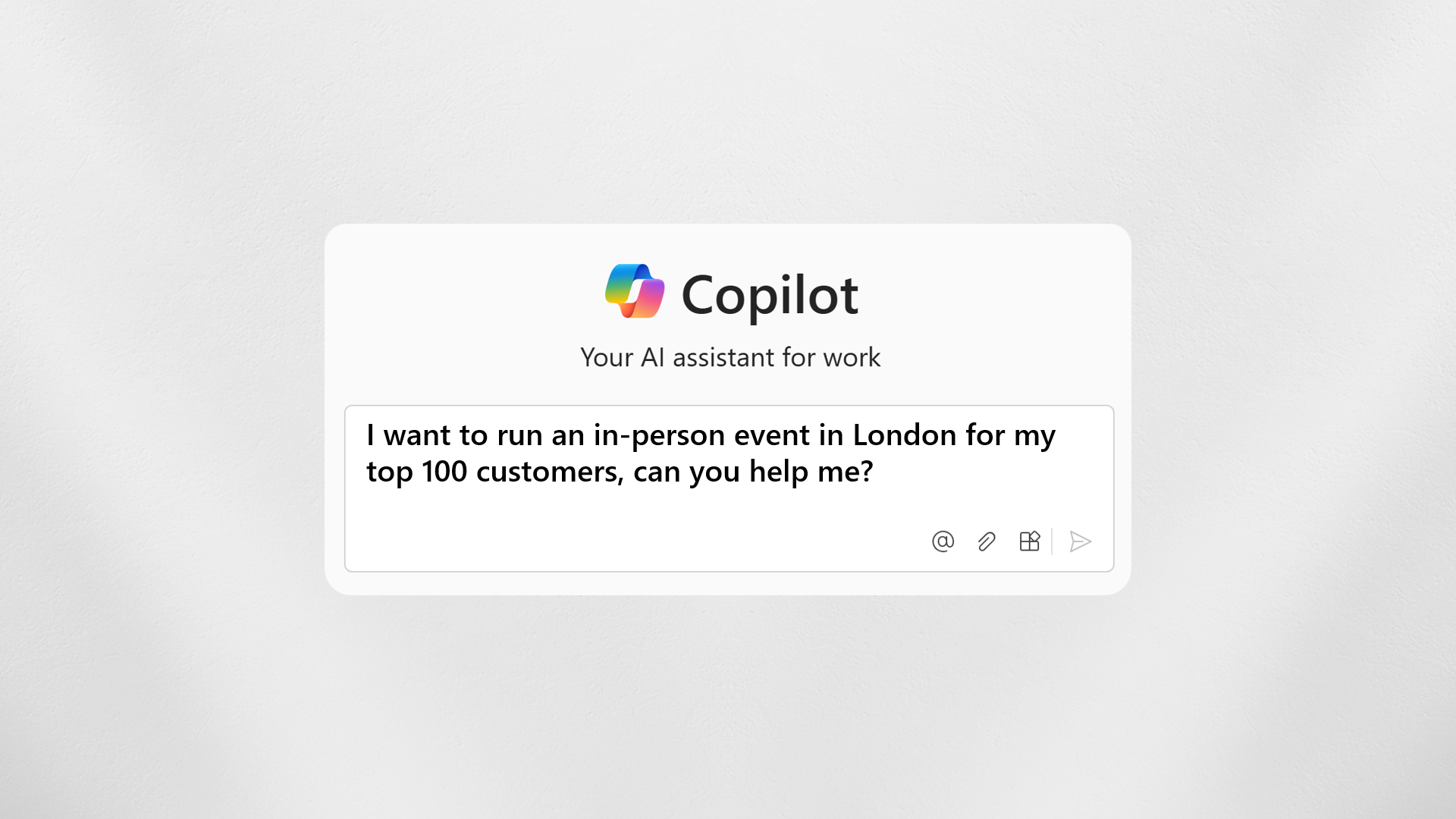
We’ll lets imagine the future for a moment: Lets say we’ve been tasked with creating an event for our top 100 customers in London. Event management is complicated, even for small events. What if we could just ask our conversational UI, “I want to run an in-person event in London for my top 100 customers, can you help me?

Lets imagine that scenario and how it would play out today. It would probably fall to someone in marketing and this individual (or team) would plan an execute everything they need in their marketing application. Except it is not quite that simple is it……
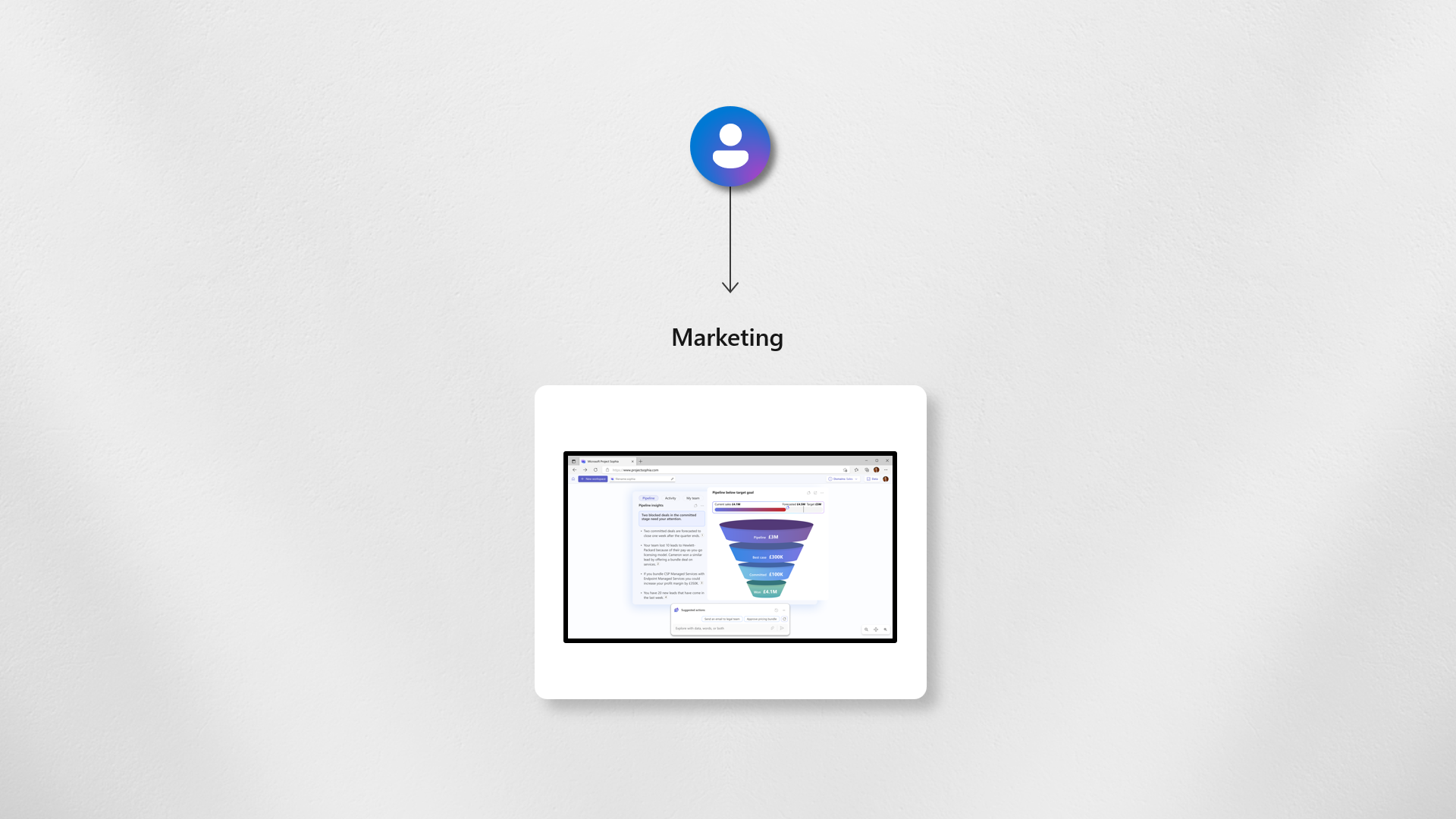
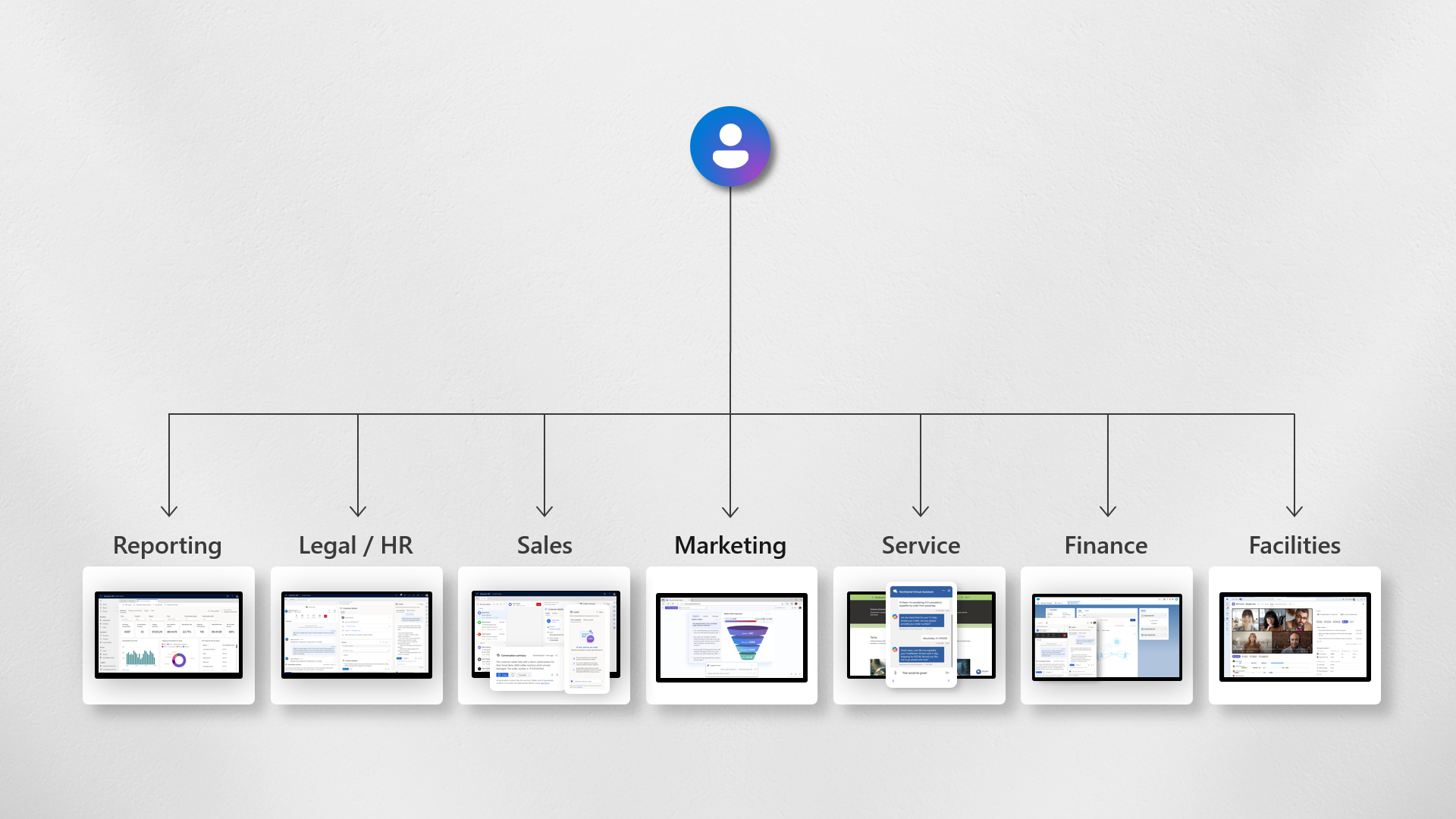
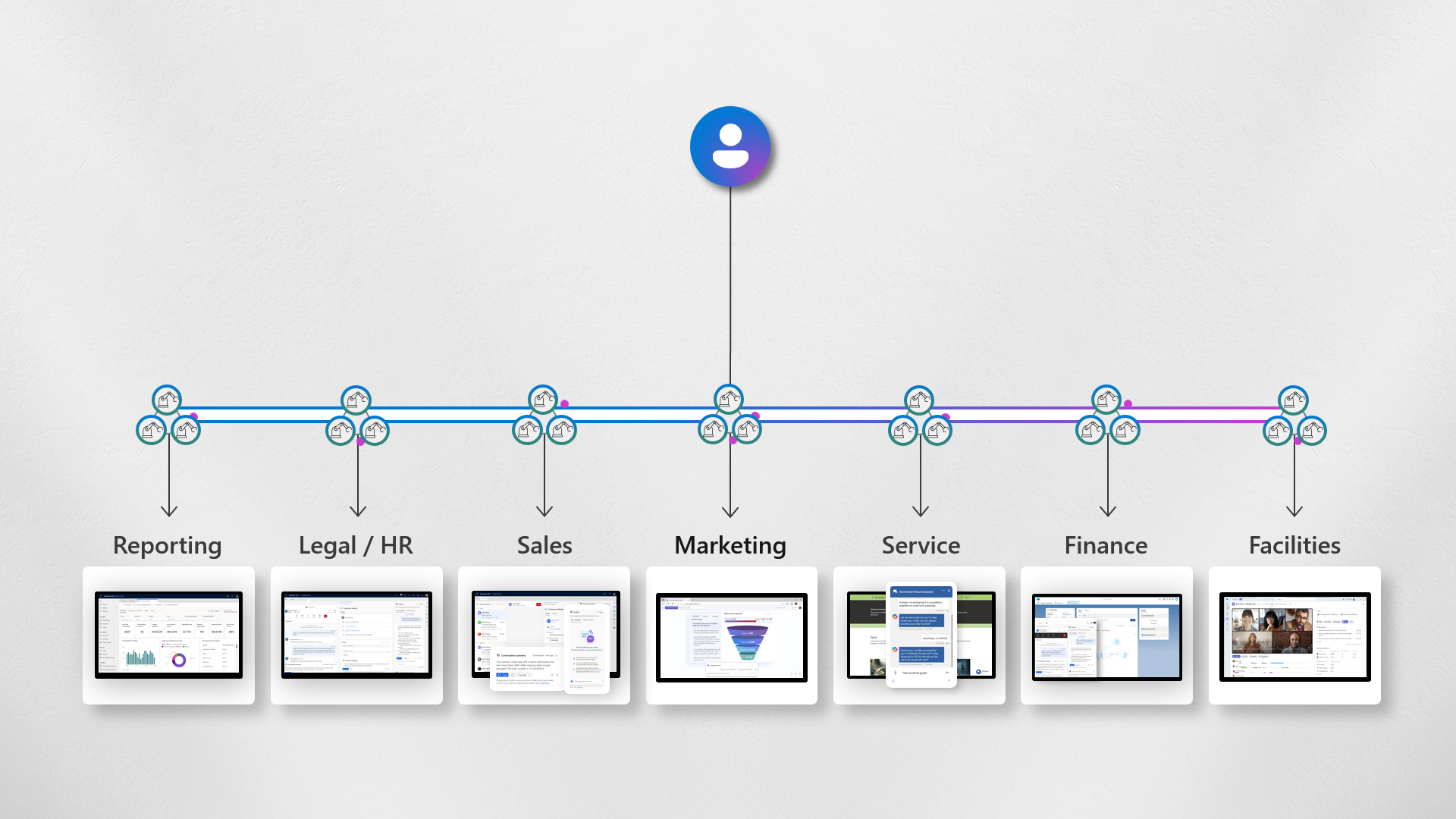
The reality is that we cant think about one application per user. Just as a sales person doesn’t just use CRM a Marketeer requires access and knowledge of a whole suite of applications. For example in this case as a markeer we would need to:

  • Create the campaign event and code in marketing to track ROI.
  • Generate a PO code in the finance application.
  • Book rooms or spaces via facilities.
  • Involve legal and HR to comply with event policies and PR requirements.
  • Use the sales tool for top customer details.
  • Ensure a service support contact is available for registration and event issues.
  • Access reporting to track registrations, attendance, and ROI opportunities.

When you consider it, there are numerous systems that an individual must a) be aware of, b) have access to, and c) receive training on. For a new employee, how long would it take to become proficient with all these tools?
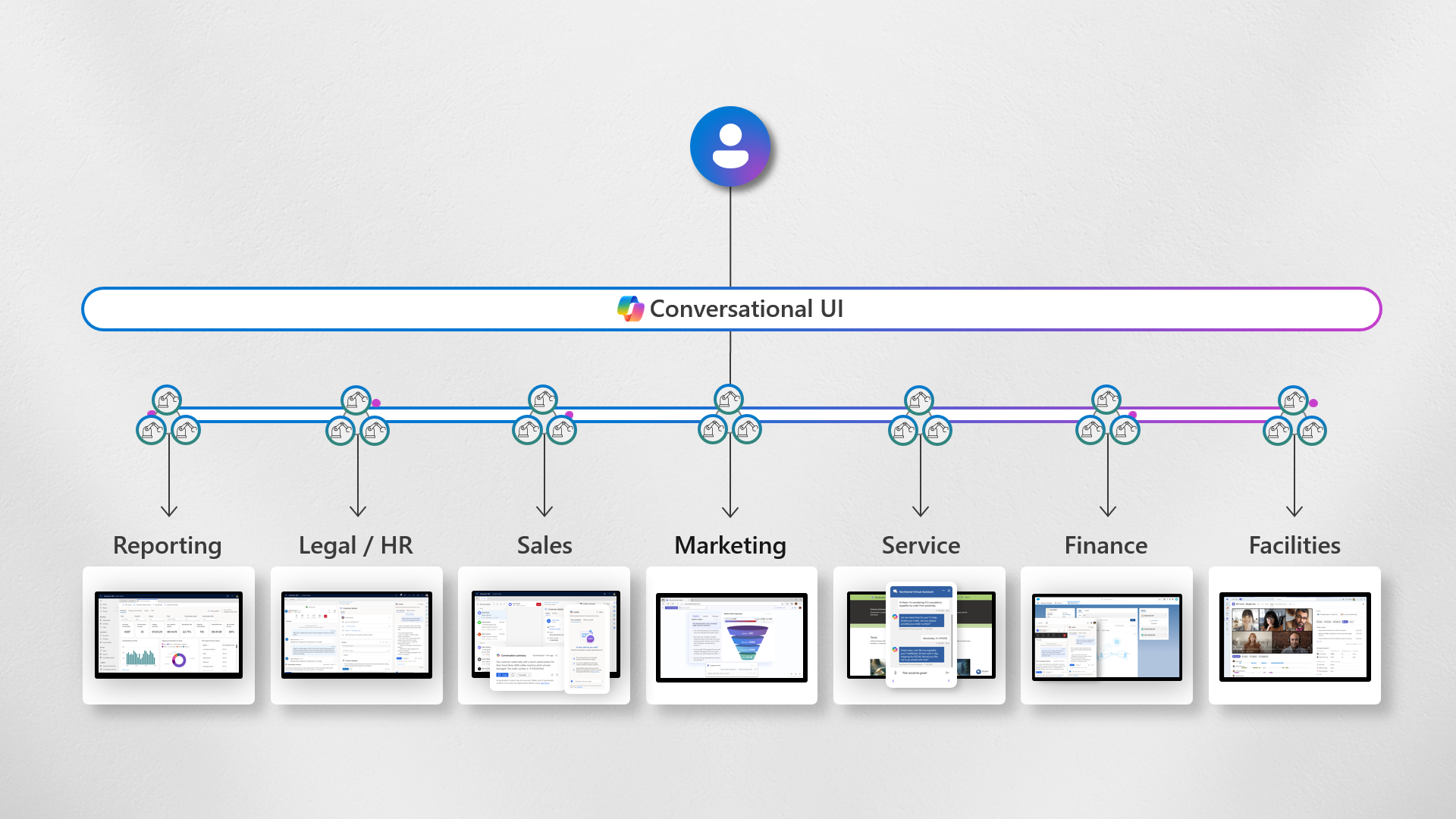
Today, we’re seeing ways to simplify things for end users. Conversational UIs are being placed in front of applications to make complex systems easier to use. Until recently, these UIs have operated independently.

Agents are increasingly enhancing this experience. They perform specific tasks related to the required process and can operate autonomously to significantly simplify the experience.
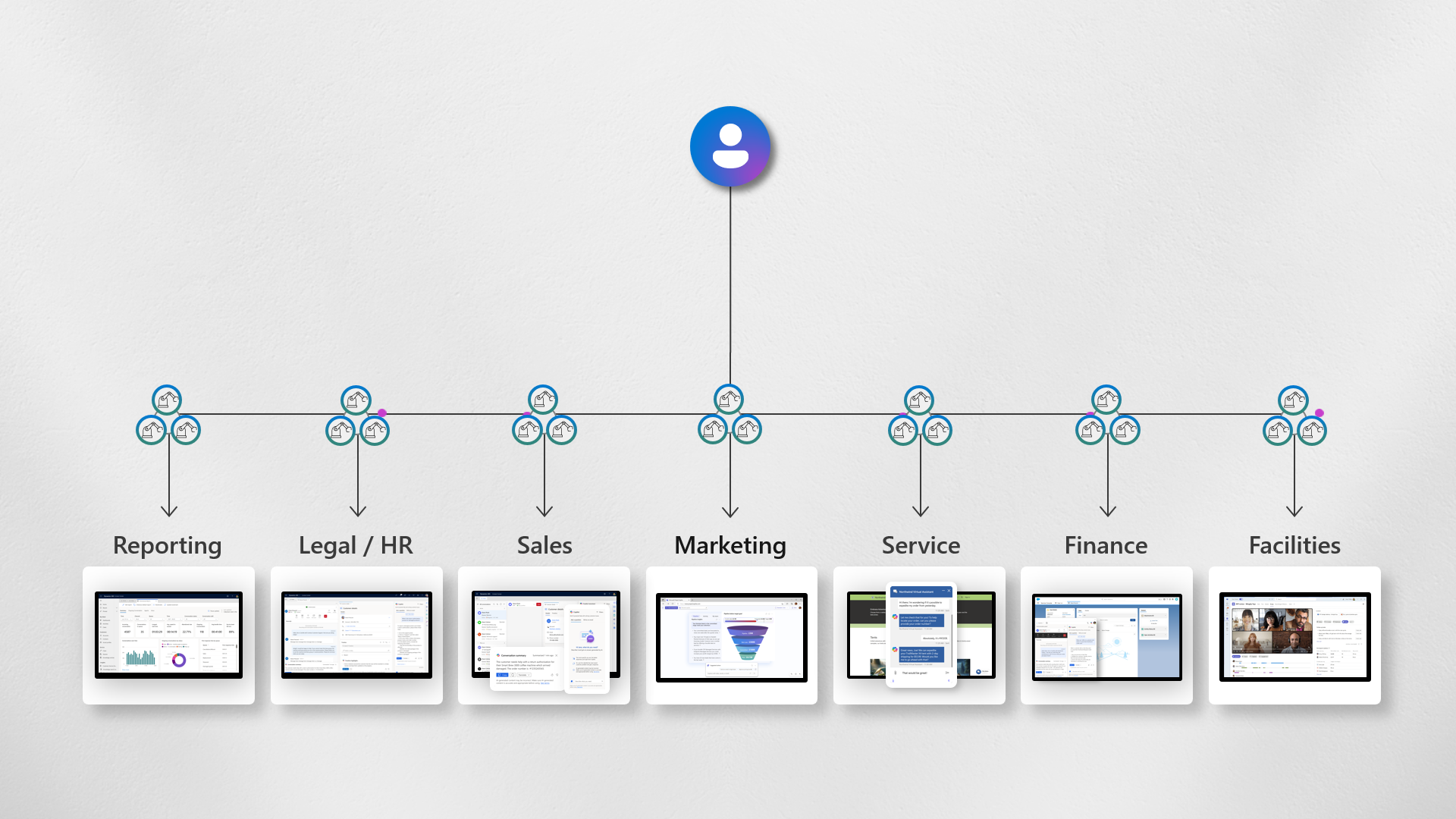
More importantly, these agents can communicate to complete tasks across systems, enabling end-to-end experiences. For instance, creating a campaign in Marketing automatically triggers a PO request in Finance. Upon approval, this books the event space automatically, and so on.
Back to where we started, on top of these agents is the conversational UI. The application experience layer that the user can ask a simple question “I want to run an in-person event in London for my top 100 customers, can you help me?” The agents then autonomously manage the cumbersome tasks asynchronously, allowing end users to concentrate on content, customer experience, and maximizing ROI, rather than struggling with systems
As we move forward, the end user experience will evolve with more dynamic UIs tailored and delivered in real-time by AI. For instance, if a finance professional needs to approve a PO for an event, they will see only relevant information, like ROI, without additional marketing details. This personalized UI approach eliminates the need for custom rules, custom built interfaces, reduces complexity, speeds up employee onboarding, and minimizes errors, thus enhancing drastically efficiency and effectiveness.
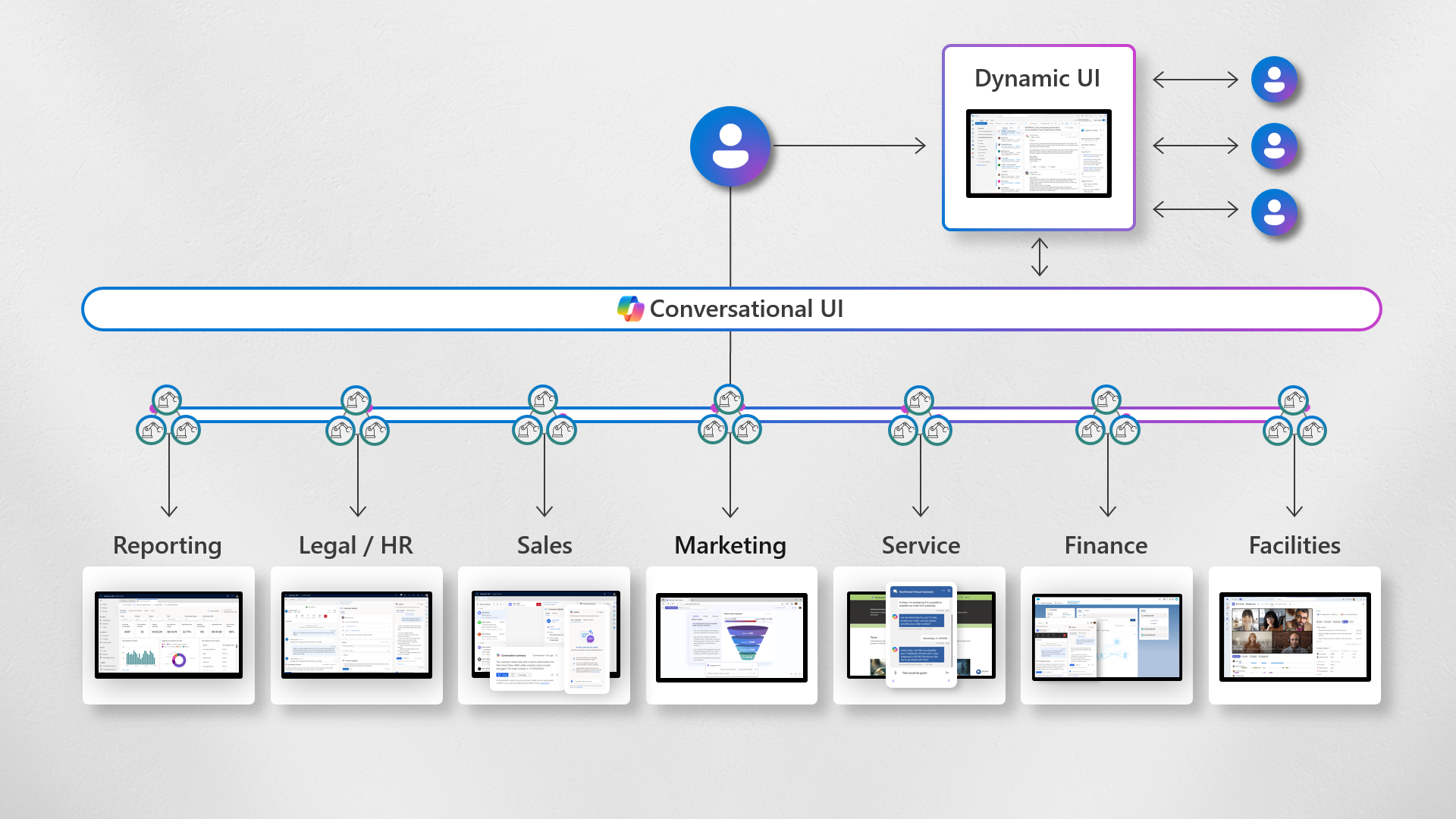
I hope this demonstrates how agents will greatly improve user experience, enhance efficiency, and transform application design.

Here is the animation as a gif:

You can download the PowerPoint deck here:

I’d love to hear your stories in the comments.

BTW, If you are interested in the concept of dynamics UIs, take a look at Project Sophia.

Click the subscribe button at the top of the page if you want to notified on future posts. Thank you.
Culture and technology

Building from last weeks post about the shape of change where I set out that there are two key ingredients needed to truly realise the business benefits that technology promises and that is: Culture + Technology. You can’t do one without the other. You can have the best technology on the planet but without a customer centric culture, a desire to learn or a willingness to adapt to new ways of doing things, it becomes almost impossible (or very expensive!) to be successful.

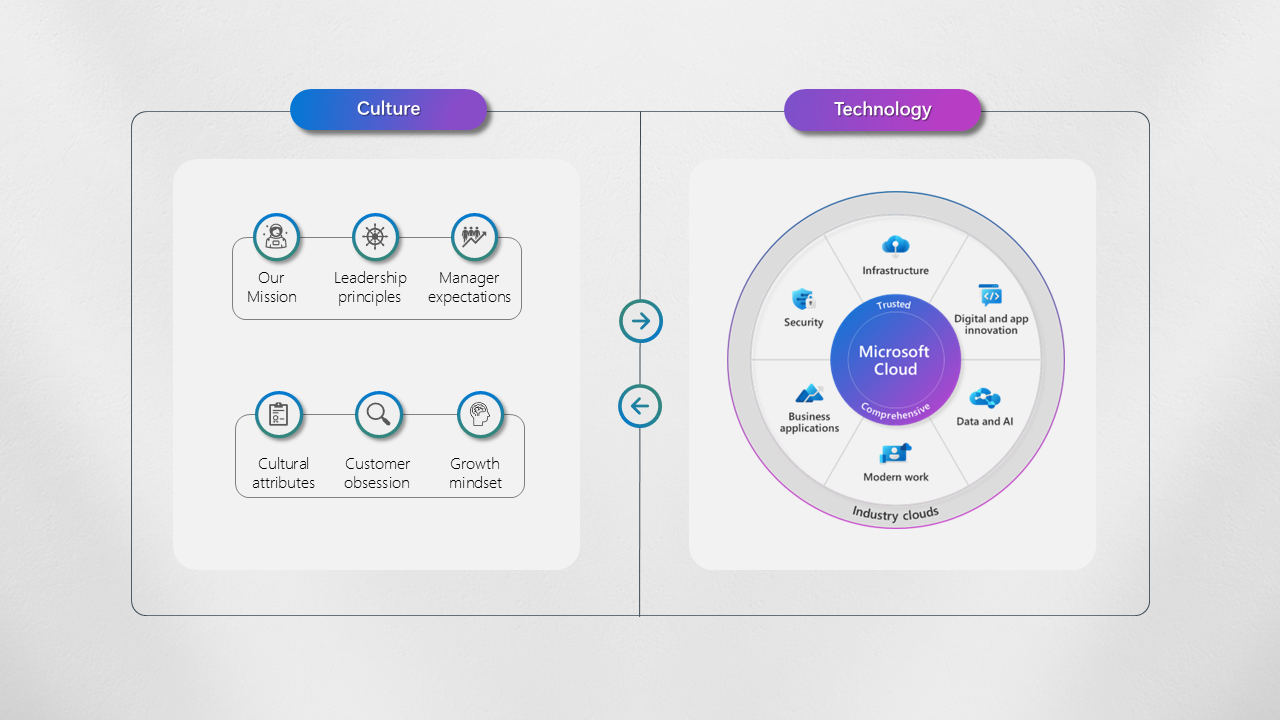
We’ve tried to codify this at Microsoft. Our technology is well documented across our six solution areas, our technology comes together seamlessly and enables us to do incredible things for our customers. New people joining the company are quickly blown away by the empowerment that this technology brings.

Less discussed perhaps is how we think about culture and so I put this slide together visualise this concept and what we do:

The way we think about our culture (at a high level) can be thought of as follows:

  • Our Mission: To empower every person and every organisation to achieve more
  • Leadership Principles: Create clarity, Generate Energy, Deliver Success
  • Manage Expectations: Model, Coach, Care
  • Cultural attributes: Customer obsessed, Diverse & Inclusive, One Microsoft
  • Company Values: Respect, Integrity, Accountability
  • Growth Mindset: Ability can be developed Vs Ability is static

At Microsoft we go much deeper on each, through training, workshops and the way we think about people & performance. The key is Have you defined what your culture is? and Can people clearly and consistently articulate it?

You can download the above slide here

You can find out more on our culture and employee experience here.

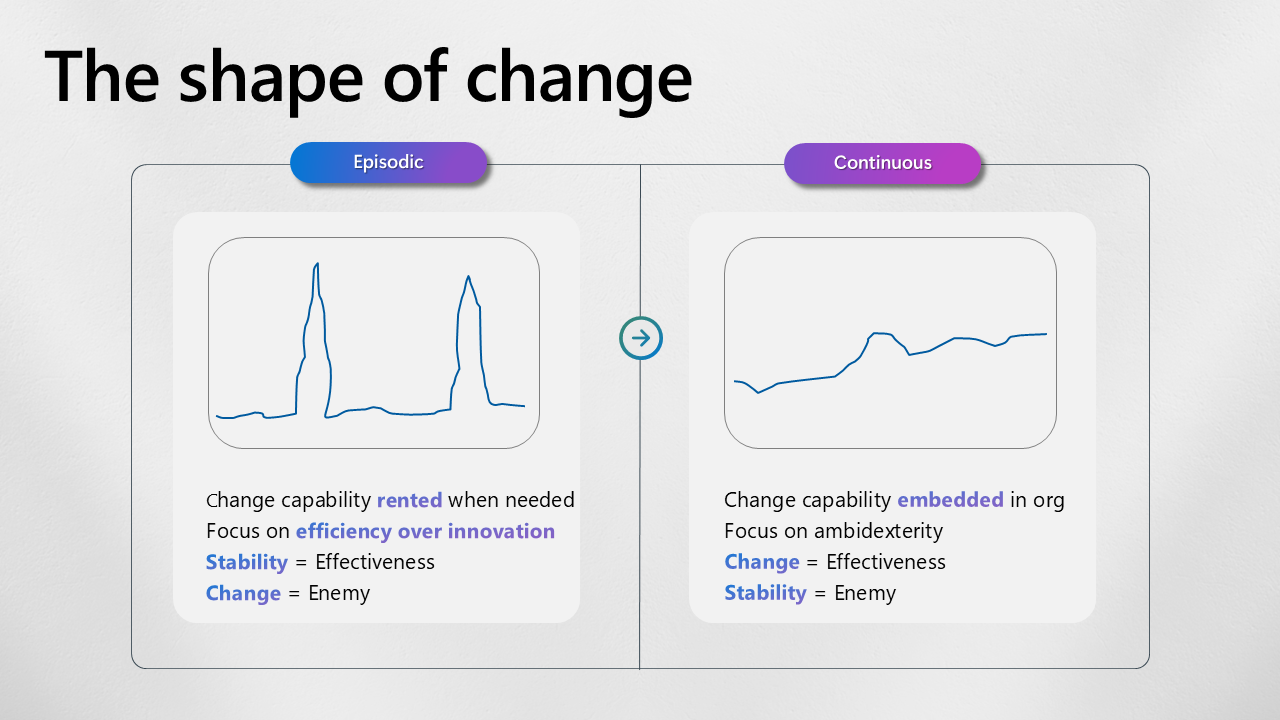
The shape of change

I spend a lot of time talking to customers about technology, specifically how technology can unlock business benefits, drive transformational change and provide substantial outcomes for business.

Quite some time ago I was provided with the following chart. This was during a leadership training course I was on and was used to provide context for leaders during a time of substantial change at the company. I realised quite quickly how relevant this was not only in my role as a leader but rather how organisations need to rethink change. From Episodic (let me see my team through change) to Continuous (let me empower my team to be continually adaptable).

When adopting technology, success is derived not just from the technology that can underpin and unlock business benefits but it’s essential that a culture of learning, adoption and customer centricity is essential to realistically achieve anything that the technology promises to achieve.

You can download this slide here:

AI Assessment Framework

I frequently engage with organizations about AI, focusing on how to achieve business objectives, measure ROI, and accelerate their AI journey, regardless of whether they are just starting out or already advanced.
One effective way to consider potential actions—and thus identify the associated blockers, risks, and benefits—is to plot scenarios using the AI Assessment Framework.

There isn’t a one-size-fits-all AI model. As I mentioned in earlier posts, there are thousands of models available, and it’s important to select the right one for your specific scenarios. For those on the Microsoft platform, you can take advantage of a comprehensive ecosystem of AI models without needing to switch clouds. This approach minimizes risks and costs while maximizing time to value. A visual of this ecosystem is here.

So to the Framework:


Think about use cases across 3 dimensions to determine Complexity, Risk and ROI. The three dimensions are:

  1. Build or Buy
  2. Internal or External
  3. Automation or Manual

For example:

  1. Build or Buy: How much Build (custom AI algorithms on Azure ML) Vs Buy (CoPilot for Sales) does your Use case need?
  2. Internal or External: How Internally (Agent Assist) facing Vs Externally (Self-Serve) facing is it?
  3. Automation or Manual: How automated (automated loan approval) Vs human manual Intervention (CoPilot for Sales)

The combination of these factors will lead to different approaches. For instance, a Buy + Internal + Manual approach involves a relatively straightforward implementation and distinct risk considerations, compared to a custom AI model that automatically approves loans.

Now as the visual indicates it’s not as binary as build or buy, each dimension has a scale, but this does help you think about how far along the scale for each dimension do you want or need to go.

You can download a PowerPoint version of this here.

I hope this helps, please let me know!

PS Thanks to Justin Moor for the Cube 3D model animation at the end!

An AI Ecosystem

One of the most exciting things going right now is the availability of AI models. When trying to solve business problems that can sustain change it can’t be one model for all. Fortunately you have choice and it’s available all on one platform. Build, Buy or Configure, you choose.

Find out more here from Ignite: https://lnkd.in/euD8ccQi. In the meantime, I tried to summarise the availability of models in this slide. Let me know what you think

You can download this PowerPoint file here.

The Microsoft Platform Slide

A few people have been asking about this slide that I presented last week, so I thought I share it publicly here. The download link for the source file is at the bottom of this page.

It describes at a high level how the various elements of the Microsoft cloud come together on one platform to deliver value across organisations.

Please let me know how/if you use it!

  • D365 is a modular set of components that can be deployed independently to deliver quick return on investment (ROI) or as a comprehensive solution as part of a broader transformation strategy.
  • CCAS, while not a new product, is now offered as a standalone service. It is based on Customer Service and Azure Communication Services, a core component of Microsoft Teams which has reached 320 million monthly active users, a 20-fold increase since 2019 (as of July 2024).
  • D365 leverages Power Platform, functioning almost as a first-party Power Platform application. Power Platform supports both low-code and pro-code development.
  • According to IDC’s 2024 forecast, there will be 1 billion new applications built by 2028, surpassing the total number of applications developed in the past 40 years.
  • All these solutions are built on an enterprise-grade secure platform: Azure. Furthermore, they are accessible through end user applications or familiar Modern Work experiences.

You can download the PowerPoint file here.

FinDemo CRM 2016 Update 1 now available for download

Hello all, you can now download FinDemo CRM 2016 update 1 from the solutions page (http://aka.ms/findemo). I will update DemoBuilder in due course but in the meantime you can provision a FinDemo template and apply the files over the top.

And you thought buying LinkedIn was big news!

The updates includes some bug fixes (like Security missing from the sitemap) and also some cool new features from Paul Mare on Client 360.

Hope you enjoy,

Mark

This post was originally published on https://markmargolis.wordpress.com. This posting is provided “AS IS” with no warranties, and confers no rights.

Yammer Survivor Network

If you came to this site from the Observer / Guardian article then you can find more on the Yammer Survivor Network here or please contact the  Microsoft Disaster Response team: www.microsoft.com/disasterresponse. Their twitter page is here: @msftresponse.

Client360 Update for CRM 2015 Update 1

Please find the latest version of Client360 below, this resolves many of the issues that some of you reported recently with the solution and CRM2015 Update 1. Please also note that you may want to turn off turbo forms if you are still having problems with FinDemo / Client360.


This post was originally published on https://markmargolis.wordpress.com. This posting is provided “AS IS” with no warranties, and confers no rights.

Microsoft Dynamics Contoso Insurance Video

On my last post I shared the video that Kevin made on natural user interaction, today I want to share another video he made with another colleague of mine Mark Robertson. The video will be placed on the official Microsoft YouTube channel very soon so you can show it to your customers, as soon as it is available (in the next few days) I will let you know via Twitter. In the meantime I want to give you sneak peak here first! There will more videos to follow.

*Update* The video is now in youtube (embedded below) https://youtu.be/vk88ID2Nqhg

This post was originally published on https://markmargolis.wordpress.com. This posting is provided “AS IS” with no warranties, and confers no rights.