XRM for Financial Services – Updated

A few months ago I wrote about XRM for Financial Services, today I am going to update this article. I will also write about the differences between XRM and Application Rationalisation. The image below I hope illustrates nicely a how a well defined CRM project can transform into to an XRM project and then to a fully fledged line of business application. I must take this opportunity to thank my colleague Bruce McKee who helped me visualise this below:
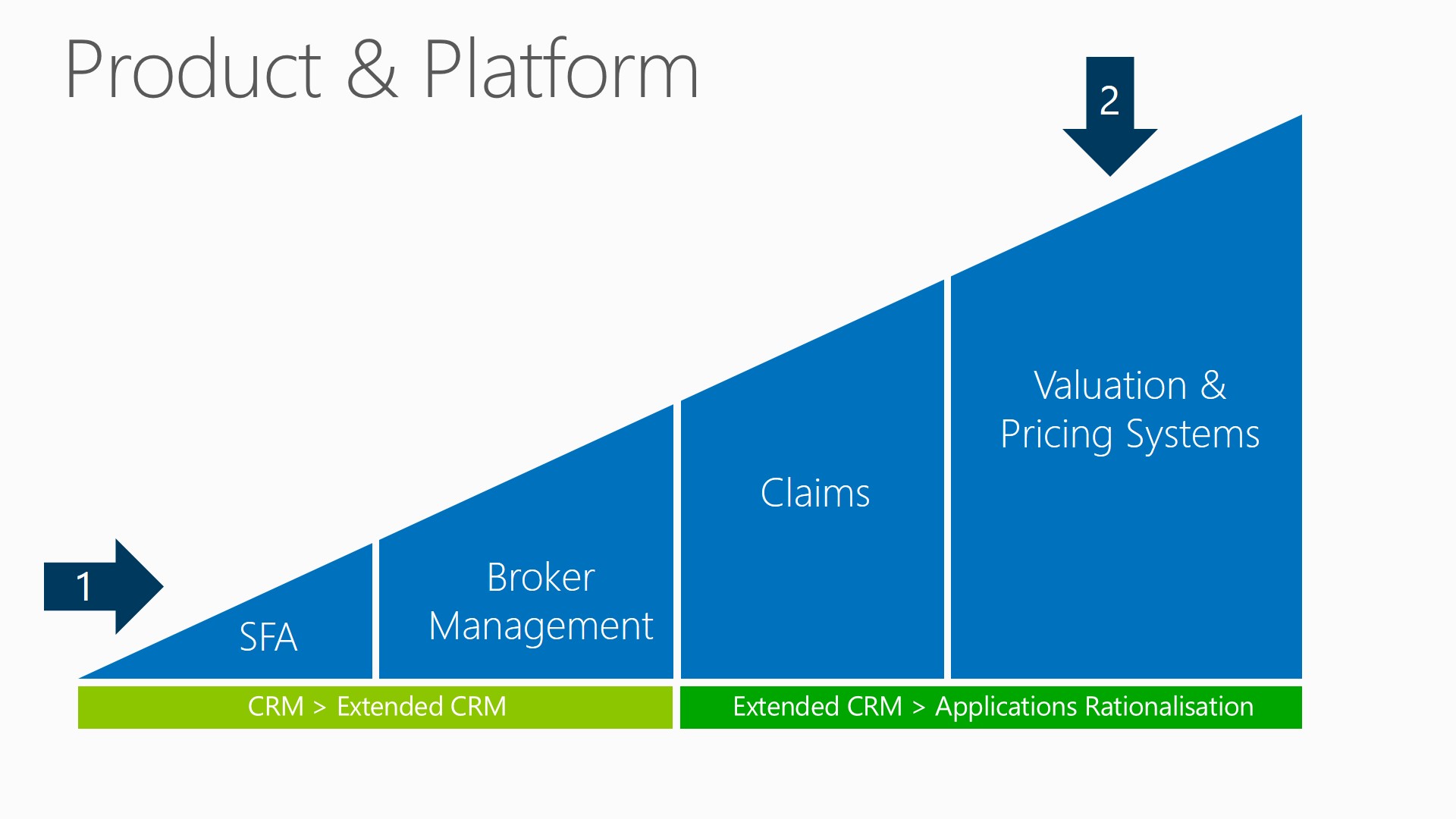
XRM and Applications Rationalisation

When I think about Microsoft Dynamics I like to consider it in terms of Product & Platform. I described this last week on Working Lunch for Financial Services when I talked about Product + Platform. Product in terms of features, functions and workloads (Sales, Service & Marketing). Equally Platform and extensibility is a key strength and perhaps one of our primary advantages. When we think about Platform we can consider the XRM and Application Rationalisation aspect:

  • XRM – Anything Relationship Management (Broker Management, Stakeholder and Regulator Management, Counterparty, Custodian etc)
  • Application Rationalisation – Although not an obvious use of CRM. It can be thought about as replacing existing legacy built applications by taking advantage of out-of-the-box features and components such as mobile, security, workflow etc.

.

“XRM” & “Application Rationalisation” is about building these extended relationship management systems or replacing legacy and disparate systems with applications that are quick and low cost to develop, easy to maintain and with no compromise on capability.

.

I find it quite interesting that we often begin projects at the bottom left (the arrow numbered 1). This typically involves features and functionality around sales force automation and business processes for Sales, Service and Marketing. As we  start the project we quickly realise the benefits that go beyond the traditional usage of CRM and we start to extend the application in other areas of the business, the most obvious of which are those areas of the business that have some form of relationship management (or XRM, X=Anything so Anything Relationship Management). In the diagram above I am using insurance as an example where we might also use CRM for Broker Management.

As we move further to the right we start to get deeper into the business and arguably into more complex or line of business areas (the arrow numbered 2). This is where we move away from what I would traditionally call XRM and I now refer to Application Rationslisation. This is because we are seeing organisations using Microsoft Dynamics to replace their existing legacy applications, rationalising their many different systems by using the Microsoft Dynamics platform to achieve this. In the example above we are seeing how organisation are surfacing their claims and or their pricing information directly in Microsoft Dynamics. Now, this has nothing to do with what we are used to referring to CRM so why would we build it in Microsoft Dynamics? Hopefully by the end of this post I’ll have been able to provide you with a few reasons as to why considering using Microsoft Dynamics to replace you existing legacy application can make a significant impact to your business.

A word of caution however, application rationaliation is rarely done in a big bang approach. These applications are often very complex in nature with inbuilt business logic that can be difficult to extract. I have seen many successful implementations that have taken an iterative approach (iterative is almost always better). Perhaps starting with surfacing the legacy application in CRM (so that the user has one less application to open). The user can take advantage of the native Microsoft Dynamics application and then any new features that may be required are then built in Microsoft Dynamics. This increases user adoption. As times goes by legacy features are either dropped because they are no longer used or they are rebuilt in Dynamics and the legacy application is fully replaced.

I’ve seen very few organisations go through the process of analyzing usage of their systems. Unused features are very rarely removed yet they are maintained and continue to have an overhead (and cost) on the overall architecture. This process of rationalising systems provides a great opportunity to not only improve the experience for the users but also reduce the costs over the long term.

A quick note on iterative development. Are you really iterative? Or have you taken a waterfall approach and split the project or features into chunks and called those chunks iterations? If iterative or agile development is not working in the way you expect (it takes time to get it right) then study or even better, hire an expert to help. Microsoft Dynamics can help you and your organisation become  more agile but you need to understand the core principals of agile and iterative development to really maximise the benefits.

Whenever the topic of XRM or Application Rationalsation comes up I’m always asked why do people use Microsoft Dynamics as a platform. Here are my top reasons:

  • Office based outlook and familiar interface
  • Drive User adoption
  • Increase Time to value
  • Risk Reduction
  • Reduce implementation and support costs
  • Multi- channel / multi device
  • Scalability & Security

And if you are looking for applications that you think might be a ripe to build in Microsoft Dynamics, consider the following:

  • Applications that involve some form of relationship and activity management
  • Applications that require multiple experiences across channels & devices
  • Applications that have had low user adoption
  • Applications that have been difficult to change (agility) and maintain
  • Where users are having to open to many disparate applications and want to reduce to a single point of entry

The concept of  Microsoft Dynamics CRM as a platform has been around for many years and in that time I have had the pleasure of building three products on the platform:

  • A Hedge Fund / Asset Management system (Investor Relations, Fund & Investor Flows, Investor Reporting, Nominee and Custodian relationships)
  • A Corporate Banking CRM system (Wallet Share, Research, Call Reports, Client Reporting, Account Planning, Client & Product On Boarding)
  • A Data Residency Solution (Data residing within geographic region such as Switzerland)

I can’t imagine building the above as a greenfield project and by choosing to use Microsoft Dynamics CRM I was able to very quickly focus my efforts on the business needs of my customers and potential customers rather than worrying about technology. I hope the slides below help you to understand the reasons why I chose to use Microsoft Dynamics CRM as a platform.

When thinking about Microsoft Dynamics CRM as a platform I think it is worth thinking about two primary cases:

  1. Extended relationship Management – building out the platform to provide functionality beyond traditional sales, marketing and services to all those parts of the business that manage relationships: Clients, Suppliers, Counterparties, Stakeholders, or anyone or anything that involves point to point interaction and communication.
  2. Application Rationalisation – replacing legacy systems that have been built greenfield or replacing complex Access databases, Excel spread sheets, Lotus Notes applications etc.

The Problem we are trying to solve

xrm1b

  • Expensive and slow development / release cycles
  • Too many disparate applications
  • Lack of a consistent framework and best practise
  • High business and project risk – compliance adherence
  • High developer dependency
  • Little or no security, redundancy, backup or version control
  • Data accuracy and auditability concerns
  • Scalability, performance limitations
  • Cost of training, development team and ongoing maintenance

The Microsoft Dynamics Solution

xrm2b

  • Reduce Costs – By rationalizing on a single platform and taking advance of the native features Microsoft Dynamics enables you to reduce hidden costs
  • Faster Rollout – With many features of out the box and an extensible point and click customization engine developers and business analytics can make complex line-of-business- applications without starting from scratch
  • Mitigate Risks – With less to build and complex non functional requirements already in place (infrastructure definition, redundancy, high availability strategies, etc) the development team can focus on business and functional needs and deliver of time
  • Enhanced Automation – the Microsoft Dynamics platforms provides rich automation features out of the box and is based on the well known Windows Workflow Foundation so that developers and business analysts can further automate your business
  • Integration – Microsoft Dynamics provides many integrations to other Microsoft products (Office, Outlook, SharePoint, Lync etc) it is based on Microsoft SQL server and the platform architecture and fully documented SDK provides complex integration capabilities with back office systems using Custom .NET plugins and web services
  • Native Features – Microsoft provides many benefits beyond traditional CRM features (Sales, Marketing, Support)  Platform capabilities such as Mobility, Social, Business Process Mgmt, Business Intelligence, Outlook/Office/Lync, Configuration, Extensibility, Role based Security, Auditing, Deployment, Scalability, Manageability, Data Cleansing, Upgrade means that you team can focus on the features that deliver the most value to your business.
  • Usability – Microsoft Dynamics provides a consistent well known user interface. And is immediately familiar to any Microsoft Office Users. Furthermore the platform allows users to access the system through many different method: Browser, Mobile, Tablet, Online, Offline, Outlook
  • Scalability – The Microsoft Dynamics platform has over 3M Users and over 33,000 customers. Technical whitepapers fully that document heavy usage and infrastructure requirements such as 100,000 concurrent users with sub second performance. The platform gives you proven high availability, redundancy, security  and backup strategies right out of the box.

Out of the box building blocks
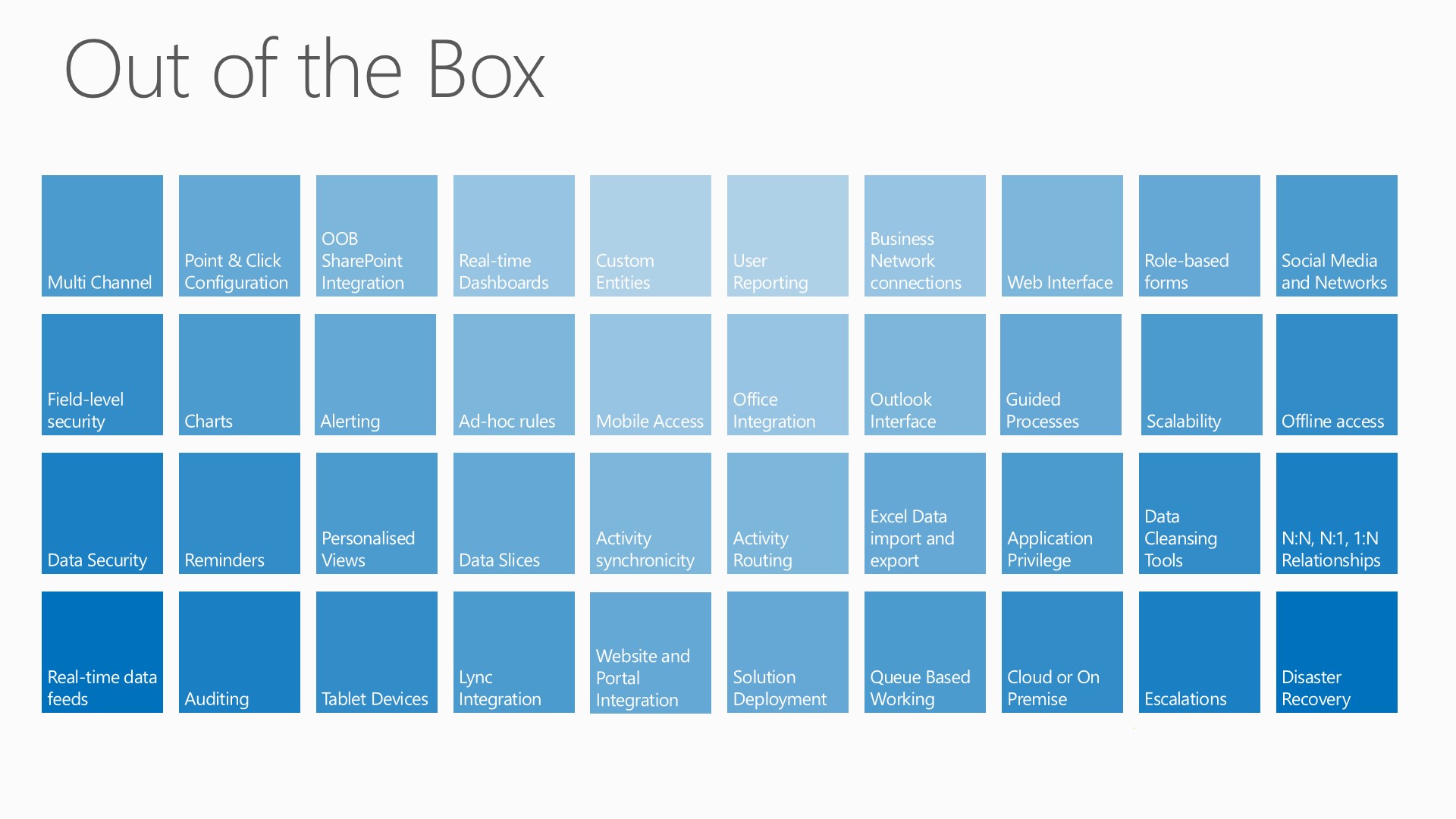
xrm out-of-the-box modules

The slide above illustrates some of the modules, and capabilities that Microsoft Dynamics gives us. It is difficult to make this slide interesting but just imaging having to build all the items above from scratch! The problem with green field applications is that you never know what you or more accurately what your business users might need. Trying to incorporate all the possible permutations is going to result in an overly complex architecture and and application. If you are an advocate of the concept of Minimal Viable Product (MVP) then you are most definitely going to want to avoid doing this. This would result in a system that is going to be difficult to maintain, difficult to add features to and becomes outdated very quickly. Sound familiar?

A platform like Microsoft Dynamics can enable you to focus on the business needs and provide you with the supportive architecture and platform to deliver those needs to the users.

To underscore this from a technical perspective, let me show you are summary of what happens when you create a new entity (table) in CRM:
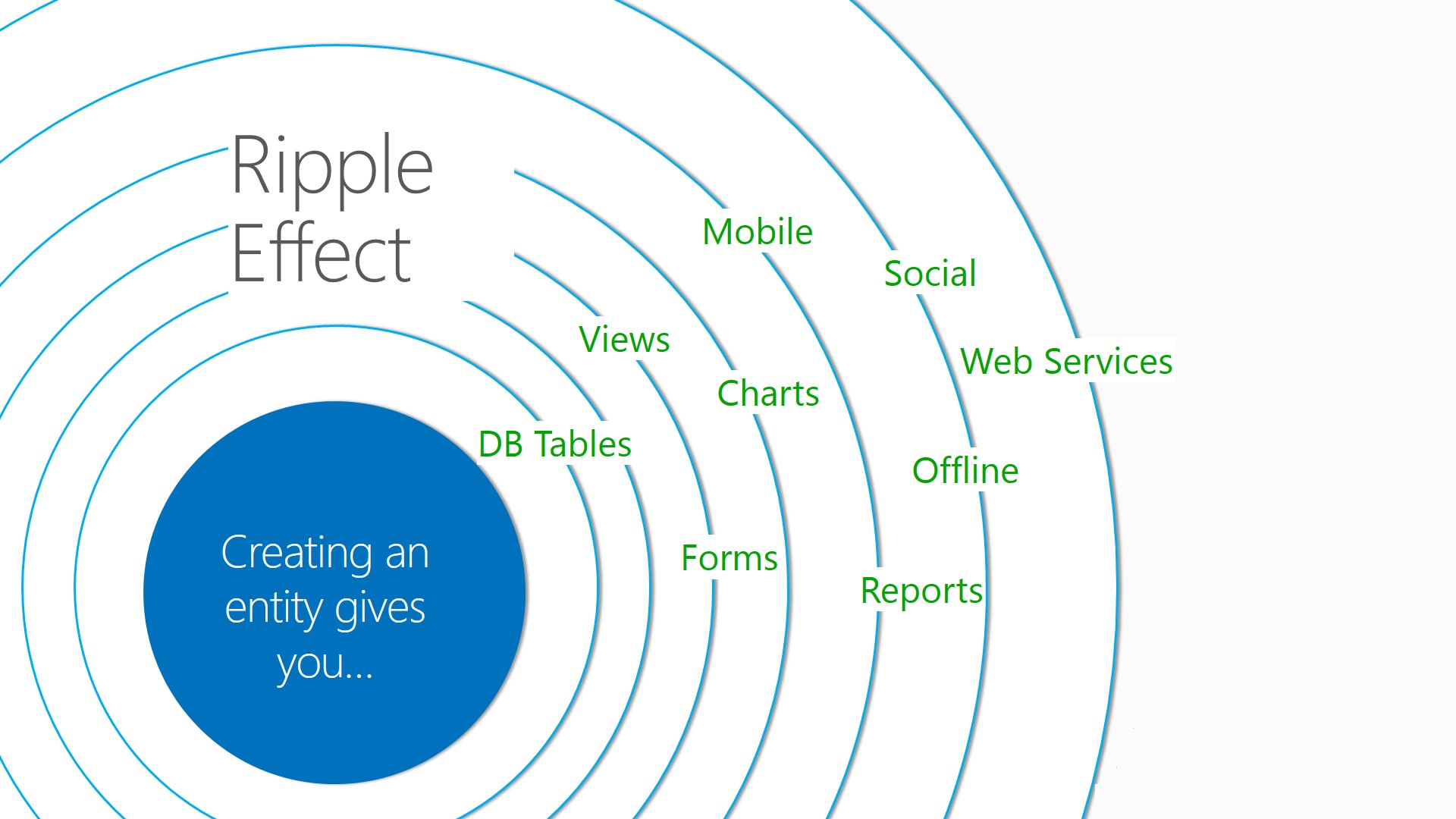
XRM ripple effect

Some XRM Examples

xrm3b

I hope that was helpful, I’ll probably come back to this again in a few months time. Please feel free to add comments below.

In other news I will be attending Tech Ready in Seattle this year. Tech Ready is a Microsoft internal only conference and I’m very excited to be going. I hope to be able to blog the experience here. I’m waiting for official permission, though due to the confidential nature of the content I won’t be able to share everything.

This posting is provided “AS IS” with no warranties, and confers no rights.

Next on Mark Margolis’s Blog: Product, Project and Day to Day Prioritisation
CRM Working Lunch – Financial Services

Last month I was a guest on “Working Lunch” a thirty minute UK Financial Services Industry Team Webinar run by two colleagues of mine Phil Allen and Bruce McKee. The website for the event and future dates can be found here and further details of the webinar including the full recording can be found here.

I was delighted to be a guest and hope to be invited later in the year to talk about some of the developments in the road map and new releases, particularly “Orion”. Below is an extract from the recording:

Phil:For the next section I’m delighted to welcome Mark Margolis, from our Dynamics team to talk about innovation in customer service in the financial sector in particular.
Phil:Welcome Mark
Phil:So Dynamics – is it just about customer relationship management right?
Mark: 🙂 I like to think about Dynamics in terms or Product + Platform. Product in terms of features, functions and workloads (sales, service, marketing). Equally Platform and extensibility is a key strength and perhaps one of our primary advantages. When we think about Platform we can consider the XRM +and Application Rationalisation aspect:
  • XRM – Anything Relationship Management (Broker Management, Stakeholder and Regulator Management)
  • Application Rationalisation – is not an obvious use of CRM. It s about replacing exiting legacy built applicationas and taking advantage of out-of-the-box features and components such as  mobile, security, workflow etc.
This realises benefits such as :

  • Office based outlook and familiar interface
  • Drive User adoption
  • Reduce Time to value
  • Risk Reduction
  • Reduce implementation and support costs
  • Multi- channel / multi device
  • Scalability & Security

Top 5 areas where CRM can be used to replace existing applications:

  • Applications that involve some form of relationship and activity management
  • Applications that require multiple experiences across channels & devices
  • Applications that have had low user adoption
  • Applications that have been difficult to change (agility) and maintain
  • Where users are having to open to many disparate applications and want to reduce to a single point of entry

Phil: A big topic across the retail banking, wealth management and insurance companies we talk to is to do with their customer channel strategy. How much of a shift in the way customers interact with financial services providers are you seeing?
Mark:This really depends on if you are talking about business to business or business to consumer. Clearly there are big changes in the way consumers are interacting with customers. But that has been the reality for years, this isn’t really new but organisations are still trying to find optimal ways of managing this.
But this does impact business to business as well. Ultimately we are all consumers and that impacts the way we do business. We are more informed, we have less time, we are impatient and have high expectations about our customer experience and that is tied to the way we communicate. I have different expectations depending on the channel (twitter, email, phone). Emails feels outdated now but will probably become more important as the noise decreases and channels move. Organisations need the ability and flexibility to adapt to these rapid changes.
Dynamics gives you the ability to manage these channels, trigger alerts, store preferences so becomes an ideal application and multi-channel platform.
Phil: Are consumers driving change or FS companies changing in an attempt to differentiate?
Mark: Both, I will take the easy way out!
Consumers are demanding change because they are better informed,  it is easier to switch and they are less loyal. Financial services institutions are trying to find ways to combat this.
People are increasingly demanding a personalised experience from the people they buy products and services from. Organisations are trying to find ways of understanding which customer are high value and which are less so. When they know who their customer are, they are then attempting to do something about it whether that’s automation for lower value customer or moving customers up the value chain or even providing a very rich personalised experience for the most important (profitable) customers.
Financial Services institutions are innovating also, and certainly mobile is probably one of the most common ways of doing this. A Mobile strategy however is not just about providing a mobile self-service portal to your clients and customers it is also about rich experiences for the workforce. The successful organisations are empowering their people with the applications, insights  and experiences that make them more informed and that is driving great client service experiences and loyalty.

Phil: You obviously come from the Dynamics CRM team – what sort of use cases for dynamics are you seeing across banking and insurance and do you think all opportunities to innovate on the platform are being taken?

Mark: I have probably been directly responsible for over 100 projects and perhaps  surprisingly I would say that the majority of the projects (I have seen) are based upon relatively straightforward CRM principles:

  • Most organisations don’t have a (true) single view
  • Most or some have predictive analytics (best next action) but it is not embedded in the customer journey, its somewhere else
  • Not all organisations take advantage of the platform. Some organisations still insist on build you own.  I think those organisations that only use a small part of the application, could benefit hugely by understanding the power of the platform that they have already invested in.
  • Growth Vs profitability, my clients used to say all my customers are important, that is no longer the case , its about profitability and understanding the value and future value of your customer is paramount. Not all customers are treated equal. Organisations that understand this, measure this and act on this are the ones that will be most successful.

Phil:Where does Dynamics CRM differentiate in the market, what is the sweet spot, and is there anything it can’t do?
Mark: This is software, anything is possible 🙂

  • Outlook & Office integration and familiarity drives user adoption
  • The choice of deployment models, on premise, on line, hybrid cloud
  • Product & Platform – Dynamics gives you the best of both worlds, off the shelf & build your own
  • Speed of deployment and time to value (Forrester: 243% ROI in 4.1 months) (Gartner: Microsoft CRM projects take avg. <8 months vs. 17 month  )

Phil:What does the Marketing Pilot and Netbreeze acquisitions mean for Dynamics moving forward and who are the new groups that will be interested?
Mark: These acquisitions that were announced at Convergence are very exciting, in the last twelve months we have seen the acquisition of Skype and then Yammer and now we’ve just announced Marketing Pilot and Netbreeze (social listening). These acquisitions fit very much in our applications pillar for our road map investments. We only need to look at what some of the analysts are saying to see why this is so important:

  • Gartner analyst Laura McLellan, by 2017, CMOs will spend more on IT than their counterpart CIOs.
  • IDC, “Marketing Automation is expected to grow faster than any other segment of CRM over the next 4 years

We have great features today in Marketing with closed loop capabilities right out fo the box. We also have an amazing array of very credible partners delivering horizontal apps. With Marketing Pilot and Netbreeze we are taking enterprise marketing to the next level in Microsoft Dynamics CRM.

Phil:Where is Dynamics going in the near term? Tell me about innovation in the tablet and mobile space?
Mark: We are very excited about the new release code-named “Orion” available later this year. Primary investment areas for Orion include:

  • New clean, streamlined User Interface
  • New Features
  • New Platform Capabilities
  • New Mobile Experiences

Phil: Will Outlook integration and web interfaces be retained and are will still committed to the traditional customer service agent/call centre type scenarios?
Mark: Absolutely and we will continue to see further investments in 2014

Phil: What other scenarios are you seeing across retail banking, cap markets and insurance?
Mark:

  • Core CRM
  • CRM in their language
  • Replacing legacy systems & Back office integration
  • Bringing not just data from disparate parts of the system but putting CRM in the hands of those business across not just sales, service, marketing but Onboarding, Compliance etc.
  • Using Dynamics as the platform of choice and as a driver towards user adoption. Dynamics CRM becomes the authoritative source of data.

Phil: Tell us about the Mobile and tablet experiences in financial services webinar you, Bruce and Simon are running on Wednesday?
Mark: Its about the usage of Mobile and tablet experiences in financial services, we going to talk a bit about how organisations are taking advantage of the platform and using it to innovate. We will look at :

  • Microsoft out-of-the-box experiences
  • Partner apps
  • Build you own

Phil: So we look to be out of time. Mark, Bruce, thank you both very much for coming on and sharing your thoughts today.

This posting is provided “AS IS” with no warranties, and confers no rights.

Next time on Mark Margolis’s BlogXRM for Financial Services – Updated

Opportunity & Deal Analytics with Microsoft Dynamics CRM

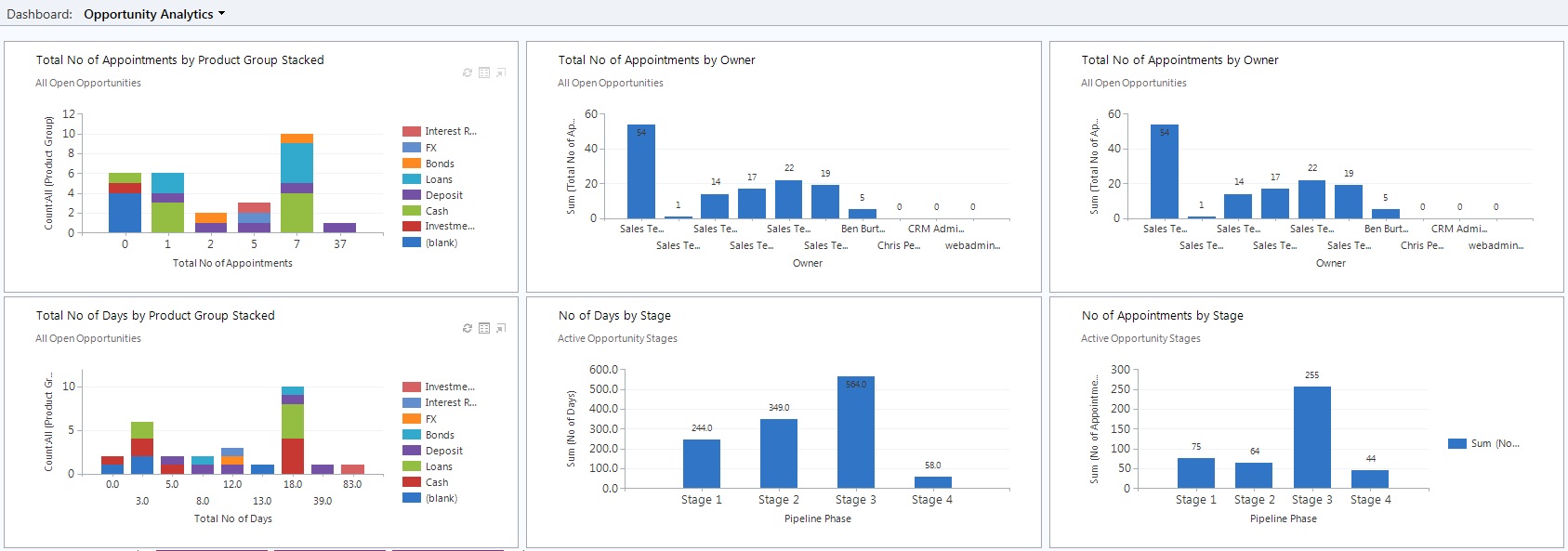
Microsoft Dynamics CRM gives me great capabilities out of the box such as the ability to manage my pipeline, create and track goals and targets. It also gives me great dashboards that provide insights into the deal process whilst giving me control of my pipeline.

A few months ago I wrote about Power View with CRM 2011 and CRM Online, but this time I wanted to do something a little bit different. I wanted to know:

  • How many days on average does it take to close a deal
  • How many appointments or interactions does it take to close a deal
  • How many days and appointment’s does it take at each stage of the deal so that I could identify efficiencies and bottlenecks.

I then wanted to slice and dice that data by:

  • Owner
  • Deal / Opportunity Stage
  • And any other CRM data

I wanted to do all this without writing a single line of code! I started to create some workflows but I quickly realised that it would be easier to use North52’s Formula manager. For those of you who have read this blog before you’ll know I use this extensively.

This is one the dashboards I was able to build:

OppAnalytics

With this I can now answer questions like:

  • How long is the sales cycle for each employee
  • At what stage do opportunities get stalled in your sales cycle
  • The length of their sales cycle in terms of deals won or lost
  • At what stage do opportunities typically fall off.
  • What percentage of first calls\meetings lead to second calls meetings
  • What’s the average sales cycle time per sales stage
  • Over time, what is the total value of the funnel at each stage
  • Number of times you contact each prospect before you close the sale

If  you want to do it yourself you can follow the steps below. John from North52 contacted me recently to tell me he has now turned this into an accelerator. You can download the accelerator here along with installation instructions. Alternatively here are the files:

Dashboard Design

I started with the outcome I wanted. I knew the insights I wanted gain and so I designed the dashboard(s) that would give me those insights. I came up with something very close to the above example. Resist the temptation to start building things, I know it is very easy, but the ability and ease that Dynamics CRM gives you to customise things can also be a projects greatest weakness.  Think, design and then do.

Having designed the dashboard I could see I needed to make a few modifications:

  1. A needed a new entity to store the number of days and the number of appointments at each stage of the opportunity. I called this entity Opportunity Stage. I added the following fields to the Opportuntiy Stage entity:
    • Start Date
    • End Date (date and time)
    • No of appointments (Whole number)
    • No of days (Decimal number)
    • Pipeline Phase (Single line of text)
    • OpportunityID (Lookup) – this is not a field but a relationship to the parent opportunity
  2. I then needed to add 2 fields to the Opportunity entity:
    1. Total no of appointments (Whole number)
    2. Total no of days (Decimal number)
  3. I then tidied a few things up by hiding the Opportunity Stage from the Opportunity form and I placed the relevant fields on the forms for testing purposes etc.

The next thing I needed to do was to create the calculations. To do this I needed:

  1. 1 Schedule:
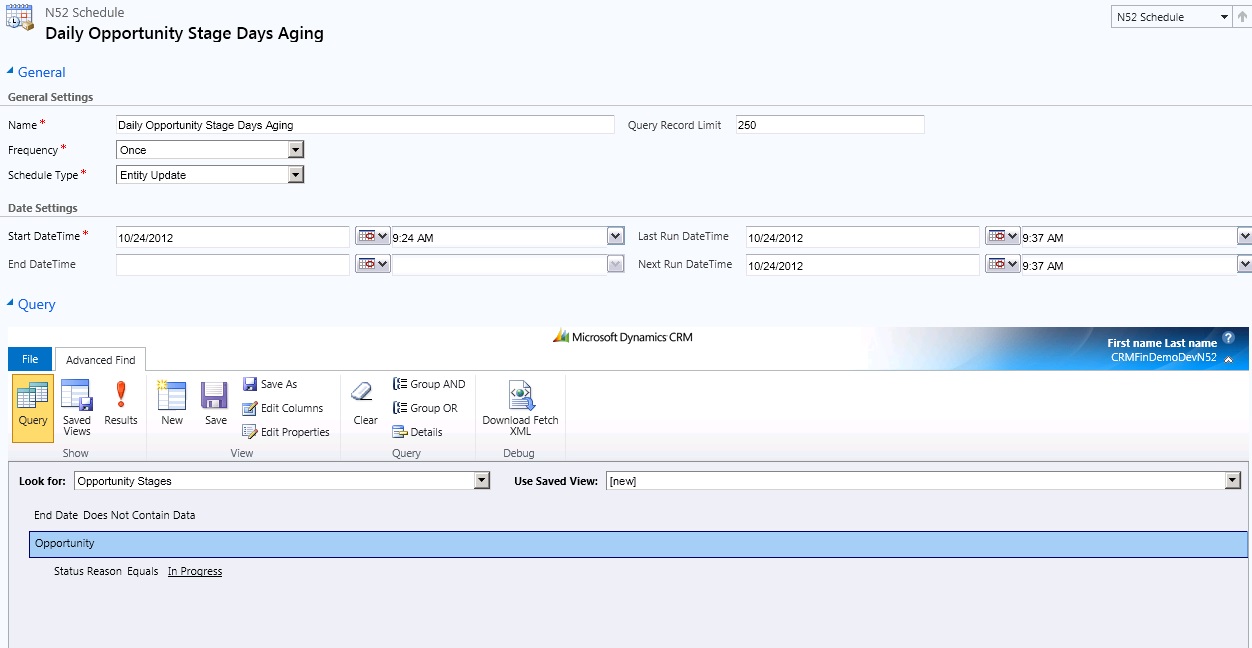
    • The schedule would run nightly and would calculate the number of  days an appointment was open for each stage of an opportunity
  2. 6 formulas:
    1. Opportunity Stage – Update Opportunity – Total Appointments
    2. Opportunity Stage -Update Opportunities- Total Days
    3. Opportunity Stages – Save – To Current Record
    4. Appointment – Update Tot No of Appointments on Opportunity Stages
    5. Opportunity Stages – Save – To Current Record
    6. Opportunity Stages – Nightly Batch Microsoft

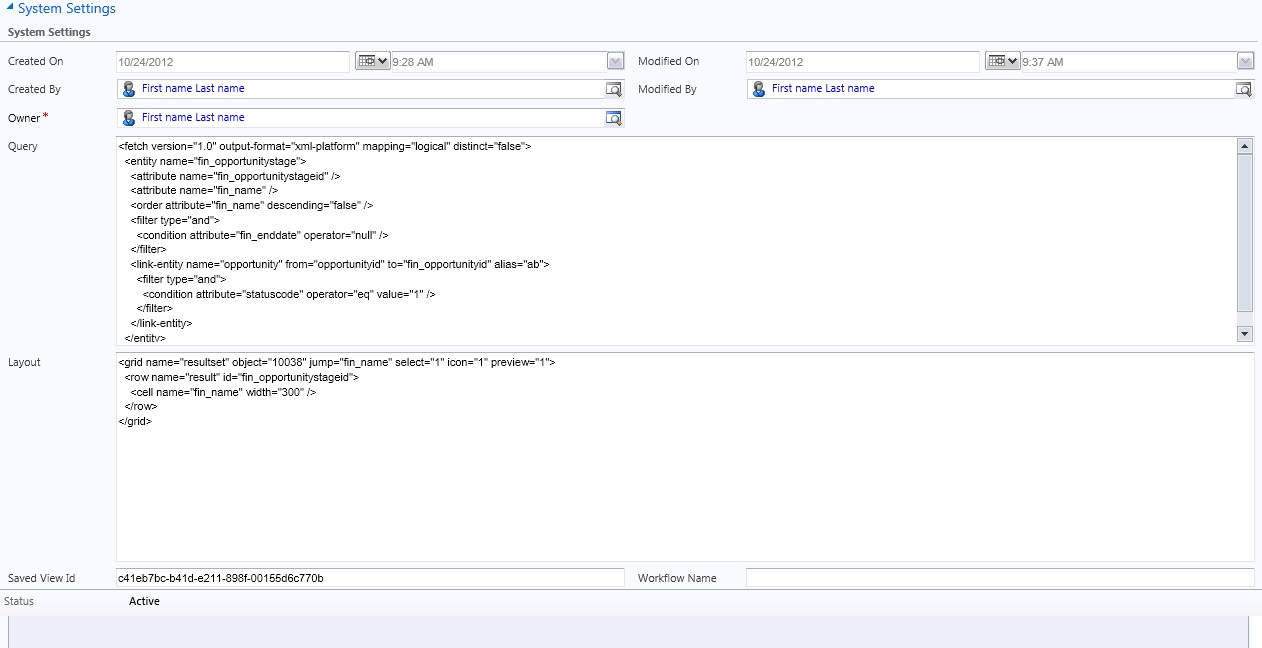
Schedule – 

sched1

sched2

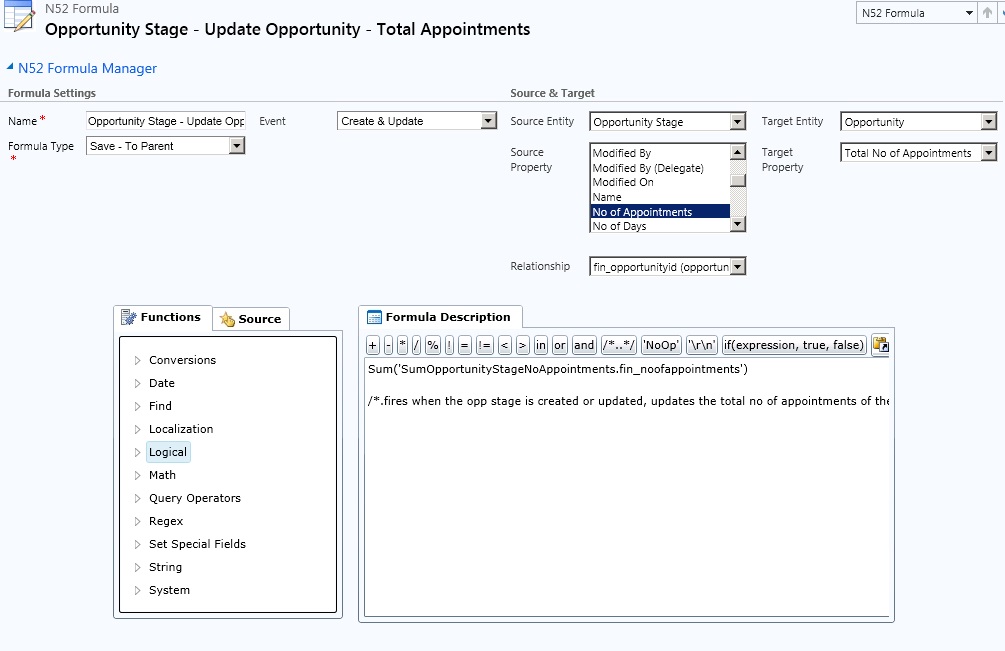
1. Opportunity Stage – Update Opportunity – Total Appointments

Create the Formula below

formuma1

Formula
Sum(‘SumOpportunityStageNoAppointments.fin_noofappointments’)

Description
‘SumOpportunityStageNoAppointments’ is a formula detail record which contains a fetchxml query to retrieve the sum of all the appointments on the opportunity stages entity. Behind the scenes the system is filtering the fetchxml below by the current opportunity & using the SUM fetchxml aggregation operator.

<fetch version=”1.0″ output-format=”xml-platform” mapping=”logical” distinct=”false”>
<entity name=”fin_opportunitystages”
<attribute name=”fin_noofappointments” />
</entity>
</fetch>

Create the formula detail

formuma1b

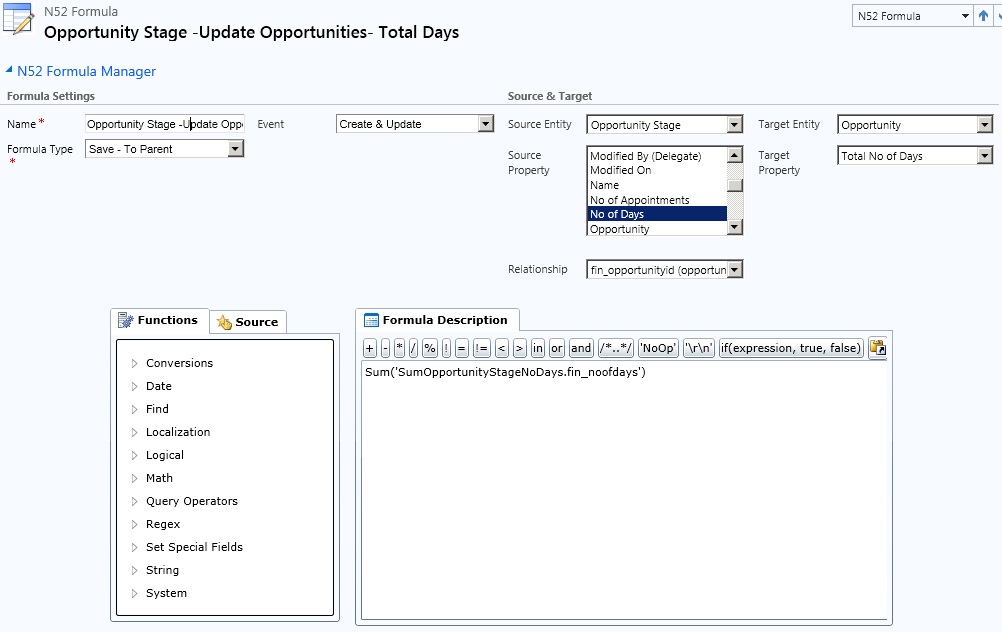
2. Opportunity Stage -Update Opportunities- Total Days

Create the Fomula below

formuma2

Formula
Sum(‘SumOpportunityStageNoDays.fin_noofdays’)

Description
‘SumOpportunityStageNoDays’ is a formula detail record which contains a fetchxml query to retrieve the sum of all the numberof days on the opportunity stages entity. Behind the scenes the system is filtering the fetchxml below by the current opportunity & using the SUM fetchxml aggregation operator.

<fetch version=”1.0″ output-format=”xml-platform” mapping=”logical” distinct=”false”>
<entity name=”fin_opportunitystages”
<attribute name=”fin_noofdays” />
</entity>
</fetch>

Create the formula detail

formuma2b

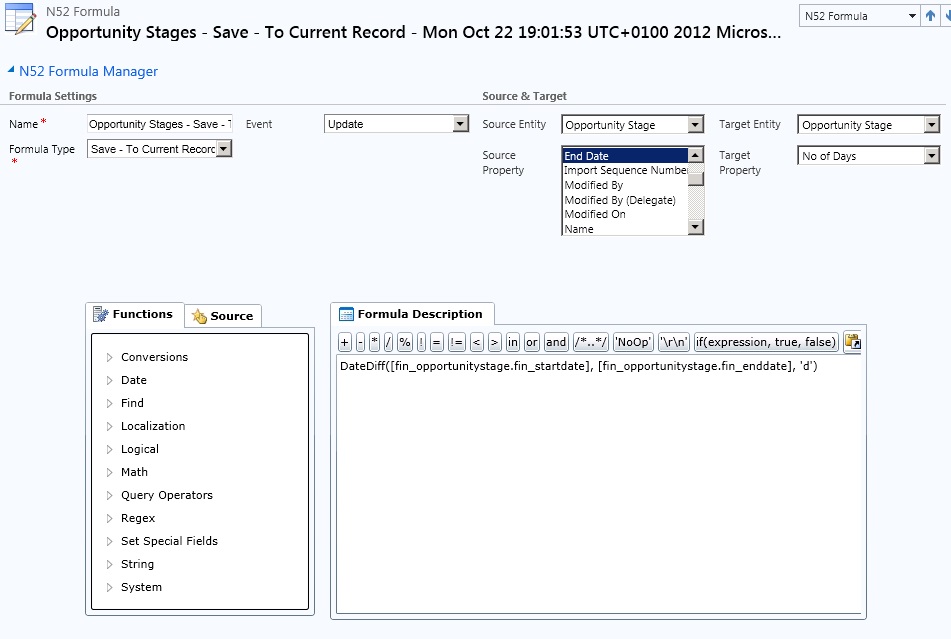
3. Opportunity Stages – Save – To Current Record

formuma3

Formula
DateDiff([fin_opportunitystage.fin_startdate], [fin_opportunitystage.fin_enddate], ‘d’)

Description
This formula uses the datediff() function to calculate the number of days between 2 dates & store the value on the opportunity stages entity.

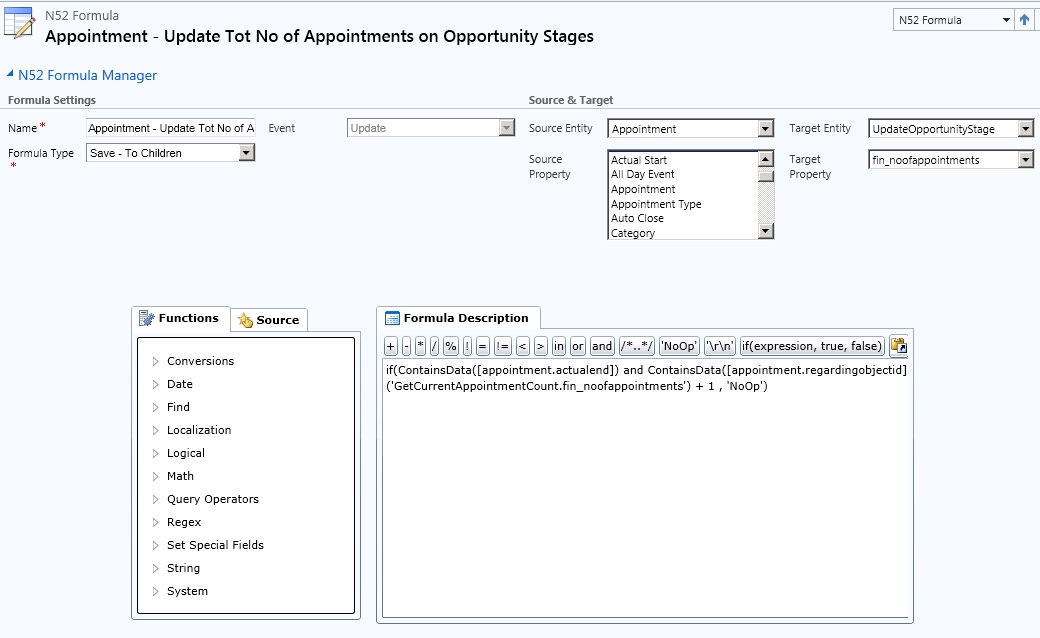
4. Appointment – Update Tot No of Appointments on Opportunity Stages

formuma4

Formula
if(ContainsData([appointment.actualend]) and ContainsData([appointment.regardingobjectid]), FirstRecord(‘GetCurrentAppointmentCount.fin_noofappointments’) + 1 , ‘NoOp’)

Description
This formula first checks to see if the actualend field is set on the appointment (i.e. it’s being marked as completed) & it checks to see if the regarding field has some data. If these conditions are true then the formula will execute the fetchxml query associated with’ GetCurrentAppointmentCount’.

When the formula has calculated the number of appointments its then executes the fetchxml query associated with ‘UpdateOpportunityStage’. This fetchxml query will return a single row which the formula will then set to the calculated number of appointments.

Create Formula detail – UpdateOpportunityStage

formuma4b

Create formula detail – GetCurrentAppointmentCount

formuma4a

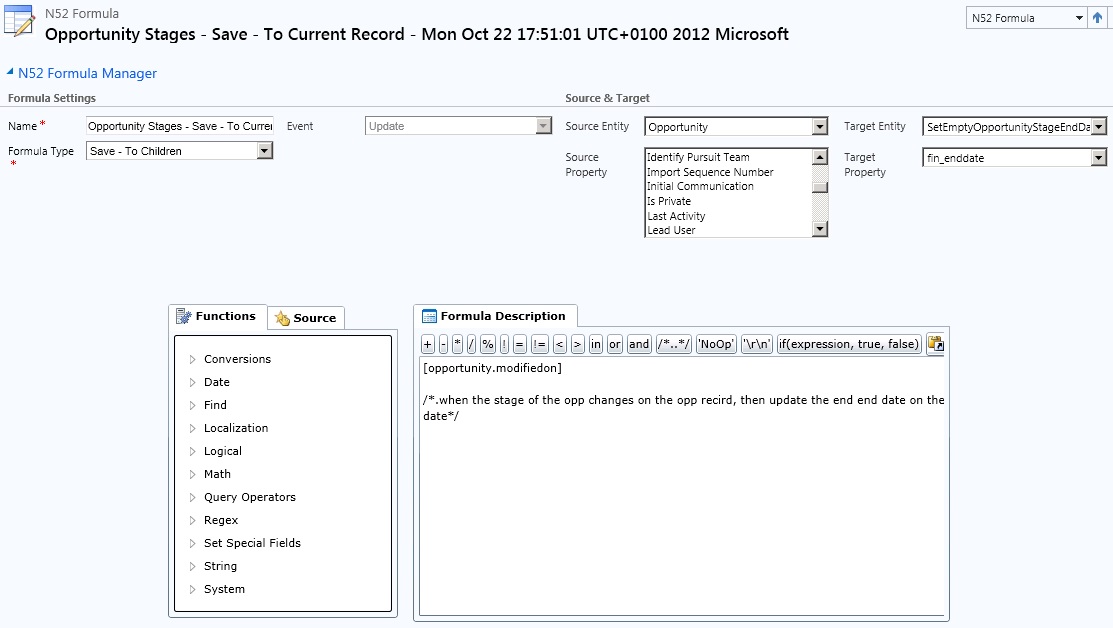
Opportunity Stages – Save – To Current Record

formuma5

Formula
[Opportunity.modifiedon]

Description
Whenever the pipeline stage of an opportunity changes then the modifiedon date of the opportunity is saved to the current open opportunity stage record. This record is found by executing the fetchxml that is associated with the ‘SetEmptyOpportunityStageEndDate’ formula detail record.

Create formula detail – SetEmptyOpportunityStageEndDates

formuma5b


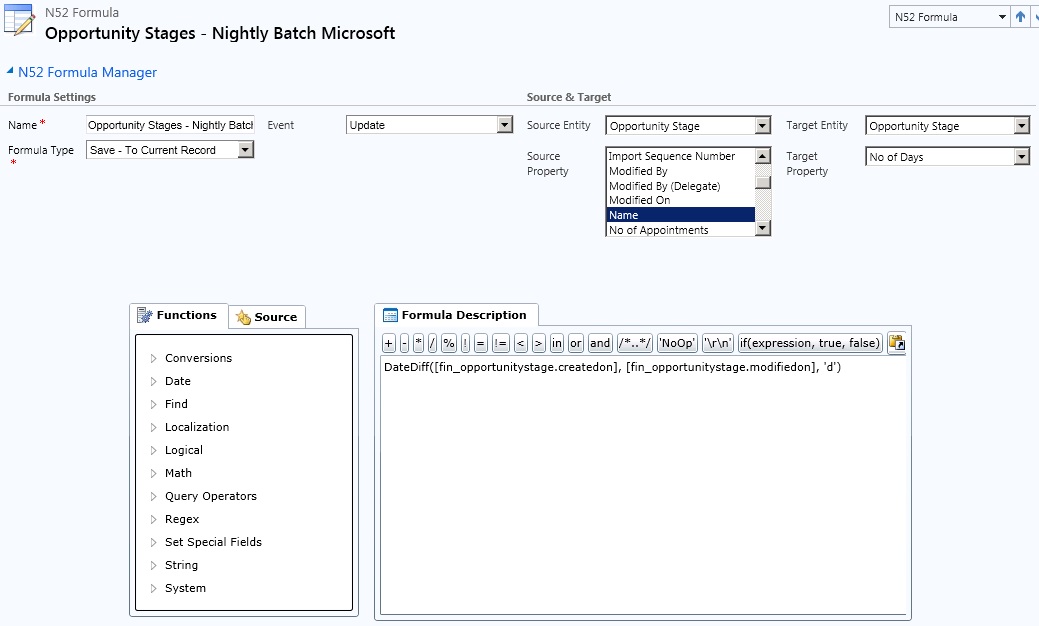
Opportunity Stages – Nightly Batch Microsoft

formula6

Formula
DateDiff([fin_opportunitystage.createdon], [fin_opportunitystage.modifiedon], ‘d’)

Description
When the nightly schedule executes it calls this formula which uses the DateDiff() function to calculate the number of days the opportunity has been opened at this stage & places the value in the No. of days field on the associated opportunity stage entity.

This posting is provided “AS IS” with no warranties, and confers no rights.

Next time on Mark Margolis’s BlogCRM Working Lunch – Financial Services

A CRM Timeline Component

Those that know me, know how much I like visuals, visualising information in a meaningful way can not only help foster  user adoption it can also give you real insights into your business. I was talking to the team at The XRM Consultancy recently about data visulisation and in particular about two of by favorite books “The Design of Everyday Things”  by Donald Norman and a “Practical Guide to Designing with Data” by Brian Suda (you can see other books I recommend here). We talked at length about the amazing tools that are available to enrich the user experience. Bruce showed me a fantastic open source timeline called Timeline JS and how he wanted to turn this into a component for Microsoft Dynamics CRM. A few weeks later he was ready to show me the CRM activity history timeline they had built and that he was going to provide it or free!

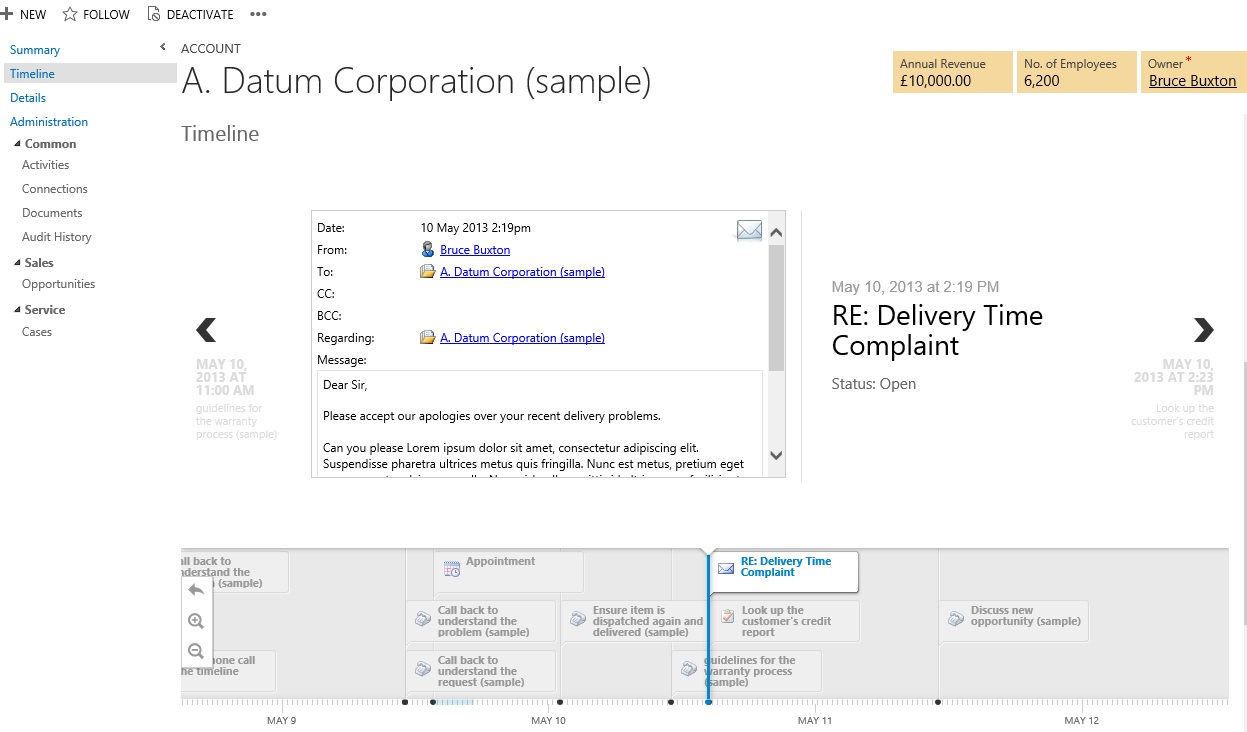
Here is what it looks like:

timeline

Here is a video of it in action!

And here is the solution file for download. (*Update* The solution file has been updated to support Outlook. Timeline_1_0_0_6_managed.zip)

Please note: :

  • At the moment, it only shows activities where the regarding object is populated (it will rollup in the future)
  • Only shows top 100 records for performance considerations
  • Email, Task, Phone Call, Appointment entities are supported. Other entities such as opportuntiies and other activity types will be added soon
  • It works in mobile devices such as iPad (safari), Surface etc. I believe its based on HTML5
  • It is free, contact XRM Consultancy for more information.

Remember Thursday 16th of May is the next CRM User Group Meeting at the Microsoft offices in Reading, UK. A few of us are meeting up the night before for a few drinks. I hope to see you at both!

This posting is provided “AS IS” with no warranties, and confers no rights.

Next time on Mark Margolis’s BlogOpportunity and Deal Analytics with Microsoft Dynamics CRM

Webinar: Mobile and Tablet Experiences for Financial Services Institutions

Last week my team and I put together a Webinar on the topic of Mobile CRM and Tablet Experiences for Financial Services Institutions. You can view a recording of the webinar online here.  Below are the slides and notes that we presented at the event. At the end you can also see a backstage picture of the setup we had.

The key messages we wanted to get across about Microsoft Dynamics CRM were that it provides :

  1. A single platform, for many users with many uses on many devices
  2. Experiences that delight users by providing the right applications, within the right context on the right device
  3. Out of the box, process tailored and role based applications that can be customised for your specific needs

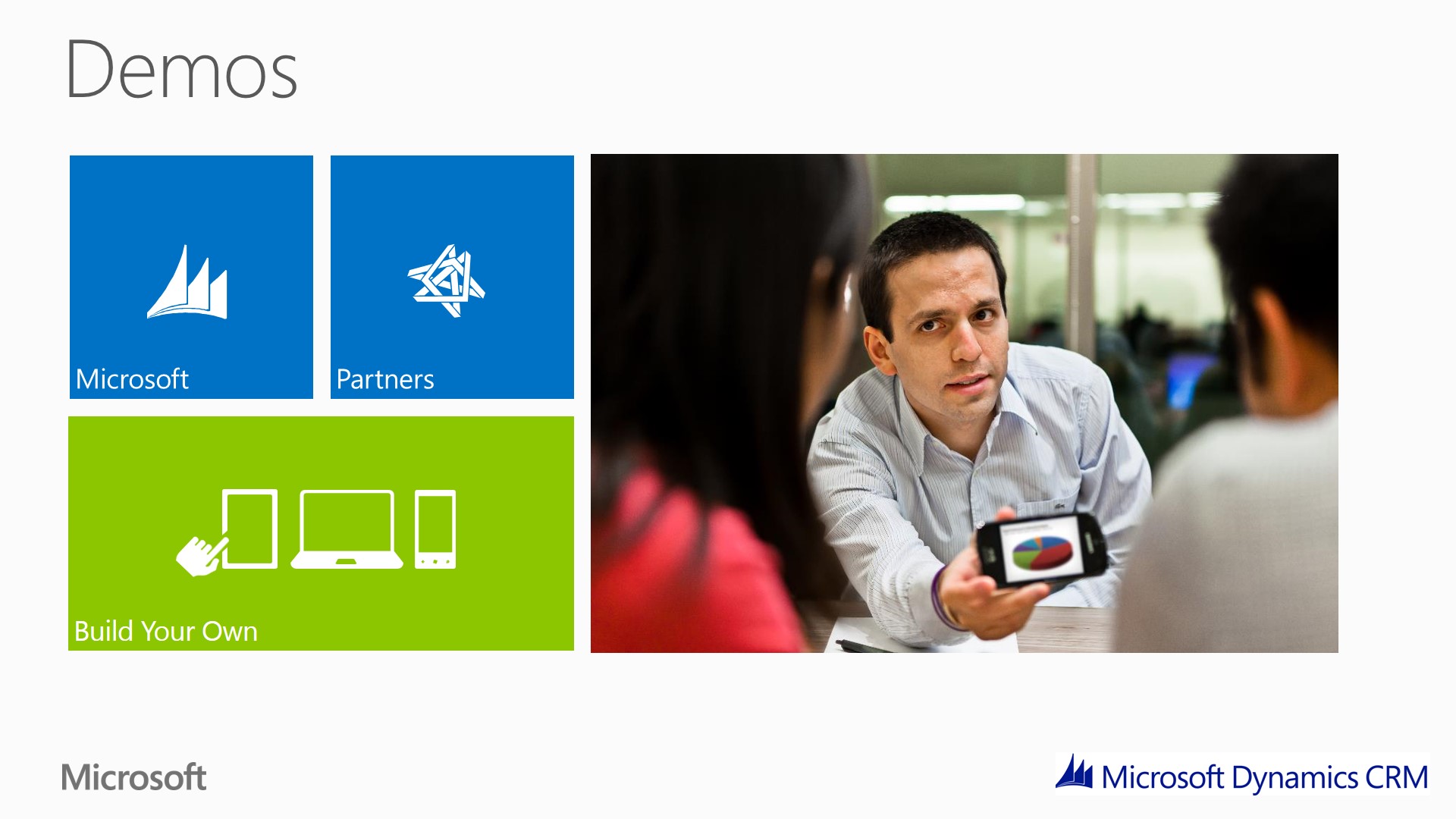
Microsoft is making massive investments on mobile CRM and this was a chance to talk about what is available today, what is coming later this year and also dispel some of the myths. As you can see below we divided the session into 3 main categories:

  1. Microsoft mobile and tablet experiences
  2. Partner mobile and tablet experiences
  3. Build your own mobile and tablet experiences

We had a very tight schedule on the webinar  so we had to limit ourselves to a maximum of six demos. This was frustrating because we have so much more to show you! If your interested in finding out more then please get in touch. I want to take this opportunity to confirm that today Microsoft Dynamics CRM is available on the following devices:

  • iPad
  • iPhone
  • Android Phone and Tablets
  • Blackberry
  • Windows Phones
  • Windows 8 & Windows RT
  • Microsoft Surface

Mobile and Tablet Experiences for Financial Services Institutions

Slide1

Introduction

Slide2

Introduction
At the Gartner event we talked about the Nexus of four forces, social, mobility, cloud and big data. Today we are going to talk about a topic that we hear about almost every day and that is Mobile.
Platform
A good Mobile strategy is one that put the Mobile experience in the context of the business, the user and the role that need to be performed. Business needs a to platform to support this. One platform for multiple users, for multiple uses, multiple devices. Businesses need the agility to reflect the rapid changes of mobile uses not just in terms of strategy but also in terms of devices, two years is too long to stay on one device.
Innovate
Every company is different with different process. In a fast moving world , you also need to be able to be flexible. Organisations are looking to innovate through these mobile experiences. For example , Advisors are walking in with the investor portfolio and showing in real-time the impact for changing their portfolio mandate,. Branches are looking to give meeter greater the information that they need to have a more informed and personal relationship in the branch.
Innovation of processes is slow and complex, as the innovation of back, so organisations are looking to innovate through mobile because this is a mediums that is understood and very much in front of the customer.
Repeat and reuse
Multiple roles, but a single platform means that you can use the same system for different use cases, different uses. This re-use means that you can deliver tailored specific applications quicker and more cost effectively. This can span the front and back office
Specific role based applications
Gone are the days of one large behemoth of CRM – No more one application does all. These applications deliver Specific scenarios. It is about CRM in context. So that the Advisors has an experience that is tailored to his role, where as greeters will have a very different experiences. All on the same platform, same data. It is about apps not software. Apps deliver specific scenarios of value. Think about your smartphone.

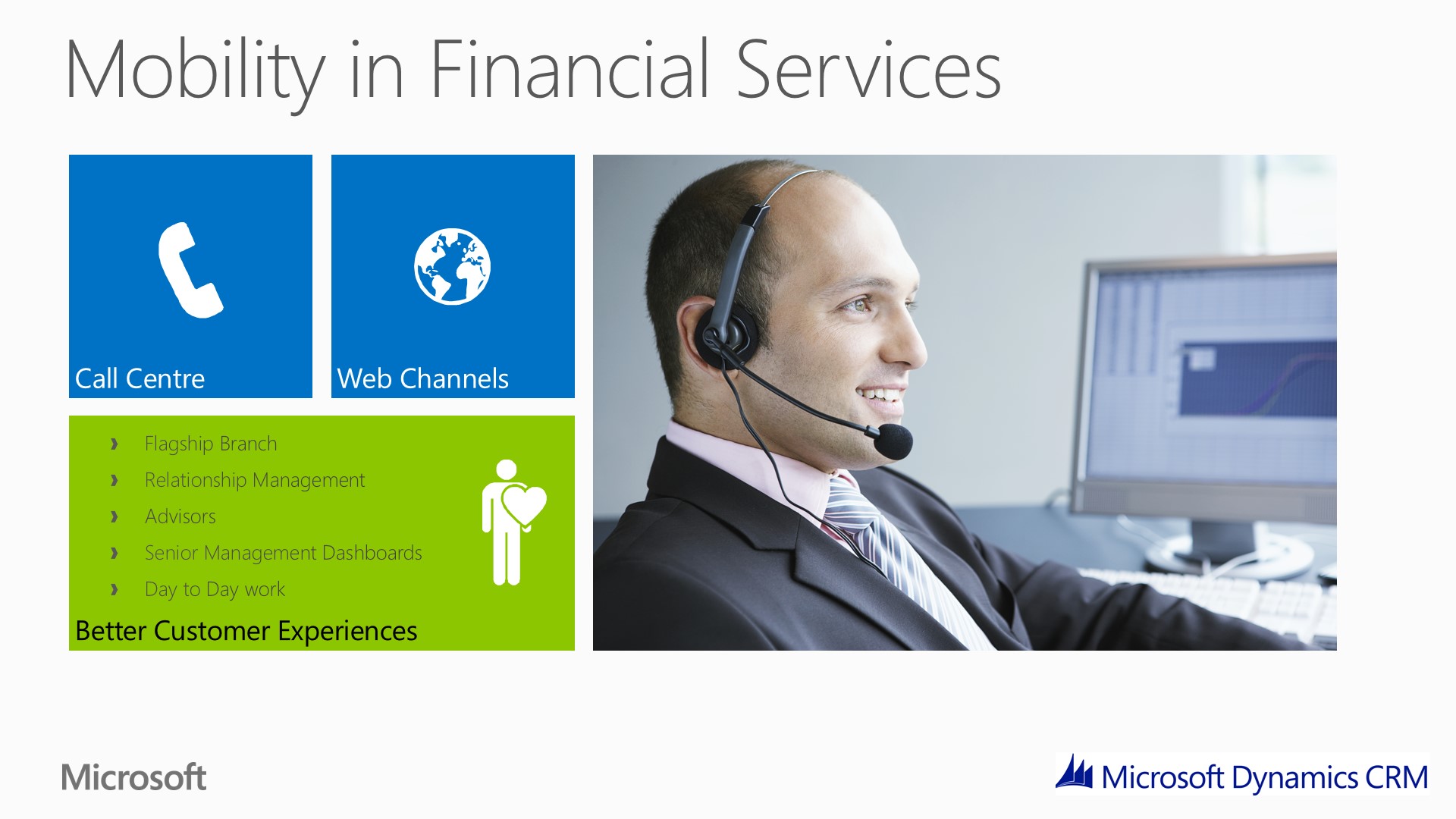
Mobility in Financial Services

Slide310+ years ago IT and innovation was multi channel. Outlook , Web, Telephone
10+ years ago, banks built self-service channels to reduce cost (e.g telephone banking and web portal self-service, they lost the one on one and personal interaction.) They built these multi-channel capabilities but they were siloed.
The UK’s biggest banks have chosen Dynamics as their platform, a single platform to provide a variety of functions.
In the past for them it was not about the customer experience. Now it is a better customer experience, customers now have a voice and more choice. It no longer about more customers it is about more profitable customers and that means we need to build loyalty. Examples of these changes are:
Retail banks building flagship branches and encouraging their customers back into the branch.
Relationship Managers & Advisors visiting clients and they need detailed client information when they are on the road. Clients expect them to be fully informed.
Senior Managers want management information, business intelligence on tablet devices.
Mobility now affects our day-to-day work, with more and more employees using tablets at their desks, attending meetings and using them to take notes. They want experiences and devices that enable to consume and create content wherever they are.

Dynamics CRM Value as a platform

Slide4

Integration Layer for CRM – back office systems across mobile devices
CRM is being used as the integration later for back office systems and becomes the single point of entry for the users.
Dynamics provided a mobile framework
Dynamics gives you the tools to build these applications from a framework rather than from scratch.
Dynamics is becoming the authoritative source of customer data
In many cases Dynamics CRM may not be the golden source of data, but it is the authoritative source of customer information. It is where users go with confidence to get client information. Why build separate applications and lose the confidence of data. Our customers are being driven by regulatory change and not only providing a better experience for customer but they need to be better informed and not miss sell products, We are seeing our customer use dynamics as this authoritative source, even if the data is from back office system, users are going to dynamics for this source.
Auditing, Security, Point & Click Administration, Integration Capability, Cross Device
Microsoft Dynamics CRM provides the underlying platform, security, and administration allowing you to focus on the business and the information that your users need.

Demonstrations

Slide5Today’s demo has been divided into three categories:

  1. Mobile and Tablet experiences that Microsoft will be delivering
  2. Mobile and Tablet experiences that Partners will be delivering
  3. Examples of build your own Mobile and Tablet experiences on the Microsoft Dynamics Platform but available on multiple devices

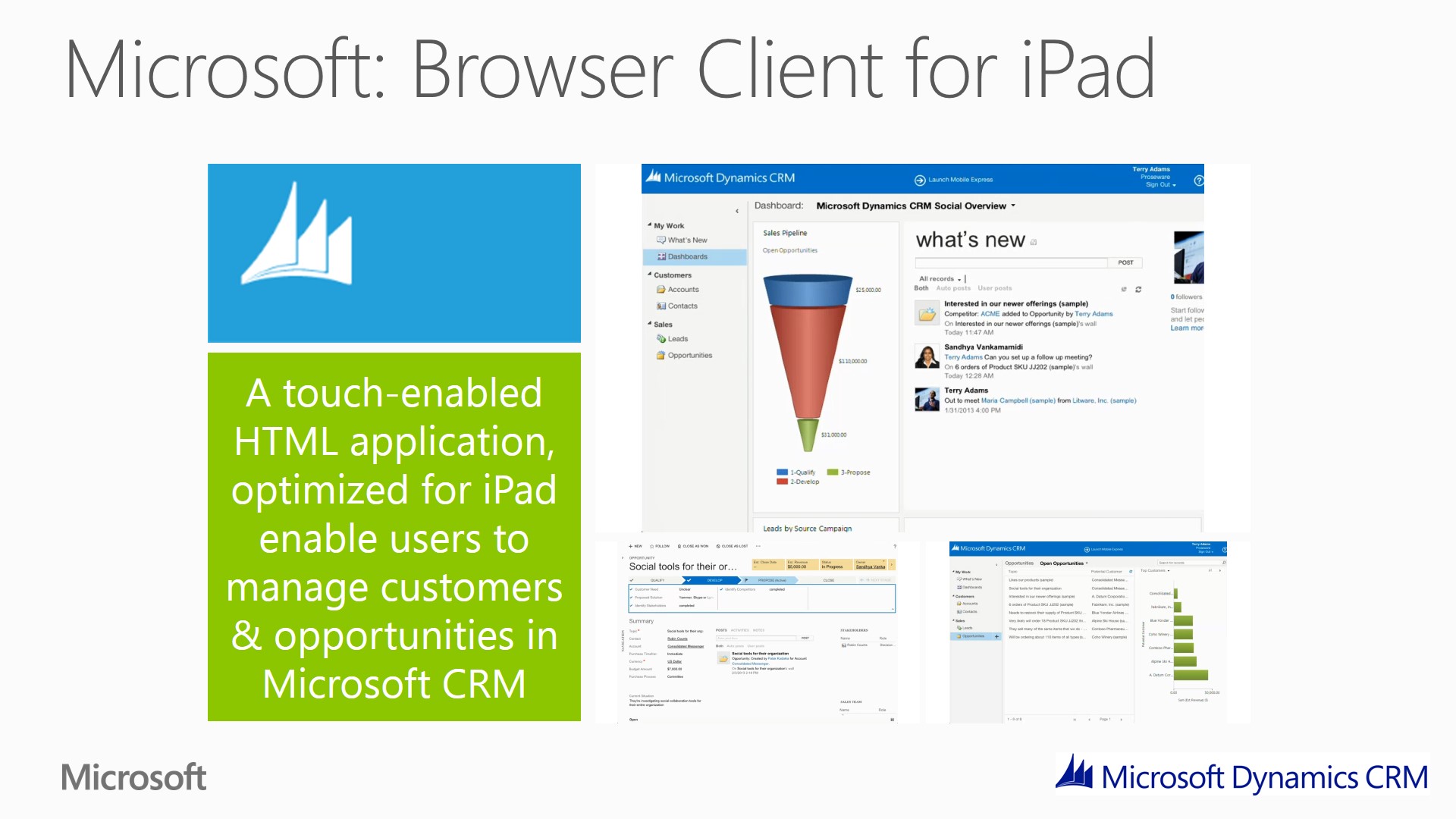
Microsoft: Browser Client for iPad

Slide6iPad client available today for CRM Online customers, availability for on premise is coming later in 2013.

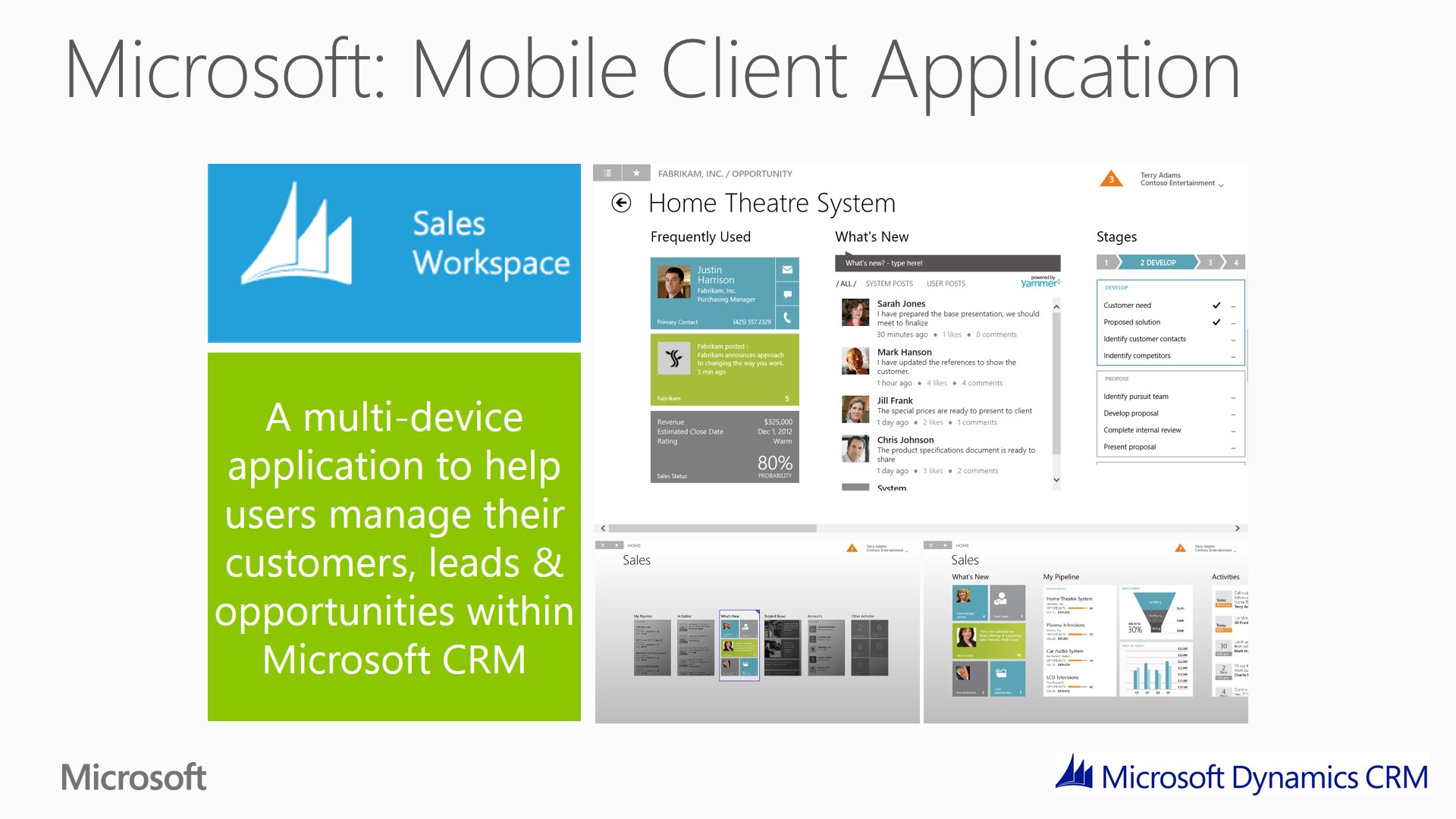
Microsoft: Mobile Client Application

Slide7Example of the sort of touch experiences Microsoft will be shipping in the future. The first examples of which will be available later in 2013

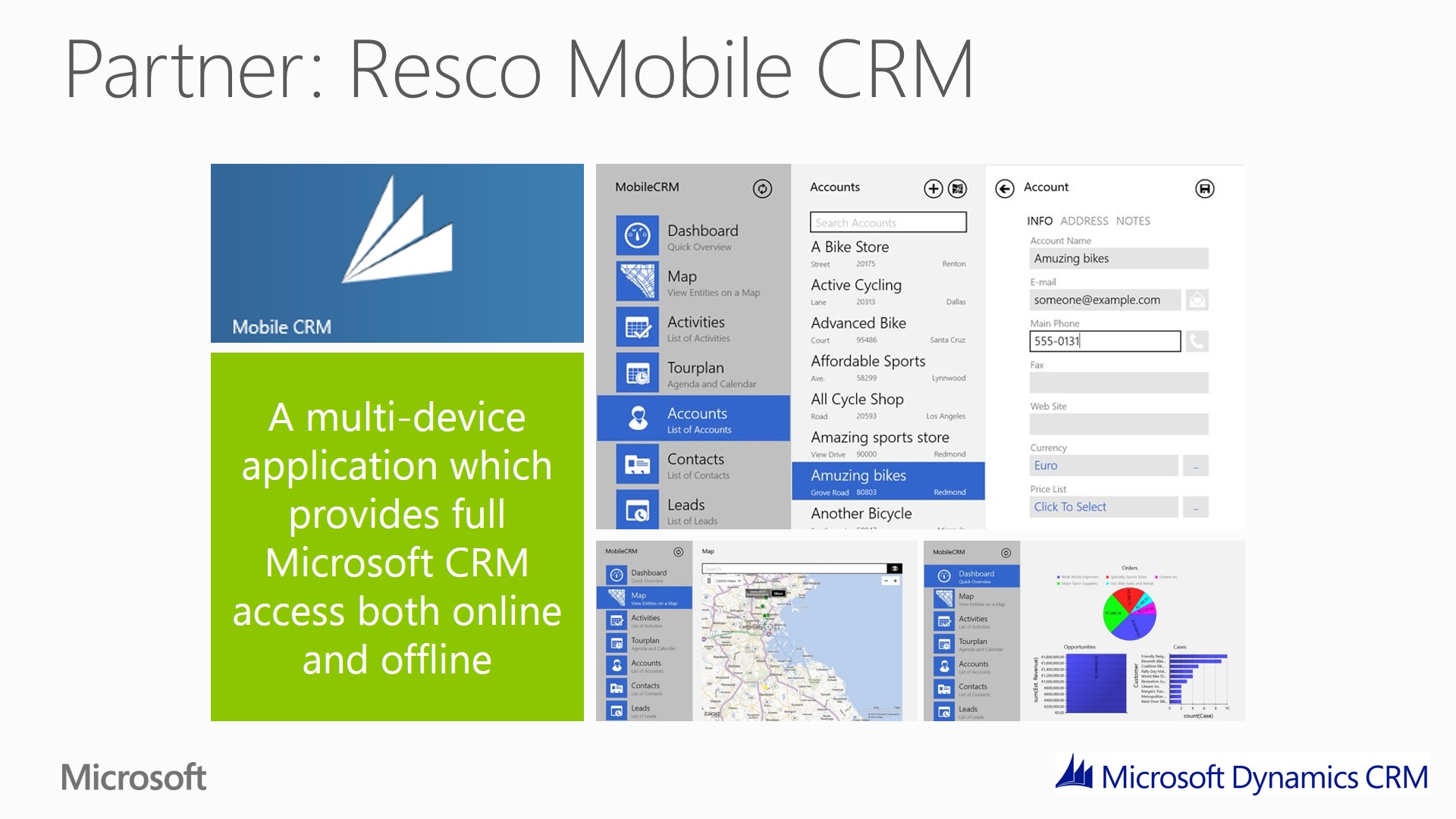
Partner: Resco Mobile CRM

Slide8Resco Mobile CRM provides comprehensive CRM functionality  is available today (free and paid version) on multiple devices (iPhone, iPad, Windows 8, Windows Phone, Android, etc)

Partner: Sonoma Partner EZ Opp

Slide9

Sonoma EZ Opp is a role specific application and is available today (free) for windows 8 devices

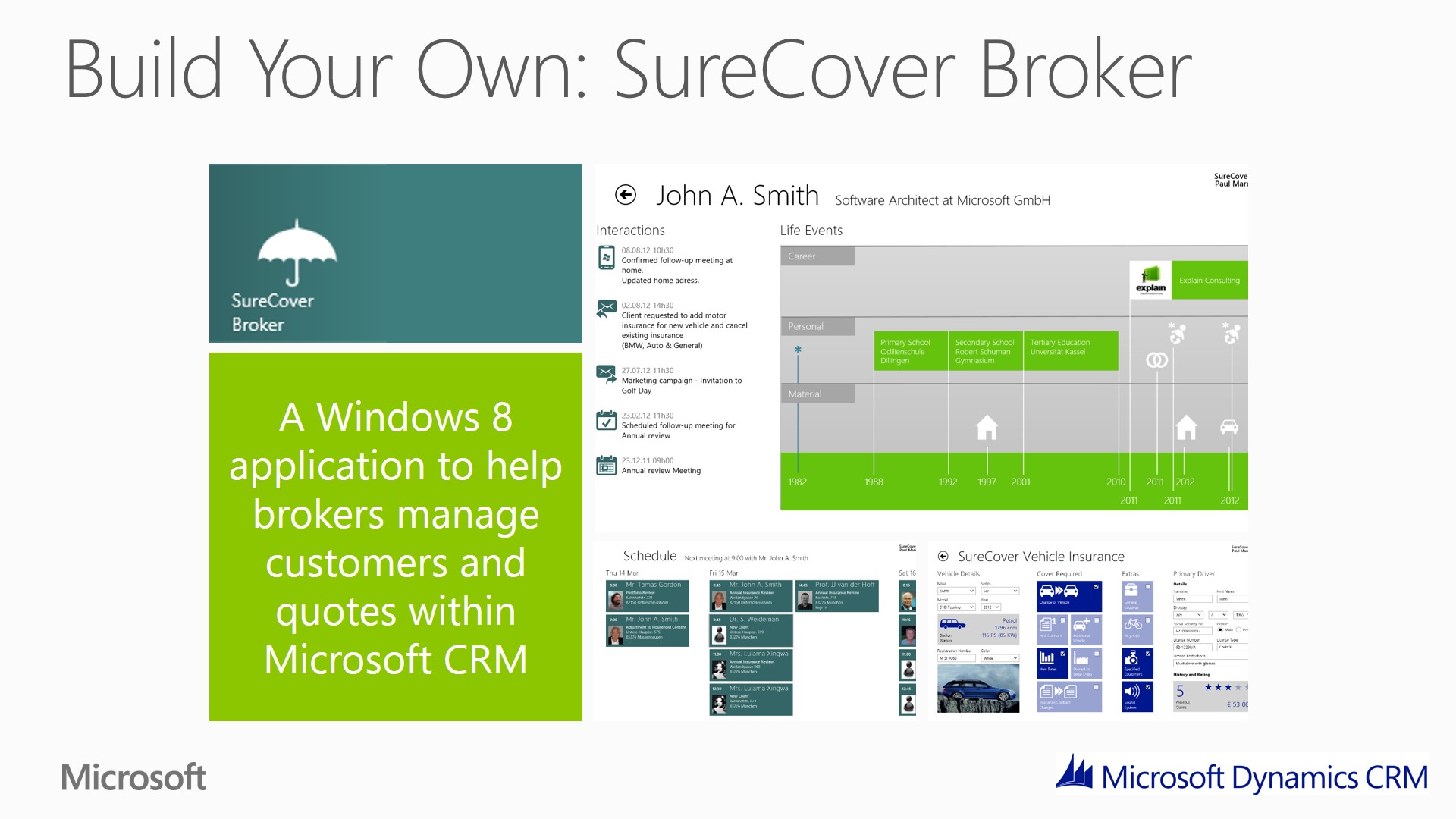
Build Your Own: SureCover Broker

Slide10

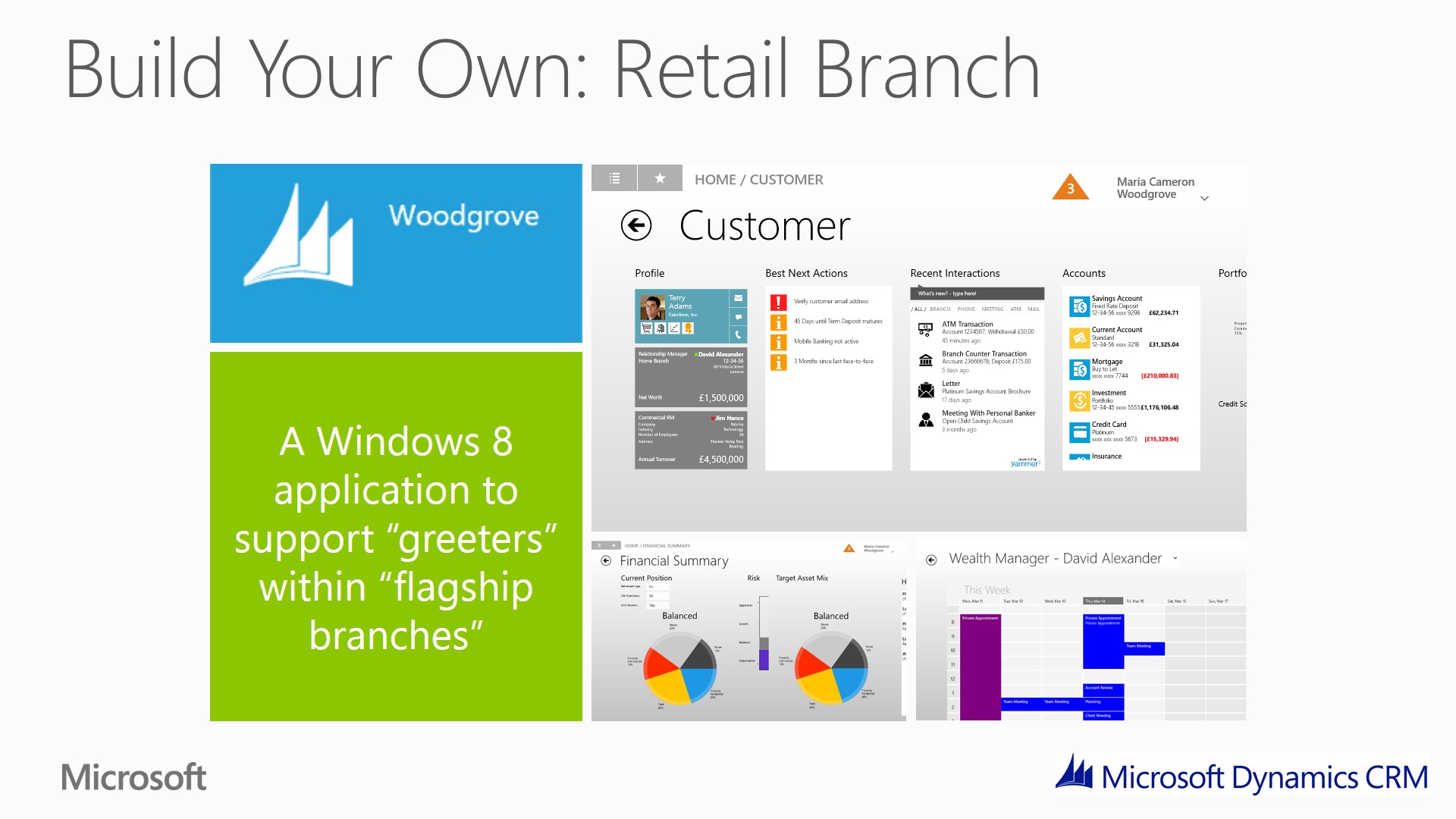
Build Your Own: Retail Branch

Slide11

Summary

Slide12

  • Proactive, intelligent software makes complex tasks simple
  • Work where you want on any device
  • Out of the box or build you own
  • Innovate Applications that deliver specific scenarios of value
  • Bring back personal element
  • Dynamics as a platform One platform for multiple users, for multiple uses, multiple devices
  • Informs, guides and delights users Right experience Right context Right device

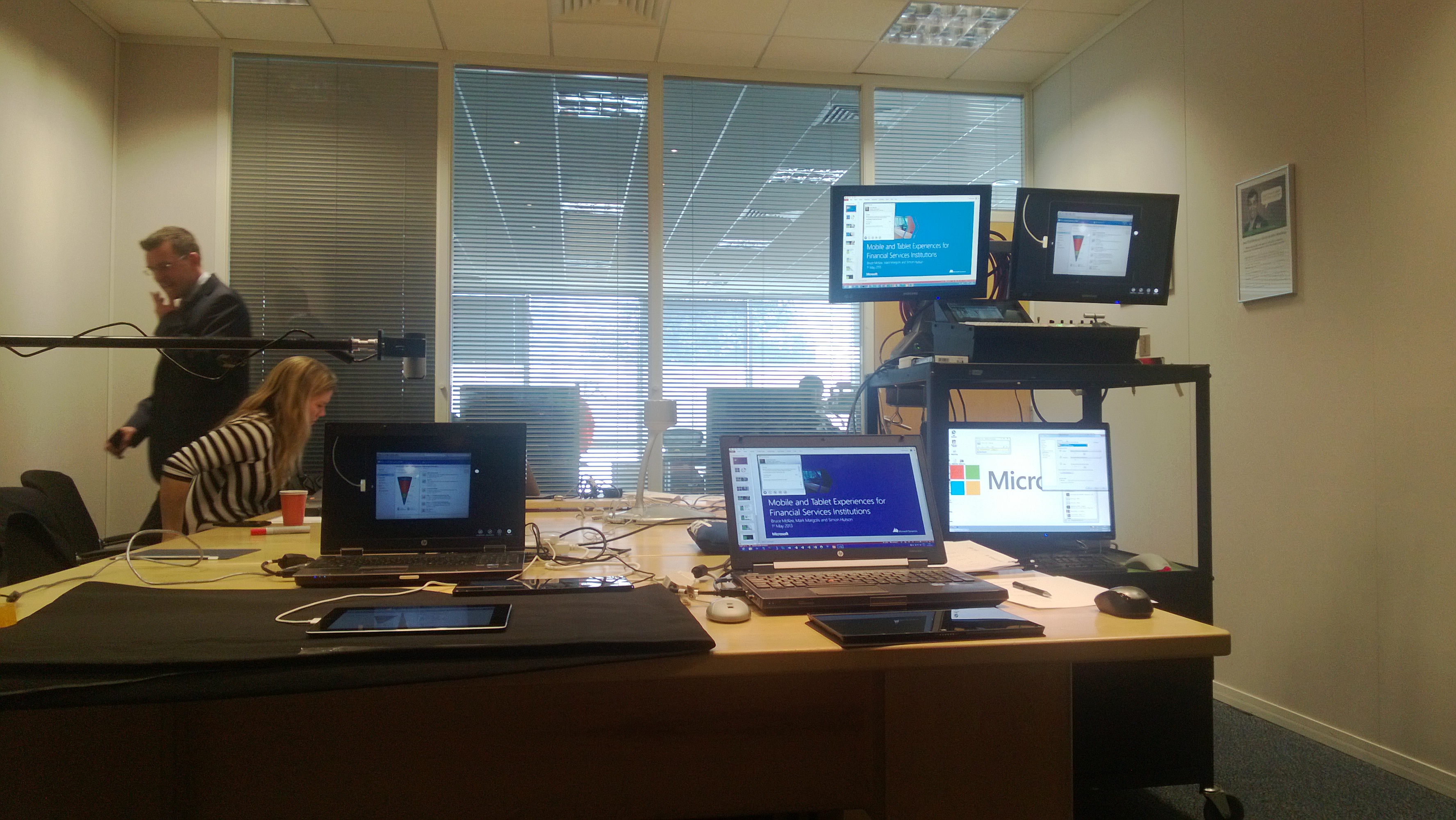
Backstage at the Webinar

?????????????????????????????????????????????

We had an interesting set up:

  • 1 iPad
  • 2 Surface’s
  • 1 iPhone
  • 2 Windows 8 Phones
  • 2 Laptops
  • 1 PC
  • 3 Monitors
  • 1 Video Mixer
  • We used my laptop to present the PowerPoint presentation.
  • We used Simon’s laptop connected to the webcam pointed to the tablet devices (you can see the webcam attached to the mike stand on the left).
  • Both laptops then connected to the Video Mixer (you can see the mixer just below the 2 monitors).
  • The video mixer was then feeding the PC in the rig which is PC that was running Lync (OCS) to broadcast the Webinar to the attendees.

This posting is provided “AS IS” with no warranties, and confers no rights.

Next time on Mark Margolis’s Blog: A CRM Timeline Component

My Top Outlook Features

With the integration of Outlook and Microsoft Dynamics CRM it is difficult to delineate what is an Outlook feature and what is a CRM feature. A colleague of mine (Ian Anderson) says CRM is not integrated with Outlook it is embedded in Outlook, I think that is a great way to think about it.  When I consider the challenges of user adoption in CRM projects I’m always reassured when the users are Outlook users, most of the time they don’t even know that they are using CRM. The advantage of this is often taken for granted but should never been underestimated.

This week I had the chance to speak with Lillian Hiscox, Lillian is a solution specialist in the productivity (Outlook, Lync, Office, etc) team here at Microsoft. On my way home I stopped by her desk and we had a brief chat about some of the new features coming in Outlook 2013.

What follows are some of my favorite Outlook features.  Some are old, some are new (Outlook 2013), some you know about, others you may not. All make me more productive. In no particular order:

1. My Customised Outlook Environment

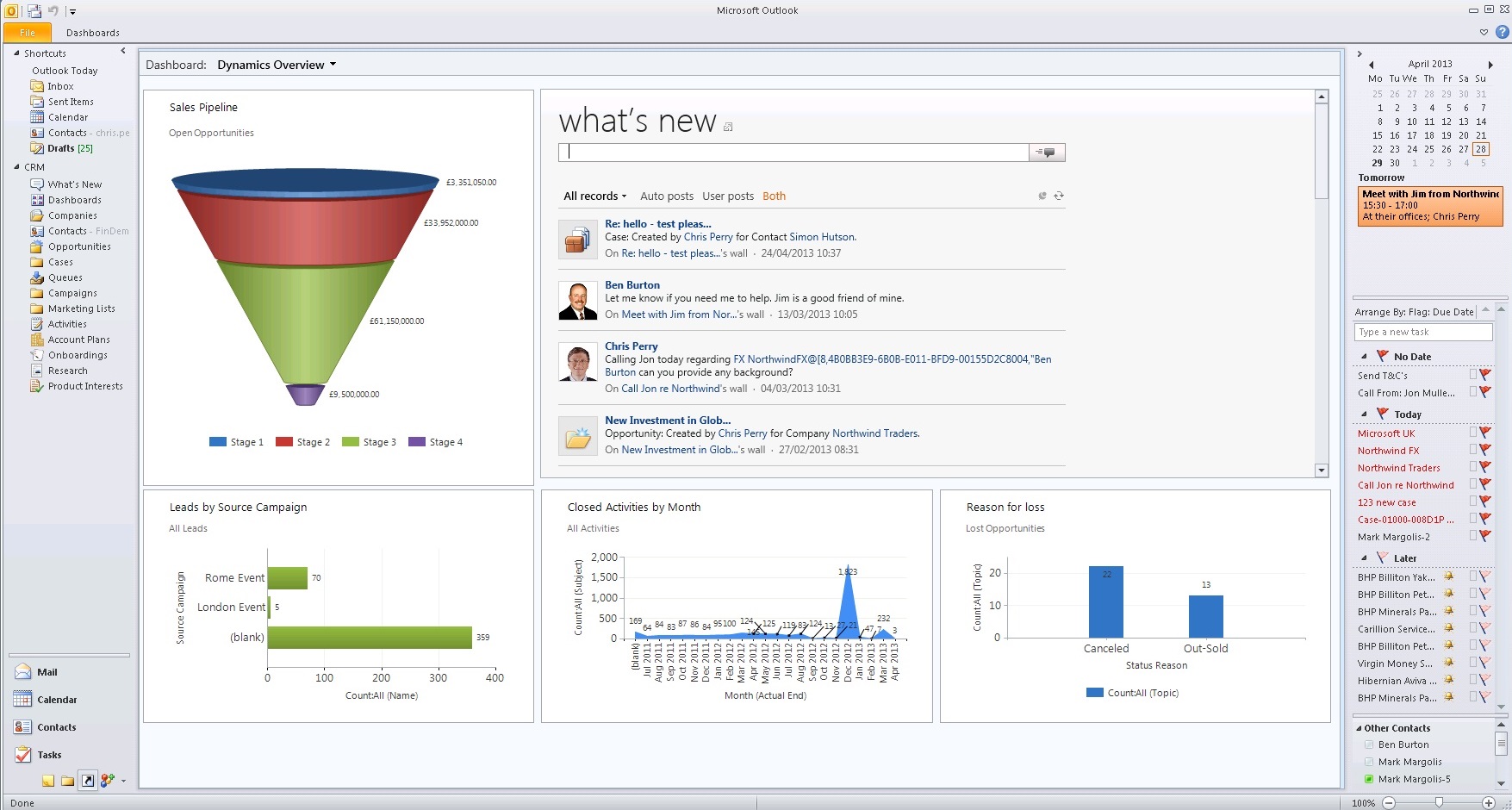
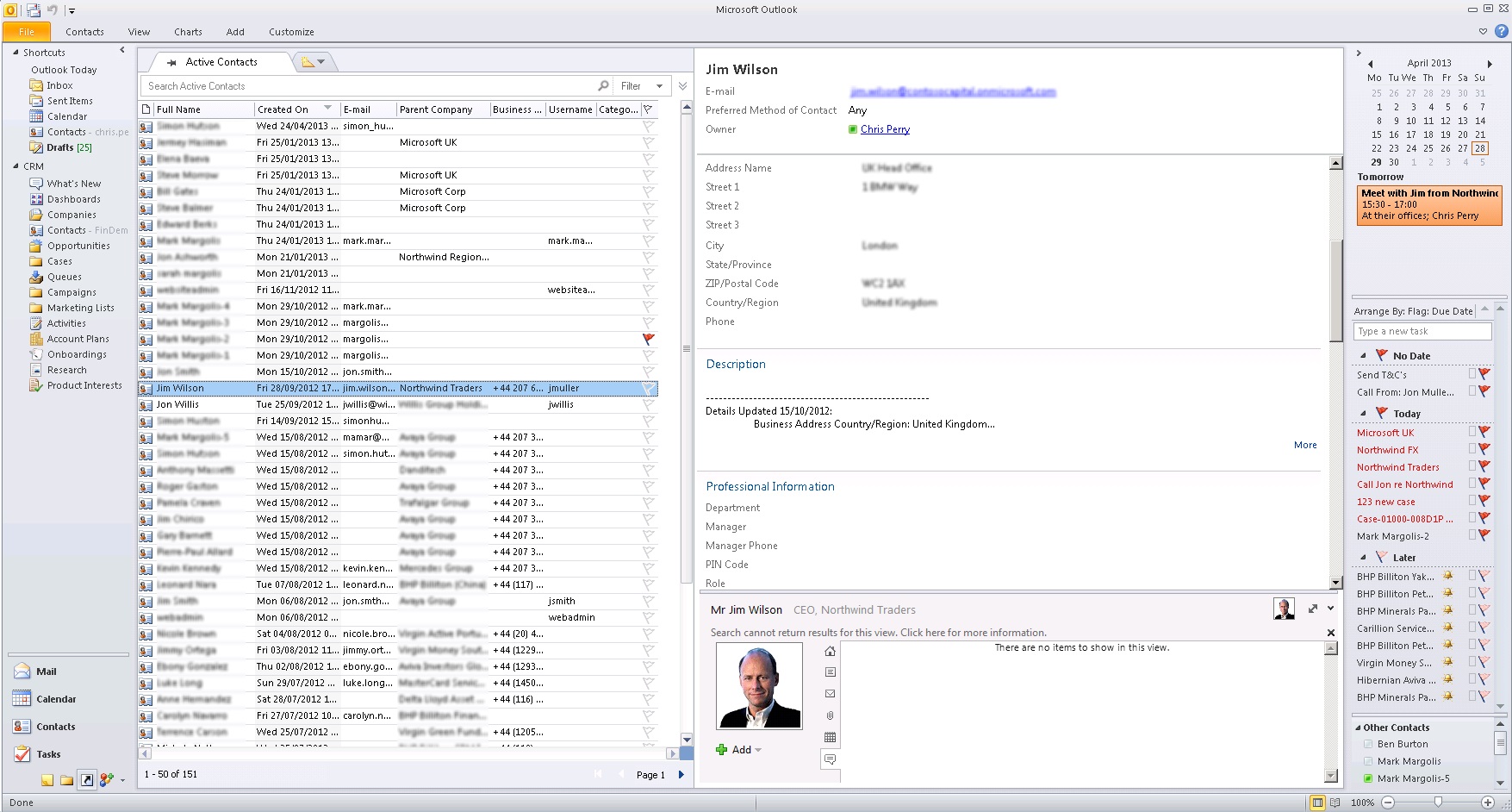
I love the way I can customise my own Outlook. I can choose my own shortcuts, I can remove my own navigation items, I can place my reading panes, I can have everything I need on one page without needing to navigate to different pages or applications. On top of all this, as a user I am no longer thinking in terms of systems, I have Email, Calendar, CRM, SharePoint Document Management and my social feeds all in once place. This is what my Outlook looks like:

outlook1

outlook2

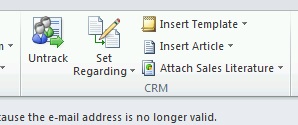
2. Track in CRM (Microsoft Dynamics CRM 2011)

We all know it, it been around for since the early releases of Microsoft Dynamics CRM. The Track in CRM Button (shown as Untrack below) has to be the most productive feature I use. I am using CRM and I don’t even know it. Emails and appointment are tracked automatically and I can personalise the experience based on individual needs (Managing directors or HR can for example turn this off).

trackincrm

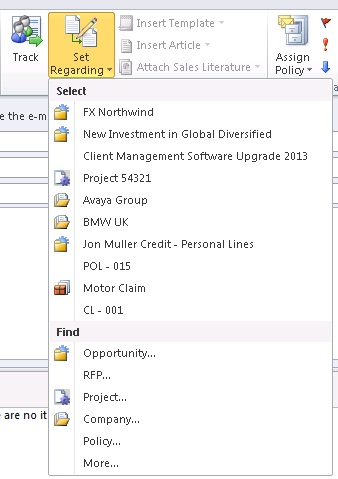
3.  Set Regarding (Microsoft Dynamics CRM 2011)

I use set regarding to tag my emails and appointments. What I really like about set regarding is that it learns the way I work and presents me with the things I am mostly likely to be working on. With one click I can link my activities (tasks, emails, appointment etc) to any record in CRM.

setregarding

4. Attach Documents (Microsoft Dynamics CRM 2011)

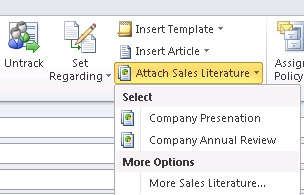
Like set regarding, I can, with one click attach document(s) from CRM directly to my email. I think this is very much an underused feature, but it makes finding and using those common documents really easy.

attachlit

5. Sync Contacts (Microsoft Dynamics CRM 2011)

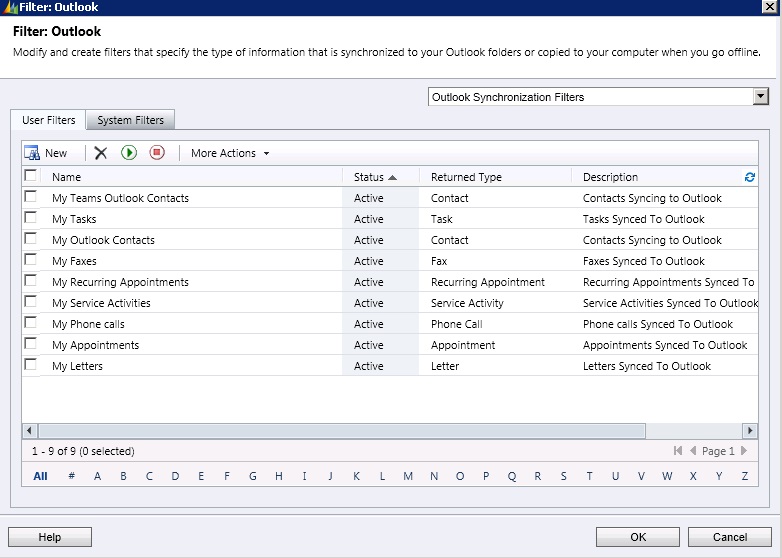
I can choose what contacts I want to appear in my Outlook and if they appear in my Outlook they appear on my phone. I have a custom filter called “My Teams Outlook Contacts”. I use this filter to sync any contacts that my team are talking to in the next 6 months and any contacts that I have already spoken to in the last 6 months. This way even with years of meetings and emails, only the most relevant information appears in my Outlook and Phone. Because my CRM system is integrated into Outlook I no longer care about where the contact or appointment is created. It simply appears when I need it most.

outlooksync

6. Pin records to Outlook (Microsoft Dynamics CRM 2011)

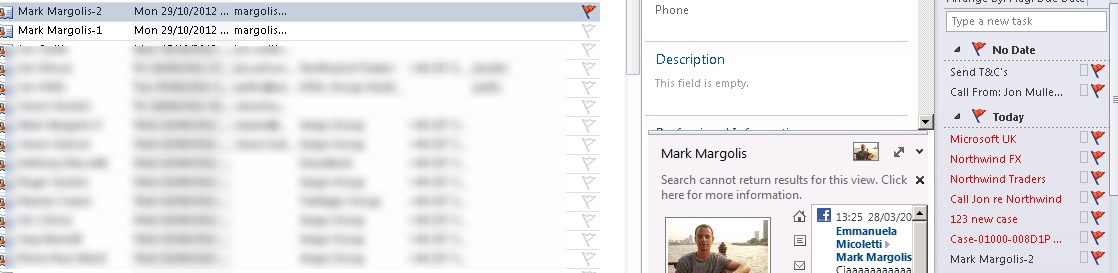
I don’t have the best memory in the world so I run my life with lists. And post it notes (or I used to). Now I simply pin items or tasks to my Outlook, they sit comfortably in my to-do panel in Outlook. These can be emails I need to send, tasks I need to do, Contacts I need to remember, Opportunities I need to work on  (any CRM record really). In the example below you can see how I have pinned a record (see the red flag) so that it appears in my to do list on the right pane.

pinitems

7. Insert Calendar

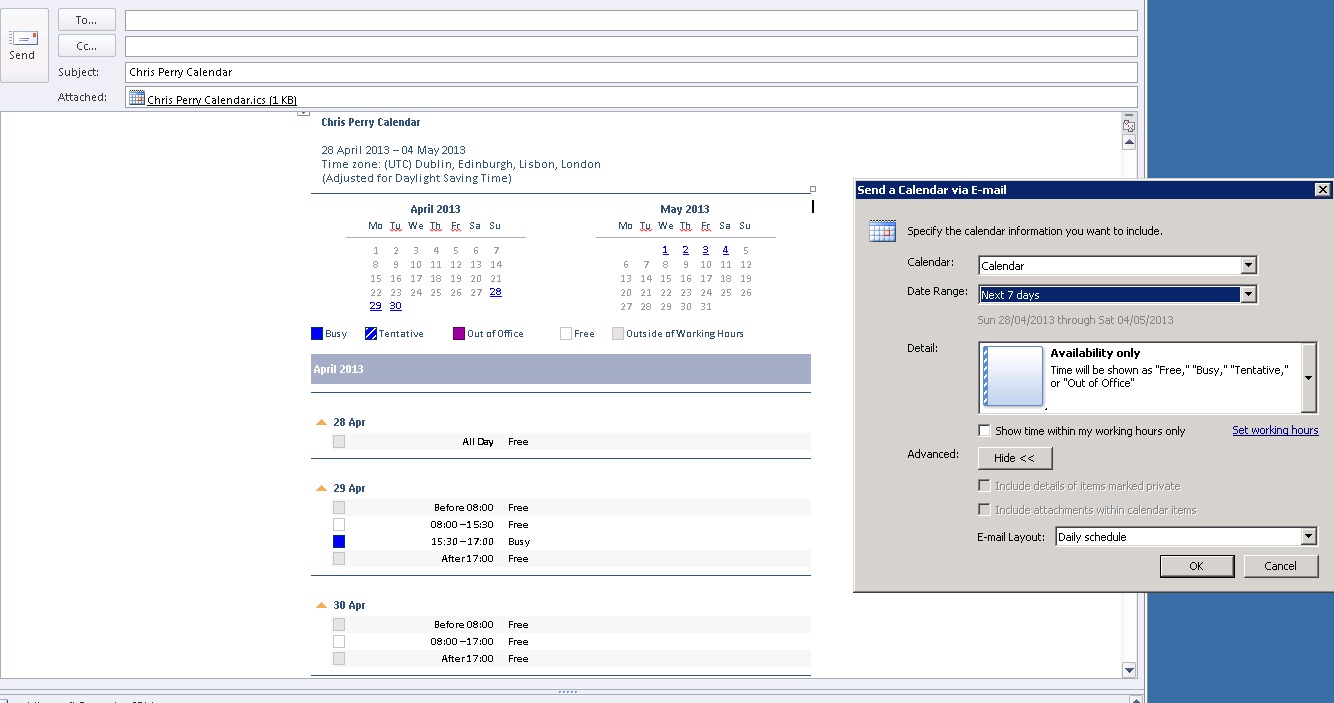
Arranging meetings can be a hassle, and it is unproductive, so to make it easy I insert my calendar directly on my email so people outside of my organisation can see when I am free (From the ribbon select insert calendar). I keep total control of my diary and I can also keep my meetings private.

insetcalendar

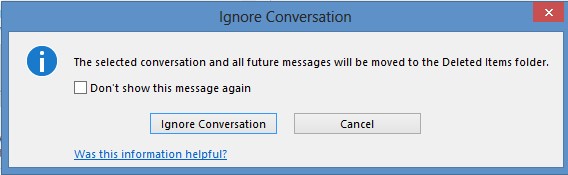
8. Ignore Conversation

Sometime I am cc’d on an email and I don’t really need to be part of the conversation. When that it the case I use the ignore feature that automatically moves subsequent emails on the trail to my deleted items (right click on an email and select ignore).

ignore

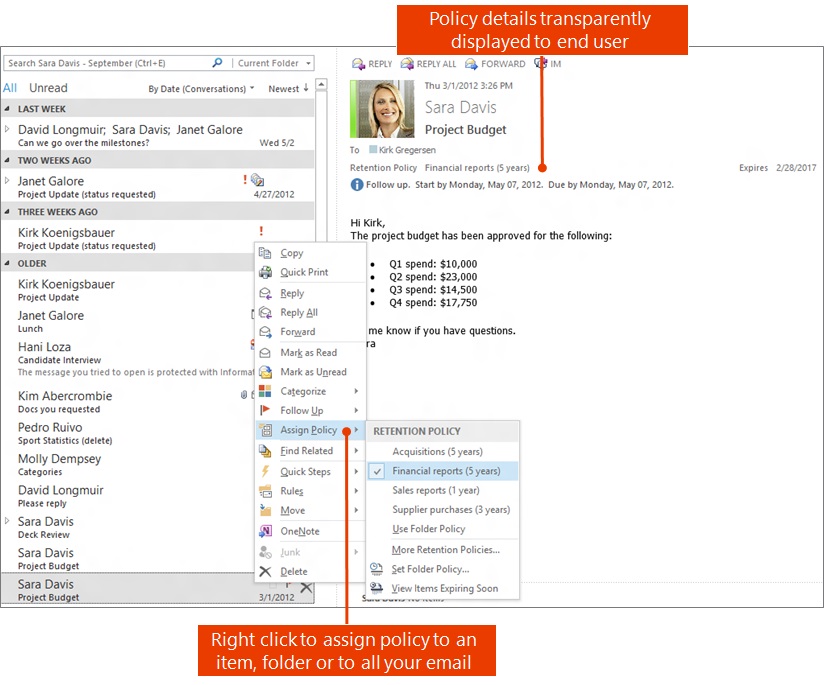
9. Assigning Policy Details (Retention Policies)

With Policy details I can easily select one of more emails and determine how long I want to keep emails. Organisations  can define their own policies based on best practice and all I need to do is say how I want the email(s) to be treated. For example I can select and email and ask Outlook to automatically delete after it 30 days. That way I know that if I need it in the short term it will be there but it is not going to clog up my email system in the  months to come.

retentionpolicy

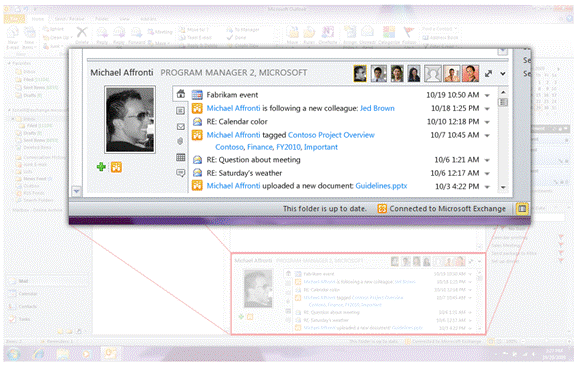
10. Outlook Social Connector

If you haven’t installed it yet, then I recommend you go and get it – you won’t look back! It is available to download from here. When you install the Outlook connector can specify the services you want, such as LinkedIn and Facebook. I really like the fact that I can be writing an email to a client. I have all the latest information on the client because the contact record is synced to my Outlook and directly in the email I can see the information that the client is posting on social networks

clip_image002_thumb

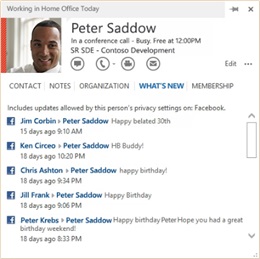
11. Social feeds on the Outlook Contact Card (Outlook 2013)

The Contact card in Outlook has been substantially improved. Among other improvements you access the contact card by simply hovering over a contact (or email address) in Outlook. In Outlook 2013 this now includes the ability it see the social activity from services such as Facebook and LinkedIn directly within the contact card.whatsnew

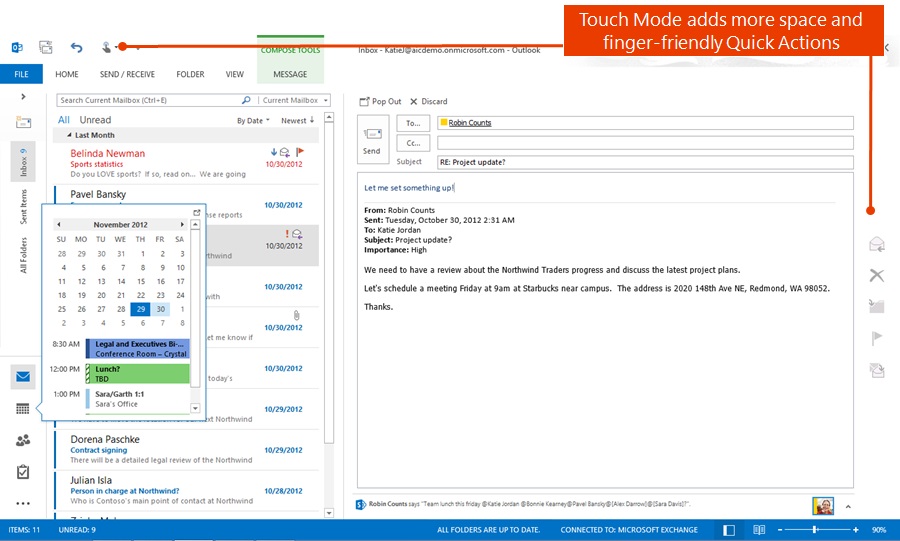
12. Touch mode / non touch mode (Outlook 2013)

With Outlook 2013 I can switch between touch and non touch (normal mode). This means that when I am using my device as a tablet I get an experience more suited to gestures (such as bigger buttons) and when I return to docked or the keyboard I can go back to normal usage. I really like the fact that I can use the same software and tools and they can be tailored to the way I want to work.

touchmode

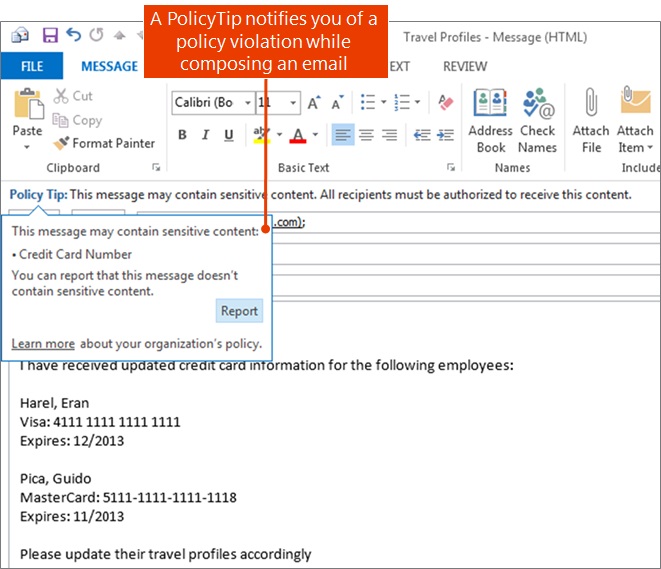
13. Policy Tips and Violations (Outlook 2013)

With Outlook 2013 you can be warned if you are about to send sensitive information in an email. Information such as credit card information can be detected within the email  and outlook will want you about the potential  policy violation.

policytip

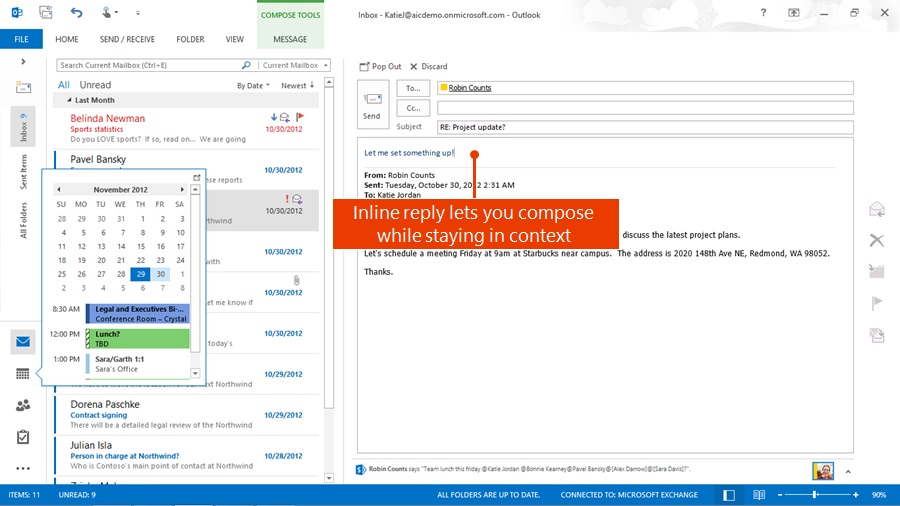
14. Inline replies (Outlook 2013)

In Outlook 2013 you can hit reply and no more popups!

inlinereply

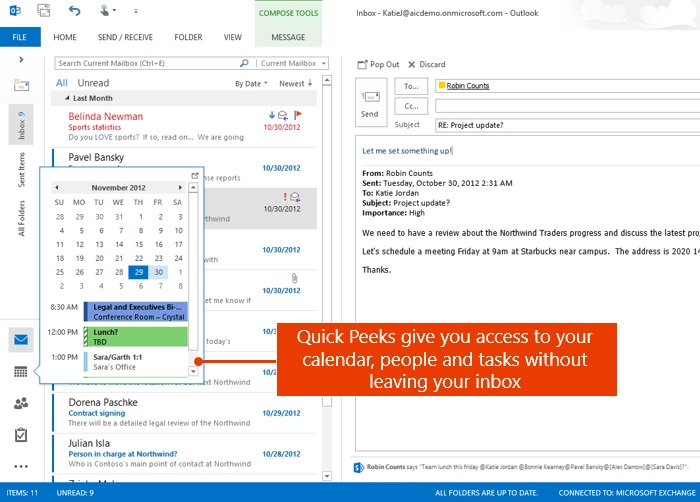
15. Quick Peaks (Outlook 2013)

This is a real time saver. Organising meetings is a real pet hate of mine, if you concur then you’ll like this. Quick Peaks allow you to hover over your calendar and within the same window you can see what appointments you have. You don’t have to switch windows you can be working right within your email.

quickpeaks

16. Suggested Appointments (Outlook 2013)

If in the email it has a date and if you are busy Outlook will suggest an alternative time in your calendar that you are free.

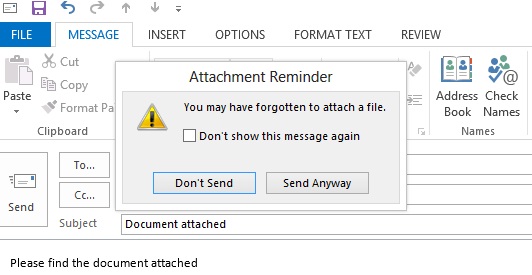
suggstedappointments17. Attachment Reminder (Outlook 2013)

We have all been here! Now Outlook will detect certain words and if there is no attachment it will warn you before you send the email.

docattach

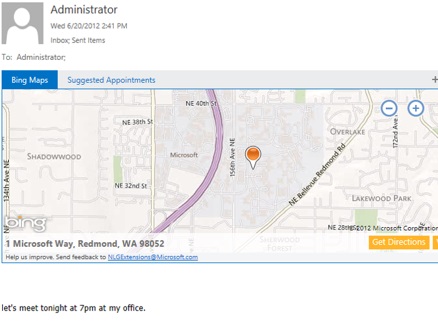
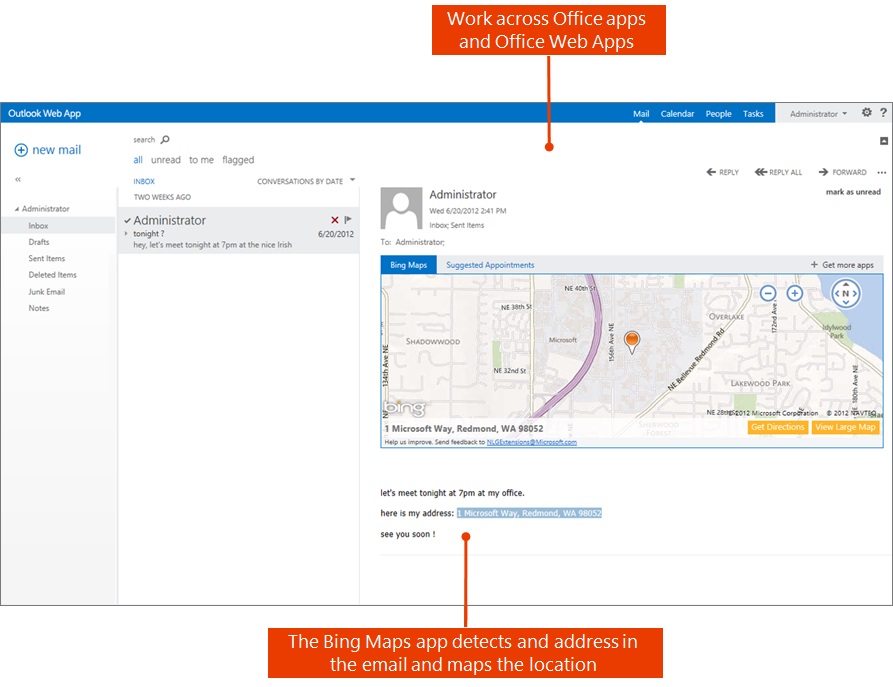
18. Bing Maps (Outlook 2013)

The Bing maps app can detect an address right with the email so you can see exactly where you need to go.

bingmapsoffice

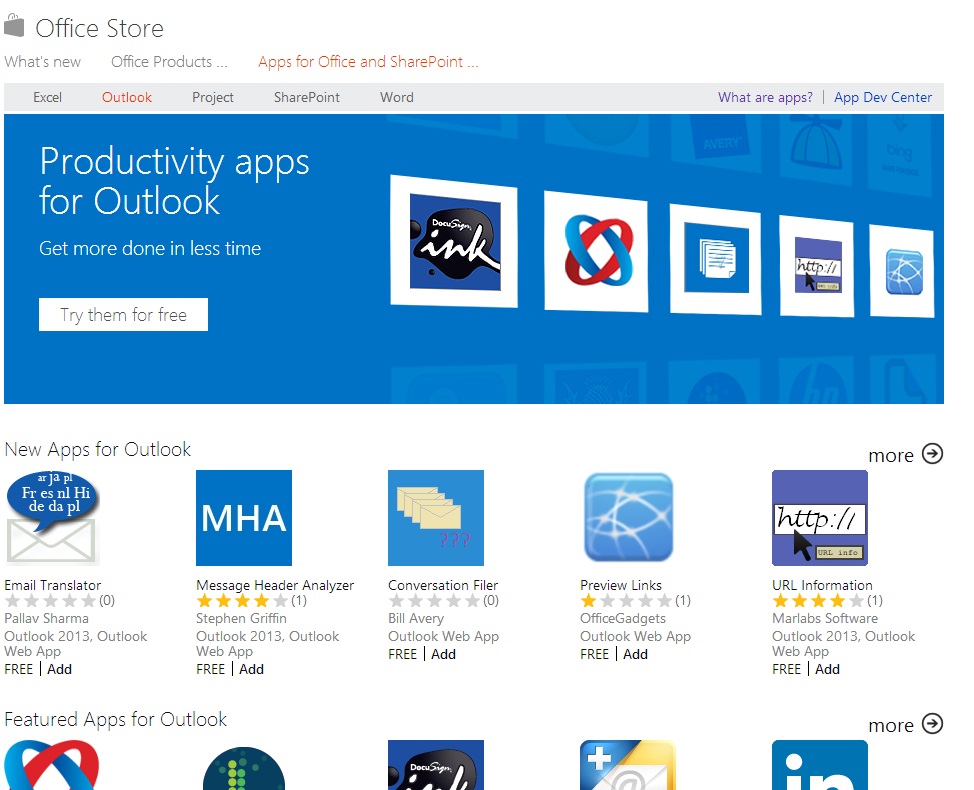
19. Office Apps (Outlook 2013)

One of the biggest announcement of the new office is its extensibility. It is very east to build, download and use these add-on applications within Office. You can find out more here.

officestore

That is it for this week. I hope there was at least one or two features that you where not aware of (or forgot about) :-). Please suggest any features you use below, Outlook is such a feature rich application it is difficult to know everything it does!

This posting is provided “AS IS” with no warranties, and confers no rights.

Next time on Mark Margolis’s BlogWebinar: Mobile and Tablet Experiences for Financial Services Institutions

CRM for Investment Banking – A summary

CRM in Investment Banking

Last weeks blog about demo tips proved to be very popular, I was given a lot of suggestions so I will be updating this article again soon (from a salesperson perspective). This week’s post is about CRM in Investment Banking. I work in Financial Services and one of my primary responsibilities is to help financial institutions understand how CRM can have a significant impact to their business and specifically how Microsoft Dynamics CRM can achieve this. One way of doing is this is to never mention the term CRM, but that’s for another post!

This will be a first in a series of posts. I loosely categorise my clients into Investment Banking, Asset Managers, Corporate Banking, Commercial Banking, Retail Banking and Insurance. I will write a post for each one of these sub verticals.

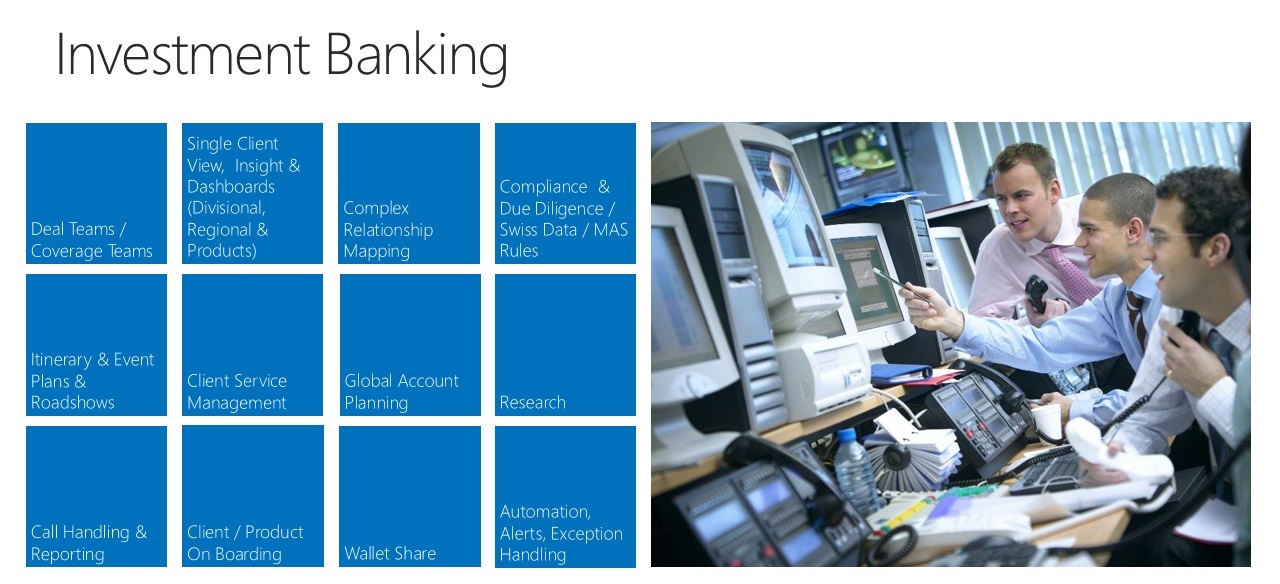
I created the following slide to use when I visit an Investment Bank, I use it to illustrate what other organisations are doing or are looking to do with CRM. It helps me provide context for the discussion and (hopefully) makes it more relevant. There is nothing truly insightful here, but it is a good way to start a discussion or demo.

CRM Investment Banking

I will also do a post on what an Investment Bank is but for now just be aware that an Investment Banks can provide the following products and services:

  • Advisory services (Corporate Finance, M&A, IPO’s, Restructuring, Research)
  • Financing (Lending, Debt Finance, Asset Finance, Syndicated Lending)
  • Global Markets (Foreign exchange, Money market, Interest rates, Credit trading; Equity derivatives)
  • Transactional services (Cash management payments, receivables, liquidity management, Custodial & securities services)
  • Real Estate (Real estate investments; Real estate finance)
  • Wealth management & Asset Management ( Institutional banking services; Offshore banking services; Private client services; Trust & fiduciary)

These are just some of the offerings, if you want more information on these then take a look here ; the products and services page from an Investment Bank.

Before I talk about how CRM can be used and how other organisations are using CRM I thought I would highlight some of the key trends and issues that I have seen in Investment Banking:

  • Lack of Growth – It is no longer just about more clients, it’s about more profitable relationships
  • Many complex back office applications that are not integrated – Lots of best of breed apps that are not integrated, some bespoke, some legacy
  • Client Expectation – Need to reduce costs whislt impoving client service, transparancy and accountability
  • Regulation and Compliance – auditability of interactions, flexibility to change, control of data
  • Consumerisation and ubiquity of access – mobile, tablet and remote working
  • Increasing complexity of products and market velocity – Increasing client expectation
  • Simplification of process and systems – Best practice with flexibility

This is then underpinned by some of the key technology trends such as:

  • Big data
  • Analytics
  • Mobile
  • Cloud
  • Platform

The good news for us who work with Microsoft Dynamics CRM is that we have a  great cohesive story to tell for all of the above.

What follows are some examples of what Investment Banks are looking to do with CRM:

Deals Teams / Coverage Teams / Activity Tracking – Ability to define entitlement rules with teams managing clients and deals with a significant degree of granularity. They want the ability to maintain control of their data yet still have the flexibility to share data across different users in teams for collaborative selling.  Ability to manage activities (call reports) and report on total client interaction. Collaboration is a key factor, Investment Banks needs to be able to collaborate due to the complexity of coverage (products and region). Collaboration enables banks to provide a better more informed service to their clients. Often these collaboration applications fall outside of the CRM system and process; this is not an effective way of working. A good CRM system should pull this information into the client workflow.

Single Client View, Insight & Dashboards (Divisional, Regional and Products) – The ability to see a single client view across different divisions, regions and products. Dynamics can provide the integration layer across back office systems (integration or view). This is what I often call the “single point of entry”, which is to say that Microsoft Dynamics CRM  becomes the “authoritative source of data” the place where people go to see client data with confidence. Microsoft Dynamics CRM does not need to be the golden source but it does surface this information in a single user interface. We have seen great success in user adoption because we are removing multiple applications and replacing it with Outlook (or the web client for those who do not have Outlook).

Complex relationship mapping – The ability to store and view the complex relationships from the Investment Banks perspective as well as from clients and any third party relationships that might be involved in the deal or relationship. With large customers having multiple touch points across regions and across products, Investment Banks needs to quickly see who is talking to who. They want to avoid duplication of work, data and calls to the client.

Compliance & Due Diligence / Swiss Data / Monetary Authority of Singapore (MAS) –  Regulations are constantly changing and these regulations put massive restrictions on the business. They need the ability to satisfy these compliance rules (client data & KYC) and need to make sure that their data remains safe behind their firewall and in region. Whilst Microsoft CRM can be deployed on premise, cloud and hybrid cloud it is the ability to deploy to their own data centers in region that give Investment banks complete control of their client data. Should regulations change then they still have the flexibility to move to the cloud on a case by case basis.

Itinerary & Event Plans &  Road shows – Managing road shows and events, making sure that senior executives are visiting the right clients in the most efficient manner has traditionally be done on an ad-hoc and manual way. Automating the process, having this data in CRM and maintaining a single view with complete client interaction in CRM gives Investment Banks the ability to simplify the process and reduce the cost of service.

Client Service Management – Client expectations are increasing, the drive to more profitable relationships mean that Investment Banks need the ability to manage client efficiently and effectively. Making sure that the most profitable relationships are receiving the best client service possible is increasingly important. Segmenting their coverage of client means that account teams and relationships managers are always in control.

Global Account Planning – Managing large clients with relationships across the globe and across multiple products is a challenge, Investment Banks need to be able to align objectives across products and divisions. Typically account planning has been done on Excel spreadsheets with each division and each region using slightly different templates. Having this data in disparate systems means there is a lack of  consistent process and it becomes difficult (if not impossible) to analyse and provide insights. Investment banks need the account planning process to be built in or surfaced right within the client record so that the relationship manager and stakeholders not only have a single view but they have insight into the plans and can implement best practice.

Client & Product On-boarding – The client on-boarding process if often managed by legacy applications or bespoke software that is costly to maintain and difficult to change. Credit checks, Anti Money Laundering (AML) , compliance and operational process are often held in a black box with no visibility to the extended client team or relationship managers. Reducing time to value is a key metric yet difficult to improve because of the lack of visibility. Dynamics CRM exposes this information so that it can be automated, alerts created and actioned.

Wallet Share – The drive to more profitable clients means understanding the wallet share of each client. The complexity of large institutions under multiple legal entities, on multiple products and platforms in many different regions means that this information is complex. CRM helps to map legal entities with the relationships so that information can be aggregated and provided to the relationship managers. This information is often held in back office systems but with Microsoft Dynamics integration capabilities this means that the data can be surfaced within the interface yet still managed and maintained in the back office system.

Automation, Alerts and Exception Handling – With the wealth of information available and the need to move faster, rising client expectations and with frankly less resources than before, Investment Banks are looking to automate as much as possible. Rather then manage each process it is about surfacing issues when they occur and manage by exception.

The above is by no means comprehensive and I’ll look to add to this in the future, for now I hope it provides some insights into CRM for Investment Banking. If you find this article interesting then you might like to read my previous post on XRM in Financial Services.

This posting is provided “AS IS” with no warranties, and confers no rights.

Next time on Mark Margolis’s Blog: My top Outlook features

CRM Demo Tips, Do’s and Don’ts

I have been doing software demonstrations since the day I started working over 13 years ago. Whether that was demo’s to internal stakeholders to provide them with project updates or to clients or prospects I have been learning techniques for improving demo’s ever since. I have had the privilege of working with some of the best pre sales people in the business, from the team here at Microsoft to the dedicated people at our partners and they been kind enough to provide some of their insights in this post.

Demo’s are a critical part of the sales process. The demo meeting is a great opportunity to establish credibility, a rapport and a relationship with the client. There is a lot riding on the demo and often you only have an hour to meet your objectives (see objectives below). In truth you realistically only have  twenty minutes to establish yourself, after which it is unlikely that everyone is paying as much attention as you’d like.  It’s important that the client remains engaged and for this reason you need to relate the software to their needs rather that you just showing off all the feature of your toys (most are probably irrelevant to the audience anyway). It is fine (often preferable) to leave the client wanting more.

If you are still unsure as to the importance of the software demo, then listen to Ed Thompson from Gartner , I was talking to him recently and it was interesting to hear how many CRM purchasing decisions are made based upon how the software looks and what the prospect remembered seeing.

People buy from people and they remember visuals.

I’m surprised how little time is spent on understanding the clients needs and relating the demo to specific ways the product can meet their needs. The objective of a demo is not necessarily to win the work there and then (though it is a major influence) but to inspire enough confidence in you, the company and the product to get to the next stage. To do this you need to listen. I have been in many sales meeting where sales people get caught up in their own world and end up talking far too much about the product or the company.

For the purpose of this post I am going to assume that you are interested in client or prospect demo’s, however much of this is relevant for internal stakeholders also.

Demo objectives

When I demo I try to achieve the following objectives:

  • Help the client understand how the software can solve their problem today – the business value
  • Help the client understand that their problem can be solved at a reasonable price and in a reasnoble time frame – the return on investment
  • Help the client understand how the software is flexible enough to continue to solve problems in the future (even things that they don’t know about yet) – the flexibility
  • Get them excited about the product and wanting more – the relevance
  • Gain their trust and faith to take it to the next level (whatever that might be). –  connect with the audience.
  • Address and eliminate issues or pre conceived concerns that they might have about the software

I do this by:

  • Listening to the clients requirements and needs so I can tailor the demo and make it relevant to the individuals
  • Spend enough time during the demo so they get a good overall view of the product against their requirements but not too much that it gets boring
  • Allow time at the demo for Q&A and discussion

My top three four Tips:

  1. Prepare, prepare and prepare some more
  2. Make it relevant
  3. Keep it simple
  4. Have a backup plan (assume something is going to go wrong, because it will!) prepare a click though like a PowerPoint deck. When it does go wrong, don’t panic, be calm, compose yourself and carry on.

Here are the five steps to delivering a successful demo:

  1. Discovery call
  2. Verification
  3. Test & Rehearsal
  4. Delivery
  5. Follow-up

I am going to break these into things to do before, during and after a demo.

Before the demo – do the preparation work

It is all about the preparation, you should be spending the vast majority of your time at this stage. You should be working as a team, set clear expectation with the sales team on what you want from them:

What I expect from the sales team:

  • Brief on company background
  • Who their clients are
  • Who is attending and their roles
  • Why are we seeing them – who initiated the meeting
  • What systems do they have in place
  • Expectations of meeting (both sides)

There should always be sales and pre-sales at engagements, sending in one without the other is likely to be a waste of time and will diminish credibility no matter how experienced you are.  A sign of a successful demo is one where the sales person says relatively little, this means that you are engaging the customer and he or she has no need to “fill the gaps”. It is the responsibility of the sales resource to get the right people in the room (decision makers and influencers) as a pre sales resource it is your responsibility to sell to them effectively. Remember business resources buy CRM solutions, if you are sat presenting to a load of IT people, your sales resource has failed to engage properly and get the right audience in the room. Avoid arranging a combined meeting with Business and IT the objectives and language used will be very different and it is likely that both audiences will leave disappointed.

Discovery Call

Do some research, find out as much as you before the meeting, get an understanding of their competitors, their customers, their industry and the purpose of the project. For example interview or discovery questions see my post on CRM Workshop questions. If possible, try to arrange demo’s in functional groups so demos are more targeted to the how they would use it. Once you have had the discovery call, design the demo story you should verify your proposed script with the client (see the next section).

Try and get screenshots of their existing system or even a demo. Don’t try and rebuild their exiting system when you tailor the demo, focus on the most important scenarios. Instead, make sure that the elements you are going to show are relevant, that the data is correct, perhaps mimic a report and add real users.

Prepare a very short presentation to set the scene and objectives of the demo. Keep the number of slides to a minimum (I try to keep it under 5), don’t use PowerPoint as a script for the meeting, if you need to be reminded about things to raise then use cards instead. Imagine that you lose a certain % of the audience’s interest for every slide that you add. Try and turn the demo into a story, a day in the life of (role) is an effective way to show software and relate to their business. Use the slide to visually depict the process/scene they are going to see. This will help them follow the demo and stop you losing them part way through

Verification Call

Once you have a good understanding on the requirements, design an outline demo and arrange a call to verify these requirement and verify that your proposed scenario is appropriate. If possible and if it is appropriate to do so, do a dry run with the client. Confirm the logistics for the day:

  • Location
  • Duration of the meeting
  • Number of people
  • Audience Type
  • Projector or Screen
  • Internet Access / Wifi
  • Languages (you may need to compensate any language issues by speaking slower)

Test & Rehearsal

Go through the proposed demo and make sure it becomes natural, remove elements (such as fields/navigation items) that you are not going to show to make it relevant. When you are rehearsing make notes of any data that doesn’t look right, continue to refine until you are 100% confident. Time the demo and make sure that each scene is of appropriate length, cut anything that is not essential. If possible I do a silent run an hour or so before the demo, this really helps me make the real thing feel natural.

Create a demo cheat sheet, you can see an example one of these on my post A sample Microsoft CRM 2011 Demo Script.

Remember, make sure that your demo relates to their specific scenario and industry. Make sure that every screen you are going to show them has good data, each report is populated and charts / dashboard make sense.

During the demo  – keep them engaged

If you are sufficiently prepared, this is the fun part, this is your chance to put on a show. If you know the customer, know your demo and you believe in your solution and you can deliver this with passion you and your audience will get the most out the demo. Be confident but do not patronise the audience.

I love going into meetings with the belief that I have a solution to their problem. It is why I do what I do.

Delivery

Deliver the short presentation to set the scene and objectives of the meeting. Use  the Tell – Show – Tell technique:

  • Tell them you are going to show them
  • Show them
  • Tell then what they have just seen

Work as a team, the sales person should be watching the audience closely  and should help guide you if he or she feels that the audience is not engaged. As the sales person to make a note names and job titles and make sure that any questions or follow ups are written down.

Tip for the sales person: Don’t interrupt the demo unless you really have something to add of value. Interrupting the flow or labouring a point already made can not only put off the pre sales person but it is likely to annoy the audience.

When you are delivering you demo here are some things to do and some others to avoid.

  • Do arrive early
  • Do tell / show / tell
  • Do set expectations at the outset, explain that this is just an example day in the life of (role)
  • Try and stick to the script, answer questions if they are easy. If you leave questions to the end make sure you address it
  • Speak their language
  • Speak slowly
  • Try and sit in a position where you can gauge body language and engage in eye contact
  • Always assess the room, are people engaged, draw them in with questions
  • Keep an eye on the time and be respectful of their time
  • Keep the mouse still (stop waving it around the screen such as when you want to highlight a field  –  it is really distracting)
  • Be confident but don’t patronise the client
  • Use real life customer stories, examples and metrics
  • Avoid too much time in company background (5 mins max)
  • Avoid talking without listening -it’s their meeting not yours
  • Avoid just showing them the latest features because your bored of the old ones – show them the most important and relevant features / benefits to their problem.
  • Avoid sitting too close to the screen, give the client the best view
  • Avoid rushing the demo, if you are overrunning cut something out if you have to
  • Avoid going off script and know the limitation of you demo. If you get a question, answer it verbally, you don’t have to show them.

After the demo – follow up

Be critical of yourself and make notes of what went well and what didn’t whilst it is fresh in you mind. Get feedback from your team as they would of picked up things that you would not notice. There might be questions you could not answer or did not have time to answer. Go through these with the sales person and get the answers as soon as possible. Discuss and examine how the meeting went from the perspective of the audience, for example:

  • What was their body language
  • Did they ask questions
  • Did they ask question is a positive or negative way
  • Who is a champion
  • Who is a detractor

Get feedback from the client and arrange a follow up within 48 hours.

Conclusion

When putting this post together I got some great help from friends and colleagues, I would like to conclude with three points (taken verbatim) from one of them that I think sumarises this perfectly (thanks Jamie):

  1. Understand the people – The people in the room are there and giving you their time because they have requirements that aren’t already being met, and these will vary from individual to individual. Ensuring that everyone’s pain points are addressed and they feel engaged.
  2. Understand the business – Inspiring confidence early in the engagement will win the business, there is no shortcut to this, you need to understand the vertical you are selling to, how they operate, terminology, processes and products. Presenting the customer very little in the way of CRM technology but with an inspiring and well aligned story through of their business process will always sell to a business audience regardless of what is on the screen.
  3. Understand the technology – Remember that you are the expert, have confidence and conviction in your knowledge of the technology you are showing, be passionate about the product and don’t let the customer see gaps in the demo. When you are building a demonstration environment it must work reliably and without hanging or errors, understand what you can realistically and reliably deliver in the time you have and show less that works rather than more that breaks.

And finally….

Smile and  have Fun!

This posting is provided “AS IS” with no warranties, and confers no rights.

Next time on Mark Margolis’s Blog: CRM in Investment Banking

CRM Workshop Questions and Requirements Gathering Techniques

Introduction

As a follow on to my CRM Project Scoping post I wanted to provide some examples questions that I use to help me size and get an overall understanding of a CRM project. These discovery questions can help you understand not only the size or type of project but also some of the risks and issues of the project. I’m only providing a general set of template questions here, you will want to tailor your questions to the industry, company and division you are talking to. For a comprehensive set of CRM Questionnaire or question templates then Microsoft Sure Step Methodology is a great place to start. I also refer you to my previous post on Great Books for Software and Product Management.

Before I start I thought I would provide a brief overview of the requirements elicitation process and objectives. I am going to write a detailed post on this in the future, for now a brief summary will suffice.

Remember : there is no one size fits all for all types of projects so you will need to be flexible but that is not to say that you should ignore best practise. Be pragmatic.

The requirements process should deliver assets that:

  • Clearly outline to the client what they want
  • Clearly outline to the client what they need (the difference between want and need can be vast)
  • Clearly outline the priority of these requirements
  • Clearly outline to the developer what needs to be built

It is important that the documentation or artefacts that are produced are written appropriately for the audience. There are different artefacts that are appropriate to business users and others that are appropriate to developers.

The biggest danger during the early requirements elicitation stage is to design the solution before you understand the problem. It is human nature for users to describe their perceived solution to the problem rather than the problem itself. You must be aware of this at all times. It is amazing how quickly you can fall into the trap of solutioneering, make sure you understand the problem and it’s causes first or you are leaving the likelihood of project success to chance.

Primary Requirement Documentation Artefacts:

  • User Stories
  • Use Cases
  • Workflow & Business Process Diagrams
  • Data Models
  • User Interface Wireframes & Prototypes

Preparation & Planning

Before setting up the workshops or one on one sessions make sure you have the right people in the room. Beware of people acting on behalf of other roles (such as  managers or IT). Requirements elicitation is a specialised skill and unless you are talking to the real users your probably going to have the wrong interpretation of the problem and therefore your going to build the wrong solution.

  • Make sure you study the company you are going to see.
    • Understand their competitors and their customers. Understand the industry, what is the history and how have business, technology, regulatory changes affected this. There is nothing more frustrating from a client perspective than feeling like they are teaching the consultant about their business (why should they pay to train you?). It is important to ask questions (even if they seem obvious) but make sure you understand their business as much as you can before you go in to see then. This is a difficult balance because you are going to want to ask seemingly obvious questions (you want to avoid making costly assumptions), so find ways of making sure that you have demonstrated to the client that you understand their business. A brief scene setting presentation on your understanding of their competitors, their customers, their industry and the purpose of the project is a good way of doing this.
  • Tailor and Personalise the questions
    • Make sure the questions you have are tailored to the people you are meeting and be respectful of their time
    • Explain the purpose of the focus group/interview.
  • Listen
    • Listen, try not to interrupt and allow different people to speak (you may need to book 1-1 follow ups).
    • Restate what you have heard to make sure you have understood
  • Why
    • Keep asking why, this will help you understand the root cause and the problem behind the problem
  • Write up
    • Once you have met with the client, write-up the session immediately whilst it is still fresh in your mind.

Before the meeting see if you can get hold of:

  • Organisation Chart
  • Existing Processes or training documentation
  • Existing Application Landscape
  • Example Reports

Sample Questions

Below are a list of sample questions, this list is not exhaustive, I may try and expand on it at a later date. In the meantime I hope this helps. Remember to check out my CRM Project Scoping post and my post on Great Books for Software and Product Management and then find out more on Microsoft Sure Step methodology for more information. Send the questions in advance so they have time to prepare (however assume they won’t prepare).

Background Questions

  1. Describe the objective of the project (from your perspective)?
  2. What is the expected impact to the business?
  3. What is the expected impact to the customer?
  4. What is the expected return on investment?
  5. How will you measure project success?
  6. How will you measure return on investment?
  7. Who do you think will benefit?
  8. How has the problem been addressed in the past?
  9. How do you currently address the problem?
  10. What is preventing you from addressing this problem?
  11. If you don’t implement a solution what is the impact?
  12. How did the problem come about?
  13. Have similar change projects been undertaken before?
  14. Why did they succeed or fail?
  15. Who will be the key users and who are the main stakeholders?
  16. Whose job is on the line? (you might want to phrase this differently)
  17. How will people interact and interface with the system (Outlook, Web, Mobile, Tablet)?
  18. What other Microsoft Technologies do you use (Lync, SharePoint, etc)
  19. How many people will use the system?
  20. Will user adoption be an issue? How will user adoption be enforced, encouraged and measured?
  21. How is this project perceived?
  22. What do you think are the key challenges?
  23. What do you think are the top benefits?
  24. Who are the key supporters / objectors of the project ( you may want to rephrase)
  25. What is the CRM experience of the users?
  26. What is the technology experience of the users?

General Questions

  1. Describe your ecosystem (Partners, Customers, Competitors)
  2. Please describe a typical day
  3. Do you think you have the information you have to run your business or make informed decisions?
  4. How do you measure Client Value?
  5. Do you track information about accounts (companies)?  If so, what characteristics are important?
  6. Do you track information about contacts?  If so, what characteristics are important?
  7. Please describe the customer lifecycle.
  8. How do you identify customers?
  9. What are the steps?
  10. Who maintains the relationships?
  11. How are accounts assigned?
  12. What activities do you want to track?
  13. Are there any data security  /visibility restrictions that need to be in place?

Sales Related Questions

  1. Please provide a brief description of your existing sales organisation.
  2. What are the strengths and weaknesses of your current tools and processes?
  3. Please describe a typical day in the life of a (relevant roles).
  4. What is strategy, goals and objectives of your sales organisation?
  5. What is preventing you from achieving these?
  6. Is your strategy to acquire more customers or make existing ones more profitable (and how do you do this)?
  7. How do you contact your customers and vice versa?
  8. How do you segment your customers?
  9. What information is shared between different teams (such as marketing)?
  10. How do you forecast sales?
  11. Describe the lifecycle of a sale.
  12. How do you turn a prospect into a customer, what are the steps, what are the activities that are needed to support this?
  13. Do you have a different processes for existing and new customers?
  14. Do you have different processes (by region, product, segment)?
  15. Is any of your sales function outsourced?
  16. How do you measure sales performance?

Marketing Related Questions

  1. Please provide a brief description of your existing marketing organisation.
  2. What are the strengths and weaknesses of your current tools and processes?
  3. Please describe a typical day in the life of a (relevant roles).
  4. What is the strategy, goals and objectives of your marketing organisation?
  5. What is preventing you from achieving these?
  6. How do you plan and budget your marketing campaigns?
  7. What data is required to support marketing and is this shared between different teams?
  8. Will you marketing system need to support integration into or from other systems (sfa, mail houses, call centers, web, etc)
  9. What channels are used?
  10. How do you segment your customers?
  11. Do you outsource any part of your marketing process?
  12. Describe the lifecycle of a marketing campaign.
  13. How do you measure campaign performance?
  14. How do you measure marketing effectiveness?

Client Service

  1. Please provide a brief description of your existing client services organisation.
  2. What are the strengths and weaknesses of your current tools and processes?
  3. Please describe a typical day in the life of a (relevant roles).
  4. What is strategy, goals and objectives of your client services organisation?
  5. What is preventing you from achieving these?
  6. Describe how client service works in your organisation.
  7. Describe the lifecycle of a service request.
  8. How are issues recorded?
  9. How do you segment your customers (from a client service perspective)?
  10. How are issues resolved?
  11. What channels are used?
  12. Do you want customers to self serve?
  13. Is any of your client service function outsourced?
  14. How do you measure service performance?

Non Functional Questions

  1. System and Integrations
    1. How many systems will be impacted by the solution?
    2. How many systems will impact the solution?
  2. Data Migration
    1. Does the data need to be updated by the user?
    2. Is there data that would be useful in reports, workflow, dashboards, devices?
    3. One way or two way integration?
    4. Batch or real-time integration?
    5. What is the frequency of integration?
    6. What will be the golden source?
    7. What happens if data or system is unavailable?
  3.  Platform Requirements
  4.  Security Requirements
    1. Details any specific security requirements regarding the platform
  5.  Integration Requirements
    1. Detail any technical integration requirements
  6.  Performance and Scalability Requirements
    1. Detail any specific performance and scalability requirements that need to be adhered to
  7.   Availability and Resilience Requirements
    1. DR, Load Balancing, or any other requirements
  8.  Data Retention Requirements
  9.  Operability Requirements
  10.  Accessibility and Usability Requirements

Now that you have gathered the information you want to write this up in the appropriate format using the write artefact(s). I will cover the details of this process in a future post.

This posting is provided “AS IS” with no warranties, and confers no rights.

Next time on Mark Margolis’s Blog: CRM Demo Tips and Suggestions

2-way SMS Messages with Microsoft Dynamics CRM 2011

Recently I had to do a demo of Microsoft Dynamics CRM 2011 Online for a customer to show how CRM could work with two-way SMS messages.  I needed to demonstrate sending a message to a contact record and show how I could take the SMS reply, automatically link the reply to the contact record and use it to automate a business process. In the demo I wanted a SMS reply containing the text “SAMPLE” to create a task to send a free sample to the contact to be completed within 24 hours. However the workflow could easily be extended to process any reply message.

XCRM Consultancy and North 52 helped me put this demo and article together, they have even put a PDF guide of this scenario here.

*Important Note* I have been told that in some cases there may be a problem copying and pasting the formulas below as the single quotes   ‘ are being replaced with ‘. To resolve this, replace the quotes with single quotes ‘ or download the formula (much easier) here.

Prerequisites

  • SMS integration tool – I used the solution from xRM Consultancy (download here)
  • N52 Formula Manager – the very flexible rules engine for Microsoft Dynamics CRM from North52 (download here)
  • CRM Online – I set up a free trial at http://crm.dynamics.com
  • SMS Gateway Subscription – xRM Consultancy’s solution uses Esendex (http://www.esendex.co.uk/XRMConsultancy – this URL gives you 100 free messages to enable a thorough test)

Note: All software used in the demo is available for free from the various vendors however for use in production environments please contact the vendors.

Sending the message and handling the replies

We are going to outline how to set your environment up to integrate SMS messaging to your solution below. The basic process flow will be:

a)      Send contact SMS

b)      Contact replies to SMS

c)       SMS reply is forwarded to email address

d)      Email is Tracked in CRM

e)      North52 Formula is executed on the creation of any inbound emails from an email address containing @esendex

f)       The formula logic finds the contact with the associated SMS reply sets the regarding of the email and processes the workflow – in our demo we want to create a task assigned to the contact’s owner.

1. Ensure your recipients can reply to SMS messages

Firstly we need to ensure that recipients can reply to the SMS messages we send. For our trial Esendex account we need to enable the SMS virtual number – contact Esendex support to get this set up. Also we need to ensure that we are not using a ‘Send Alias’ (the send alias allows you to put your company name as the sender rather than a number but makes replies more difficult).

To check/remove your Send Alias open the SMS Configuration: (Settings > Solutions> SMS/Text Messaging from xRM Consultancy > Configuration > Open SMS Configuration

image001

Send Alias field on SMS Configuration page should be left blank unless you include your virtual number in outgoing messages:

image002

2. Set up SMS forwarding for received SMS (Esendex account settings)

To process SMS replies you need to configure your Esendex account to forward SMS replies sent to your virtual number to an email address. For ease of set up we are going to use a standard CRM User account and Outlook tracking to do the integration but in a production environment we would set up a queue and the email router to handle the replies.

Log on to your Esendex Account then navigate to Settings > Receiving > Email forwarding section. Set the email address where you want the received SMS message to go:

image003

3. Set up Formulas to process SMS reply

Process SMS reply email to set Regarding the appropriate Contact

To enable workflow actions that can be associated to the appropriate Contact we need to set the Regarding attribute of the received SMS reply email to the correct Contact record. We do this by matching the inbound SMS number with that of a Contact.

Navigate to Settings > North52 > N52 Formula Manager

Create a new Formula by clicking the New button and set the following properties:

Name: leave default or rename to something more meaningful for you. E.g. SMS Reply – Update Bulk SMS preference

Formula Type: Save – To Current Record

Mode: Server Side

Event: Create

Source Entity: E-mail

Source Property: Sender

Target Entity: E-mail

Target Property: Regarding

image004

Build your formula (or download here)

image005

Copy formula:if(IndexOf([email.sender], ‘esendex’, 0) > -1, SetRegardingLookup(‘contact’,   FindValue(‘contact’,      ‘mobilephone’,      Substring([email.sender], 0, IndexOf([email.sender], ‘@’,0)),      ‘contactid’),   FindValue(‘contact’,      ‘mobilephone’,      Substring([email.sender], 0, IndexOf([email.sender], ‘@’,0)),      ‘fullname’)),‘NoOp’)

Click Save and your formula is ready to test.

4. Process SMS reply email to run workflow and create the task

We need to create the workflow first. If you only want to process one type of reply your workflow would simply be an action to create a Task, however I have shown below how easy it is to set up your workflow to handle multiple reply types and have different business processes start. You could get as complex as you like with the workflow and even send automated SMS replies back to your contact.

The workflow properties

image006

The workflow steps:

image007

The Create Task properties:image008

Next we create a new Formula. Navigate to Settings > North52 > N52 Formula Manager, click the New button and set the following properties:

Name: leave default or rename to something more meaningful for you

Formula Type: Save – Perform Action

Mode: Server Side

Event: Create

Source Entity: E-mail

Source Property: Subject

Stage:   Post-Operation

Note: You will need to enable the advanced view to set the Stage parameter:

image009

image010

Build your formula (or download here) – This formula executes a workflow for the email that is tracked in CRM (uses it’s CRM record ID) and has a sender email address from ‘esendex’ image011

Copy formula:if((IndexOf([email.sender], ‘esendex’, 0) > -1, ExecuteWorkflow(‘SMS Response’, [email.activityid]),‘NoOp’)

Click Save and your formula is ready to test.

Note: The above formulae assume that you only have one contact with the matching incoming mobile number. Numbers must be formatted in an international format e.g. 447712341234 for this to work correctly. N52 Formula Manager can enforce this formatting for all your existing contact records – see the Keeping Mobile Number Formatting Consistent section below.

5. Testing it all works

Send yourself a SMS message – File > New Activity > SMS

image012

image013

Reply to the message: ‘SAMPLE + 1st line address + Postcode’:

image014

You should receive a message in your Outlook in a few secondsimage015

Click Track in CRM from within Outlook (note this would be normally set up with a Queue and be tracked automatically).

The Formula should execute as the email is tracked and created in CRM. It will set the ‘Regarding’ field for the associated contact on the email and execute the SMS Response workflow (which will then create a new task for the contact).

Tracked message with set regarding the correct contact:

image016

The new task created:

image017

Keeping Mobile Number Formatting Consistent

To ensure that you can send SMS messages and receive replies you need to ensure you have mobile numbers recorded in your CRM in the correct format. This can be achieved with a simple formula to enforce a format structure. To keep things simple we are going to require that mobile numbers are recorded in an international format of a between 11 and 15 numbers without a leading 0, e.g. 441212341234. If you wish you could make this +44 (0)12 1234 1234 (note if you do this your formula to manage replies would need to convert the sender number from 441212341234 format to +44 (0)12 1234 1234 to ensure an exact match with the mobile number recorded at the contact level – this can be achieved relatively easily with N52 Formula Manager).

Create another new Formula by clicking the New button and set the following properties:

Name: leave default or rename to something more meaningful for you. E.g. SMS – Contact Mobile field validation Server Side

Formula Type: Validation

Mode: Server Side

Event: Create & Update

Source Entity: Contact

Source Property: Mobile Number

Build your formula:

image018

Copy formula:if(ContainsData([contact.mobilephone]) and RegexIsMatch([contact.mobilephone], «^[1-9]{1}[0-9]{10,15}$»),  ‘NoOp’,  ‘Mobile Phone should be in the international format without a leading 0, +, () or spaces e.g. 447712341234, to ensure SMS delivery and reply matching’)

This posting is provided “AS IS” with no warranties, and confers no rights.

Next time on Mark Margolis’s Blog: Some sample CRM Workshops Questions